
Ever tried figuring out how to transfer crypto from Coinbase to Coinbase Wallet and suddenly felt like you were juggling multiple networks, unpredictable network fees, strange address formats, and the fear of sending your funds into the abyss?
The problem usually starts when you want full self-custody but worry you might pick the wrong network or forget to verify the details.
That worry intensifies when you imagine using the wrong QR code, losing your private keys, or selecting the wrong network to send cryptocurrency. One tiny mistake and you might lose your crypto assets forever.
Nobody wants that kind of pressure, especially when the goal is to withdraw, transfer, or simply manage your asset portfolio.
However, you can avoid all those stress points by following a straightforward, step-by-step approach that helps you create a secure flow, protect your tokens, and process transactions safely. You stay in complete control, decide how to store your cryptocurrency, and enjoy all the benefits of using a self-custody wallet.
Coinbase Wallet Rebranded to Base App
You may have noticed that Coinbase Wallet has recently undergone an upgrade to its identity and is now known as the Base App. Nothing changes regarding your ability to access, connect to, or interact with external wallets or DeFi protocols. The platform still works the same way.
To keep everything simple in this article, we’ll still refer to it as Coinbase Wallet, but please note that Base App is the same product with new branding. Every time you see Coinbase Wallet, just know that Base is included in that idea.
What You Should Do Before
Before you hit send, make sure you cover a few critical things:
- Complete your Coinbase KYC so your account can buy, withdraw, and transfer without limitations;
- Ensure you have enough crypto to transfer, plus enough extra to cover network fees;
- Install the Coinbase Wallet (Base App) and create your new wallet (or just use another, existing wallet you already created in the past);
- Store your private keys in a safe place and never share them;
- Check that the address you plan to use supports the blockchain you selected;
- Make sure the token is supported on the correct network;
- Double-check the token details before sending;
- Link your Coinbase account to the wallet if you want faster transfer options;
- Keep track of any tax-related requirements if moving large amounts;
- Have access to the QR code so you can copy or paste your wallet address easily.
How to Transfer Crypto from Coinbase to Coinbase Wallet
Step 1. Open Coinbase and select your crypto

Log in to your Coinbase account and select the cryptocurrency you want to transfer. You can send crypto like ETH, SOL, or any supported asset.
Step 2. Start the transfer
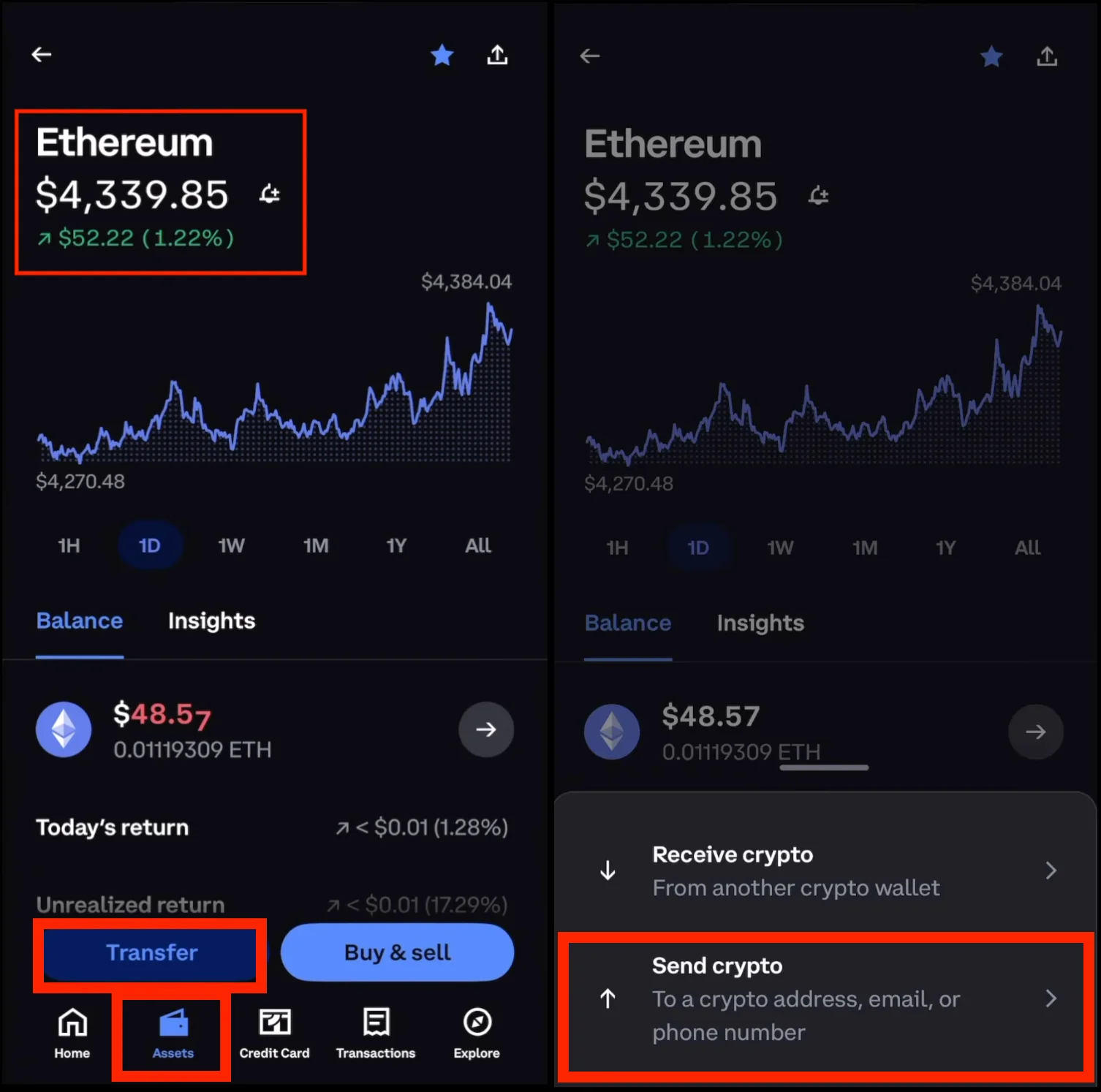
After you open the page for the specific cryptocurrency, tap the Transfer button. A new window appears with two options: Send and Receive. Click ‘Send’ to begin moving your crypto.
Step 3. Open the Coinbase Wallet and get your receiving address
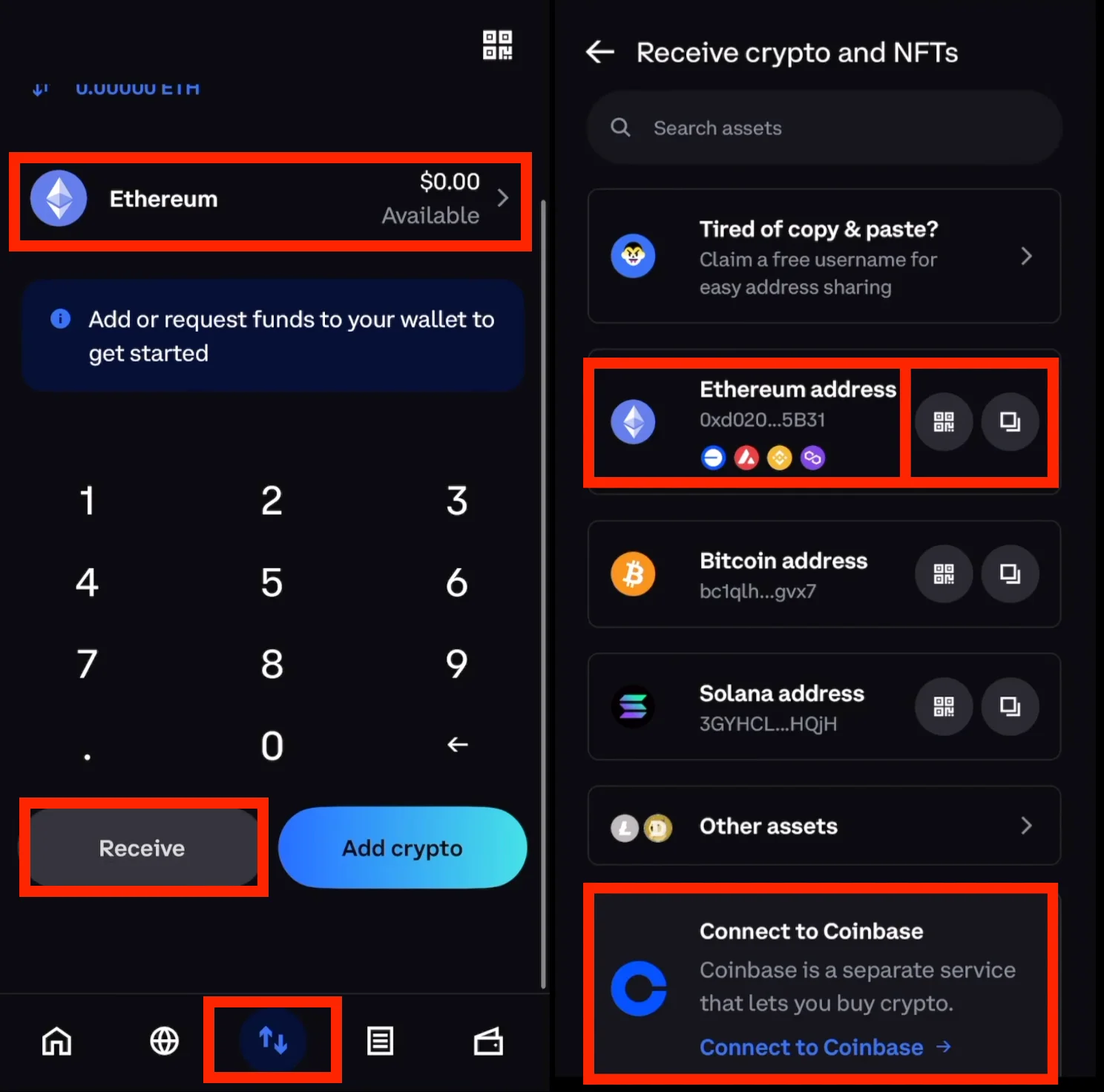
Open the Coinbase Wallet app. Tap the token you want to receive, then choose Receive. You’ll see a lengthy address, along with a QR code. You can copy or paste this when transferring. Be extra careful with this part since it determines where your funds go.
Step 4. Paste the address into Coinbase, select the proper network, and amount
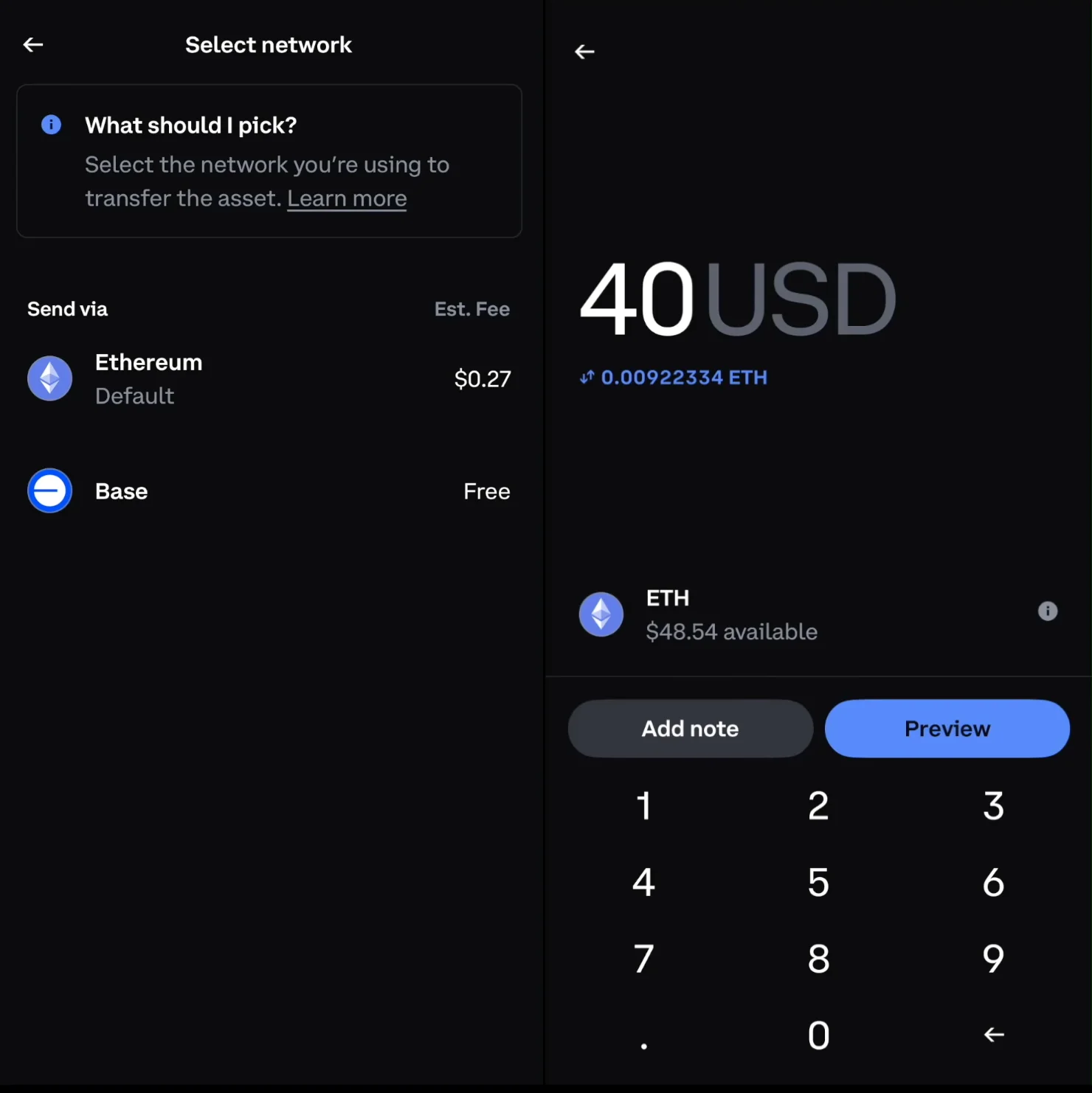
Head back to Coinbase. Paste the Coinbase wallet address and enter the amount of cryptocurrency you want to transfer. Also, ensure that you choose the proper network. In general, if you pick the wrong source or network, you’ll see warnings. If not, you’ll be able to continue.
Step 5. Review and click the ‘send now’ button
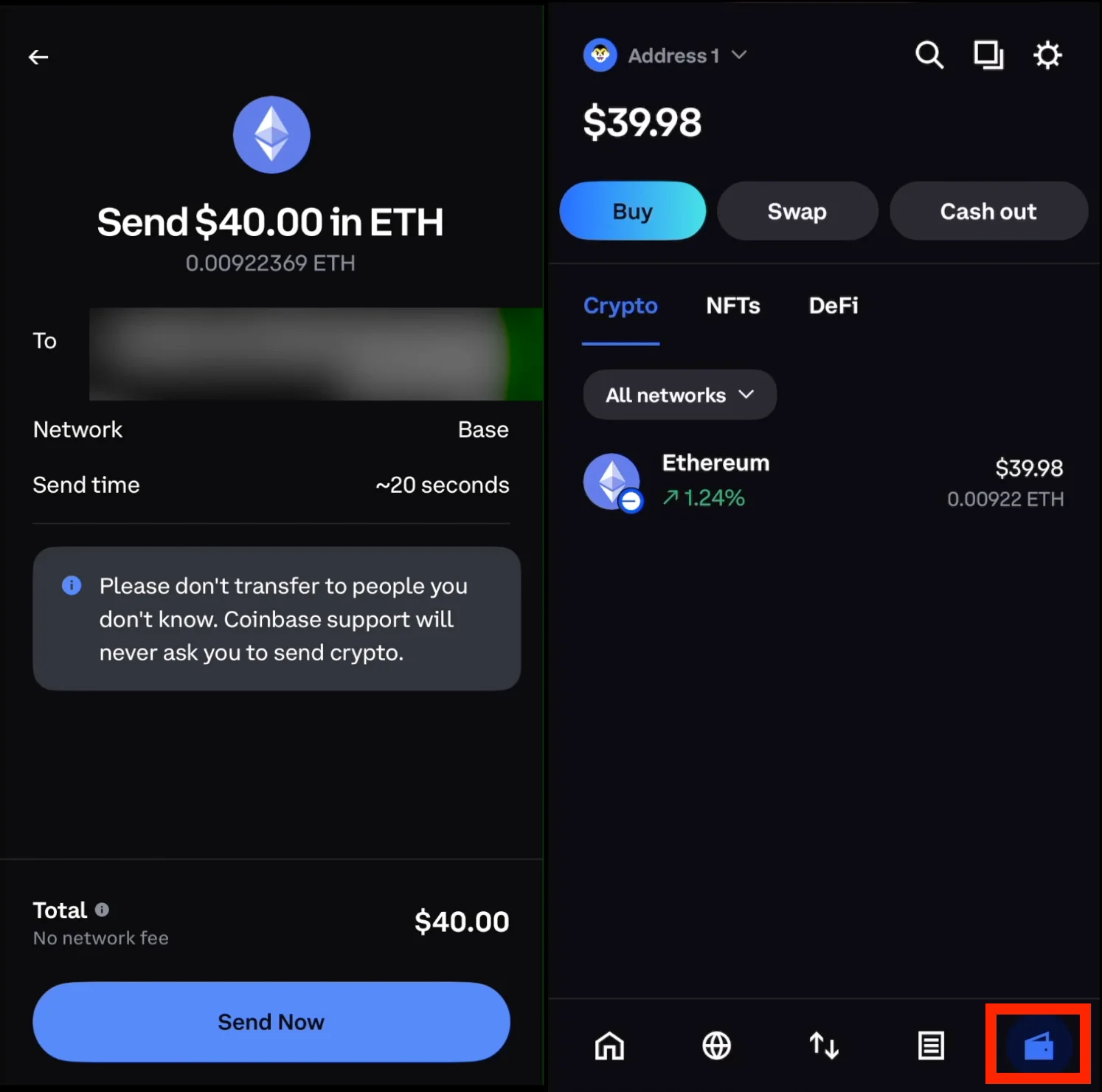
The preview displays your amount, destination address, network, and any applicable network fees. Always verify every detail before sending. You can avoid errors by checking the address first and confirming the correct network. Hit the Send Now button and let Coinbase process transactions. Transfers usually take a few minutes, depending on the blockchain. In busy cases, it might take a bit longer.
Once the transfer is complete, the cryptocurrency appears in your Coinbase Wallet. You can check the log inside your wallet to view your transactions and confirm that your funds have arrived successfully.
Now you’re free to connect your wallet to DeFi protocols, other external wallets, or simply store everything under your own self-custody.
FAQ
Can I instantly transfer crypto from Coinbase to Coinbase Wallet?
Transfers often arrive quickly, but the blockchain decides the timing, not Coinbase. Some networks are faster than others.
Do I pay network fees when transferring?
Yes, as all transfers require network fees that depend on the network you choose. The fee is shown before you confirm.
Is the Coinbase wallet the same as the Base App?
Yes. Coinbase rebranded the wallet to Base App, but it still functions the same. You can access, control, and secure your crypto assets with your own private keys.
Can Coinbase recover my funds if I send to the wrong address?
No, since it is a self-custody wallet, you control your private keys, so Coinbase cannot act on your behalf.
Can I transfer money instead of crypto?
You can only transfer crypto between Coinbase and Coinbase Wallet. If you want to move fiat money, you must withdraw it using your Coinbase exchange tools.
Can I send crypto between multiple networks?
You can, but you must always select the correct network. Sending to the wrong recipient can result in the permanent loss of your tokens.
Do I need to generate a new wallet?
You don’t need to, unless you want a fresh new wallet for organization or security purposes. If you do, remember to secure your private keys.
Is there a faster way to transfer crypto from Coinbase to Coinbase Wallet?
Yes. Coinbase sometimes offers a set of choices where the wallet address is recognized instantly, and specific transfer details are automatically filled in. You still need to verify the correct network, but the system can add the destination information for you. It is not always available for every exchange transfer; yet, when it appears, it definitely speeds up the process.
How do I transfer from the Base App back to Coinbase?
Open your Coinbase wallet in the Base App, pick the asset you want to send, and select Send. Enter your Coinbase account deposit address, preview the transfer, then confirm. Ensure you choose the correct network before sending. The Base App works similarly to Coinbase Wallet, so the process remains familiar and straightforward.
Conclusion
As we reached the end, you now know how to move crypto from Coinbase to Coinbase Wallet with ease. By following the correct steps, using supported networks, and double-checking every detail, you avoid unnecessary fees and reduce the risk of error.
With this setup, you can confidently manage your assets across both platforms efficiently and with a sense of peace of mind.