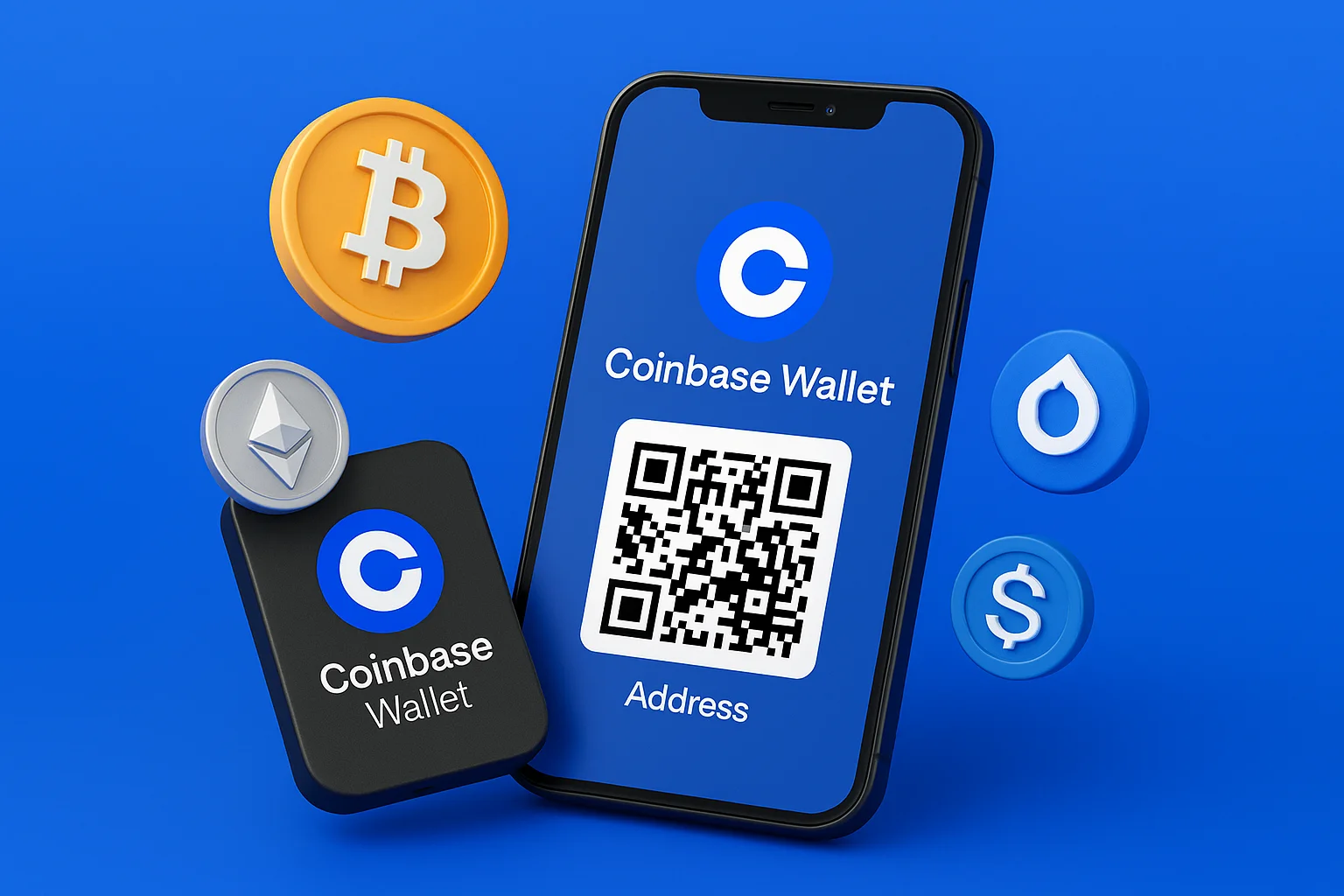
You want to receive crypto in your Coinbase Wallet, but you can’t find your “Coinbase wallet address” anywhere. Until you do, nobody can send you anything.
Without that wallet address, the sender has nowhere to send the coins. Worse, pick the wrong network (say, Ethereum instead of BSC) and the funds can be gone for good. One typo, one mismatch, and no support desk can reverse it.
This guide walks you through finding your Coinbase wallet address in the mobile app and on the web, so you can copy, share, or scan it with confidence.
Disclaimer: We used information and demonstrative images of the process as of October 16, 2025. Please note that whether you use the Coinbase app, the Coinbase Wallet app, the browser extension, or the web platform, the steps and interface remain the same or very similar. Minor design or wording updates may occur, but the overall process to find your Coinbase wallet address will not change significantly.
A wallet address is the public string other people use to send crypto to you, and unlike your recovery phrase it is safe to share.
MetaMask users can follow a similar guide on finding a MetaMask wallet address.
Table of contents
What to Know Before You Start
- A “Coinbase wallet address” is the public address you give people so they can send you crypto.
- Coinbase (the exchange) and Coinbase Wallet (the self-custody wallet) are two different products. This guide covers Coinbase Wallet and the receive flow in the Coinbase app.
- Coinbase occasionally rotates deposit addresses for security. Older ones generally still work for your account.
Find the Coinbase Address in the Mobile App
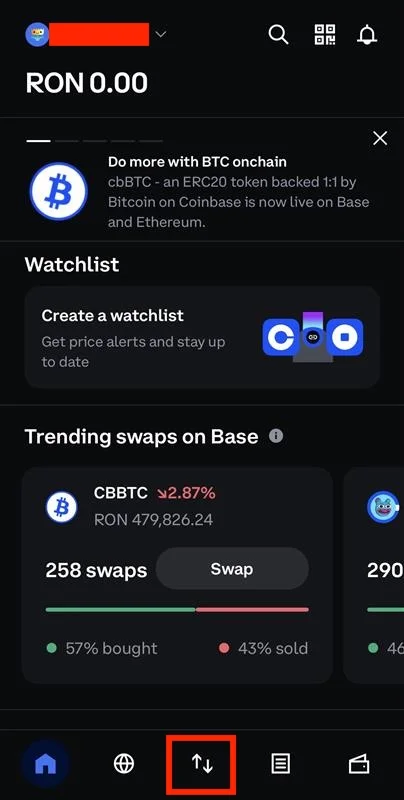
Step 1. Open the Coinbase Wallet App
Open the Coinbase Wallet app and look at the bottom navigation bar. Tap the Transfer icon (the up-down arrows). This is where you send or receive crypto.
Step 2. Tap “Receive” to Access Your Wallet Addresses
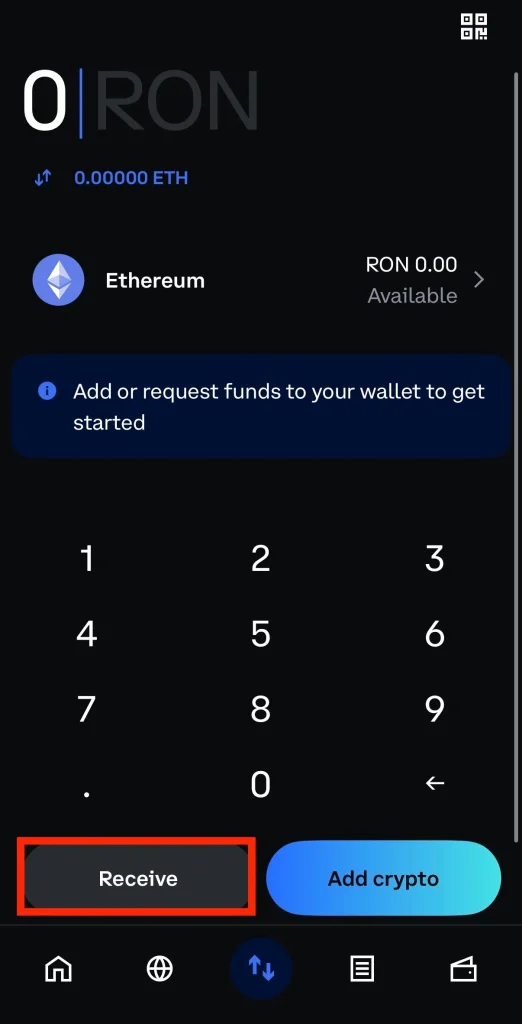
On the next screen, tap Receive. The app lists your wallet addresses for each supported cryptocurrency.
Step 3. Copy or Scan Your Wallet Address
Pick the address that matches the coin you expect to receive:
If the app asks, choose the correct network before you go on. Sending to an address on the wrong network is the most common way people lose a deposit.
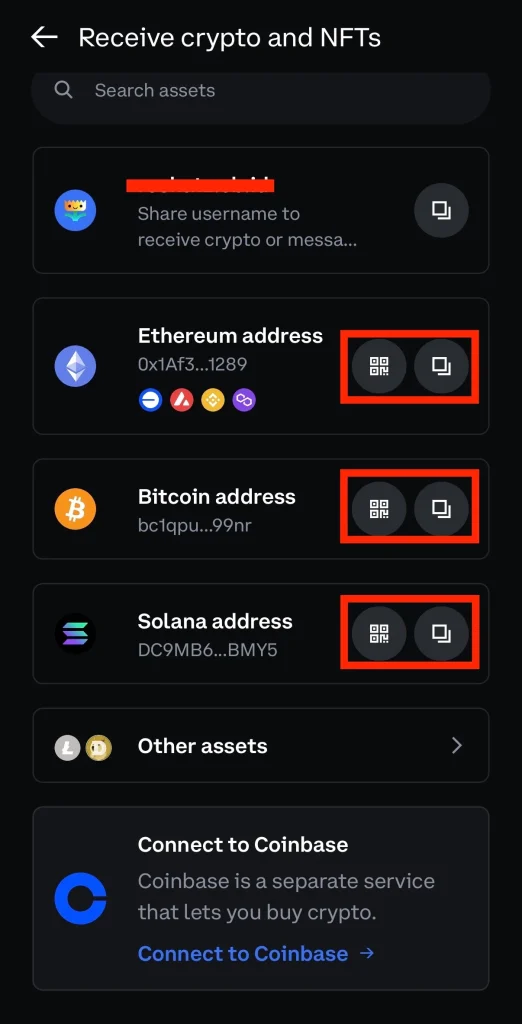
Each Coinbase wallet address comes with two icons: a QR code and a copy button.
- Tap the copy icon to copy the address to your clipboard.
- Tap the QR icon to show a code the sender can scan.
Double-check the network and the cryptocurrency before you paste or share the address. Ten seconds of checking beats a transfer nobody can recover.
How to Find Coinbase Wallet Address in Web / Desktop
Step 1. Open the Coinbase Wallet
Log in to your Coinbase account in a browser you trust. Make sure you are in the right product: the Coinbase Wallet app is for self-custody, where you hold the keys.
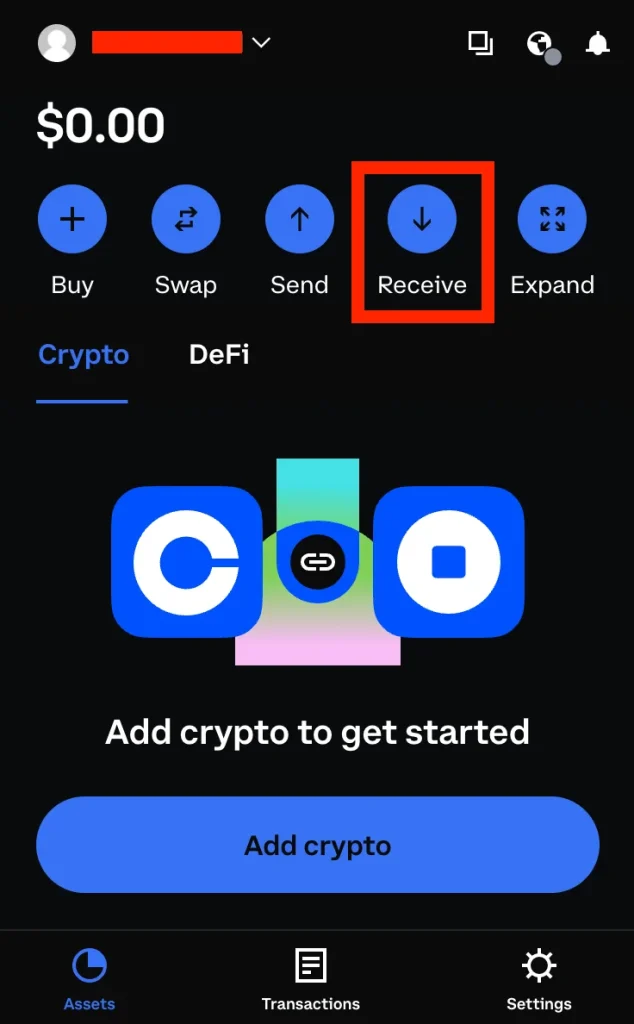
Step 2. Tap “Transfer” or “Receive”
In the main Coinbase app, the Receive option usually sits behind a “Transfer / Receive” icon.
Step 3. View the Wallet Address & QR Code
Click the asset you want to receive to show its wallet address. Receiving Bitcoin? Select your Bitcoin wallet address. Receiving ETH? Choose the Ethereum wallet address instead.
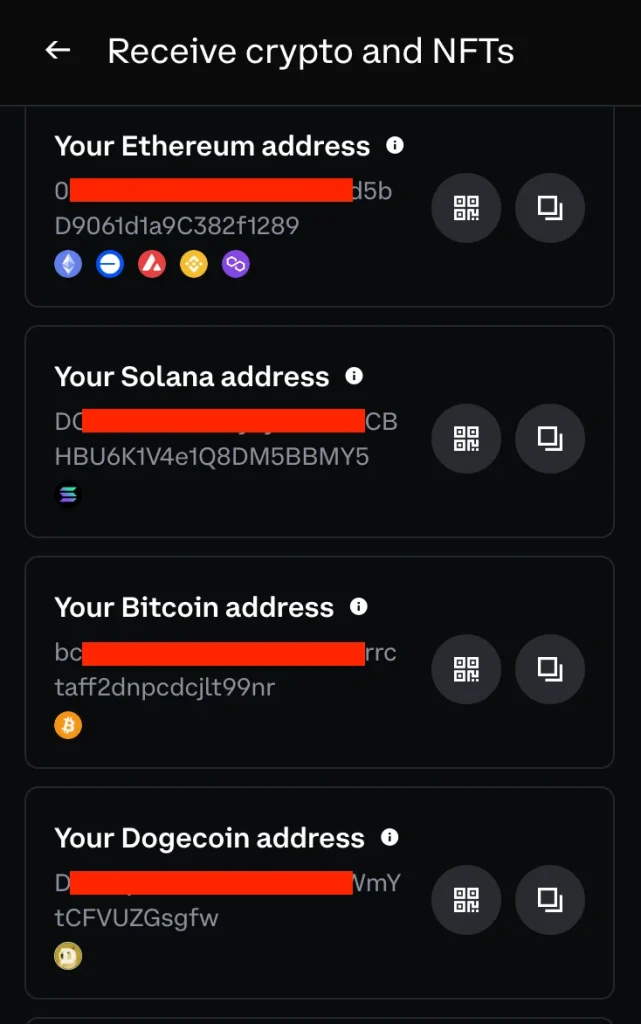
The app may ask you to confirm the network (for example, ERC-20 or BEP-20) before it continues. Get this right: a deposit sent over the wrong network can stall or disappear.
Coinbase Wallet then shows a QR code and a string of letters and numbers. That string is your Coinbase wallet address, the identifier the blockchain uses to route funds to you.
Step 4. Copy or Share the Wallet Address to Receive Funds
Tap the copy icon to copy your wallet address to the clipboard, or share it with the sender through a channel you trust. You can also tap the small QR button to enlarge the code for scanning. Before you paste or send the address, confirm that the network and the cryptocurrency match the transfer you expect. The wrong network can break the transaction and lose the funds for good.
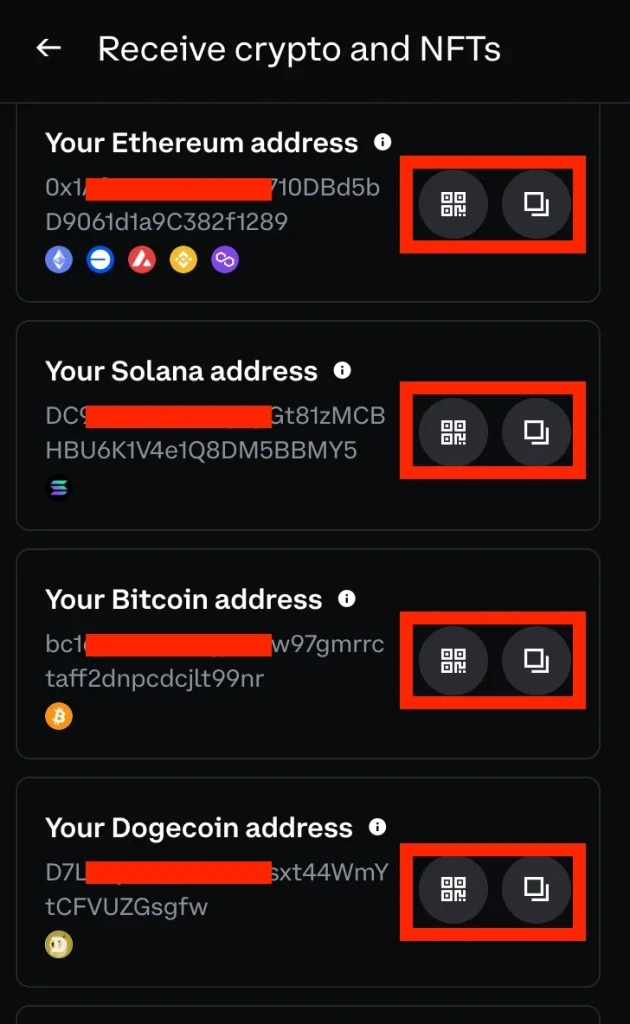
Once you have checked it, give the address to the sender and watch for the deposit in your transaction history. Only the address leaves your hands. Your keys stay with you.
Found your Coinbase Wallet address? The next step is sending funds to it. Our step-by-step guide shows you how to transfer cryptocurrency from Coinbase to Coinbase Wallet safely and without errors.
Not sure Coinbase Wallet is the right home for your crypto? Read our MetaMask vs Coinbase Wallet review before you decide.
Tips & Best Practices
- Confirm the network before you send or share your address. A wrong combination means lost funds.
- Use the “copy” button instead of typing the address by hand. One wrong character sends the money somewhere else.
- Scan the QR code when you can. It takes typing out of the process entirely.
- If Coinbase rotates your address, older ones usually still work, but confirm on your “Crypto addresses” screen.
- Keep your private key and seed phrase to yourself. Share the wallet address only, never the keys.
- Before any large transfer, review the transaction details and confirm the network one more time.
FAQ
Does Coinbase provide a wallet address?
Yes. Every user gets a unique Coinbase wallet address for each supported cryptocurrency. If you see a “verification successful, waiting” message, the site is running a quick browser security check before it loads your address. Let it finish, then use the address as normal.
Is my Coinbase wallet address always the same?
Not always. Coinbase may rotate addresses over time for security and performance reasons. Older addresses still accept crypto sent to them, but confirm the current one on your Crypto addresses screen before a transfer.
Is a Coinbase wallet address the same as a key?
No. Your wallet address is public. Your private key is secret. The address lets others send you crypto, but it does not give anyone access to your funds. Anyone who asks for your private key or seed phrase is trying to take your crypto.
Why do I have multiple Coinbase Wallet addresses?
Each cryptocurrency and network uses its own address, so you will see one per asset. This keeps your transactions clear and traceable. You may also receive new addresses as Coinbase upgrades its systems.
Should I give out my Coinbase wallet address?
Yes, your public wallet address is safe to share. Never share private keys or recovery backups. If the app is still running a verification check, wait for it to finish before you copy and share the address.
Conclusion
You now know how to find your Coinbase wallet address in both the Coinbase Wallet app and on the web platform. You can open your wallet, view the right address, and share it safely for incoming transfers.
Wondering how it stacks up against the other big mobile wallet? Our Trust Wallet vs Coinbase Wallet comparison covers that.
Before every transfer: verify the network, check the address, and wait for any verification to finish. Those few seconds protect every deposit you receive.
With these steps, you can receive crypto any time: securely, confidently, and without confusion.
How I review: Reviewed by Andrei B. I buy the hardware wallets I review, test every product myself and score it on security, UI/UX, ease of use, price and supported coins. Before I publish, I also check recent user reviews and any hack reports.
The whole process is explained on the How We Review page. You can read more about me, or contact me with corrections, from the links at the bottom of this page. For general safety advice, see the FTC guide to cryptocurrency scams.