Struggling to choose the best mining software in 2026? With so many tools available, it’s easy to waste time or, worse, lose money on software that doesn’t fit your setup or earning goals.
The wrong choice can slash your earnings, crash your rigs, or lock you into outdated algorithms. Whether you run one card at home or a full-rig farm, your mining software decides how much you earn and how well your hardware performs.
That’s why we ranked and reviewed the 5 best crypto-mining software options of 2026. Below, we break down each tool’s features, strengths, and ideal use cases so you can pick with confidence and start mining coins that pay.
Table of contents
5 Best Mining Software In a Nutshell | |
|---|---|
| CGMiner | Best for: Crypto Mining Software Overall (Industry Benchmark) Ease of use: No (command-line only) Supported coins: Bitcoin, Litecoin, Dogecoin, Dash, and others (SHA-256, Scrypt, NeoScrypt, CryptoNight) Free version: Yes (100% free and open-source) Compatibility: Windows 10/11, Linux Hardware support: ASIC, FPGA only (no GPU) |
| BFGMiner | Best for: Professional Crypto Miners Ease of use: No (CLI only, requires technical knowledge) Supported coins: Bitcoin, Litecoin, other SHA256d and Scrypt-based coins Free version: Yes (100% free and open-source) Compatibility: Windows, Linux, macOS Hardware support: ASIC, FPGA (no GPU support) |
| Awesome Miner | Best for: Managing Multiple Rigs / Mining Farms Ease of use: Yes (GUI-based, beginner-friendly) Supported coins: Bitcoin, Litecoin, Ethereum, and 20+ others (profit-switching supported) Free version: Yes (free for up to 2 miners, then paid) Compatibility: Windows, Linux (plus web dashboard) Hardware support: ASIC, GPU |
| MultiMiner | Best for: Beginners and Casual Miners Ease of use: Yes (simple interface with hardware auto-detection) Supported coins: Bitcoin, Litecoin, Ethereum, Monero, Zcash (SHA-256, Scrypt, X11, Ethash), and others Free version: Yes (open-source and free) Compatibility: Windows (macOS and Linux need extra setup) Hardware support: ASIC, GPU, FPGA |
| Kryptex | Best for: Ease of Use and Automation Ease of use: Yes (installs and runs with minimal setup) Supported coins: Bitcoin, Ethereum, Monero, Ravencoin (depends on hardware), and others Free version: Yes (free to use, but fees on payouts) Compatibility: Windows 10/11 only Hardware support: GPU, CPU (no ASIC or FPGA) |
1. CGMiner, Best Crypto Mining Software Overall (Industry Benchmark)

CGMiner has been a staple of crypto mining since 2011. Created by Australian developer Con Kolivas, it remains one of the most reliable and widely used mining tools around.
It supports major algorithms like SHA-256, Scrypt, NeoScrypt, and CryptoNight, so it works with top coins such as Bitcoin, Litecoin, Dogecoin, and Dash. Depending on your hardware, that gives you 10 to 15 mineable coins.
On security, CGMiner is open-source and community-audited, and it is widely treated as the industry standard for Bitcoin mining. More than a decade of public scrutiny means bugs get found and fixed, and no major security incidents have been reported in that time. The real risk is fake copies. Download only from the official site, never from shady mirror sites.
The interface is command-line only. No graphics, no dashboards. It’s built for performance, not convenience. That gives experienced users full control over hardware tuning, fan speed, error reporting, and real-time monitoring. If you have never opened a terminal, expect a learning curve.
CGMiner runs well on Windows 10 and 11 and is fully compatible with Linux. It’s optimized for ASIC and FPGA hardware and doesn’t support modern GPUs. Its power and cooling demands also make it a poor fit for laptops.
It’s 100% free. There is no premium version and no hidden fees.
Payouts depend on the mining pool you connect to. CGMiner works with all standard payout models, including PPS, PPLNS, and FPPS, so you can choose the method that suits your goals.
Among Reddit users, CGMiner still holds its reputation. Miners running older or customized setups praise its stability and flexibility. Some note the lack of recent updates, but for many that’s not a dealbreaker.
If you’re comfortable with command-line tools and want total control over your mining operation, CGMiner is still a top-tier choice in 2026.
2. BFGMiner, Best for Professional Crypto Miners
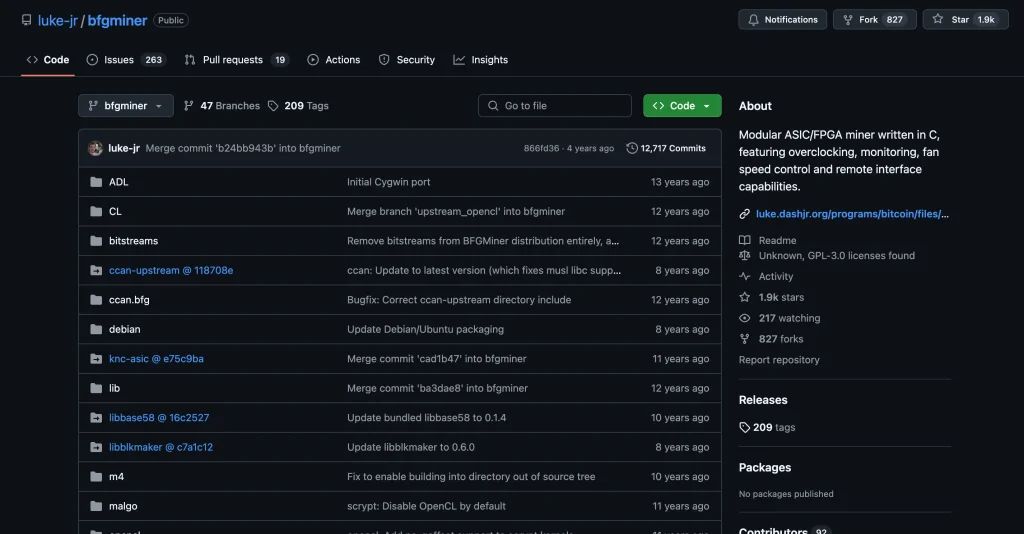
BFGMiner takes second place with a feature set built for professional miners. Luke Dashjr released it in 2012, and it’s often mentioned in the same breath as CGMiner. The two share DNA, but BFGMiner has its own advantages, especially if you run ASICs or FPGAs and want total control.
CGMiner originally supported both GPU and ASIC mining. BFGMiner dropped GPU support early on by design. It was written for FPGAs and later extended to ASICs, which keeps it lean and focused. You get extras like dynamic clocking, real-time monitoring, and a remote interface. You can also set failover strategies and mine several coins at once, something CGMiner doesn’t handle as cleanly.
It supports SHA256d and Scrypt, so you’re not limited to Bitcoin. Litecoin and other coins on those algorithms are fair game. Many miners use BFGMiner to split hash power across coins, which helps spread risk or chase better margins.
The interface is CLI-only. If you’re uncomfortable without a GUI, this isn’t for you. For advanced users, it’s efficient and stable. Written in C, it runs on Linux, macOS, and all modern versions of Windows, including 10 and 11. You can even run it on a lightweight machine or a repurposed laptop, as long as it’s connected to compatible mining hardware.
It’s completely free and open-source. There is no premium tier and no locked features.
No major security incidents have been reported, and because the code is open, bugs are usually spotted and patched quickly. Download only from Luke-Jr’s official GitHub to avoid sketchy forks.
As with most mining clients, payouts depend on your pool. BFGMiner works with all major pools, including those using PPS and PPLNS models. You can switch pools easily and even balance load between them.
Reddit feedback is mostly positive. Veteran miners like the stability and the depth of configuration options. Thanks to its modular design, some call it the better choice over CGMiner if you run only ASICs or FPGAs. Beginners may struggle without a GUI. But if you know the command line and want complete control over how your rigs run, BFGMiner is a solid pick in 2026.
3. Awesome Miner, Best for Managing Multiple Rigs / Mining Farms

If CGMiner and BFGMiner feel too technical, Awesome Miner is the more approachable option, especially if you’re new to mining or running several rigs. Swedish software company IntelliBreeze built it in 2014. Where the first two rely entirely on the command line, Awesome Miner gives you a complete graphical interface that makes managing miners far less painful.
It runs on Windows and Linux and supports both ASIC and GPU mining. Run it locally on a PC or control it remotely through its web dashboard, which helps when your rigs sit in more than one location.
It can monitor up to 200,000 ASICs or 25,000 GPUs from one screen. That is serious scale, though most users won’t come close to it.
Awesome Miner supports the most common algorithms, such as SHA-256 and Scrypt, so it works with major coins like Bitcoin and Litecoin. Built-in profit switching automatically mines whichever coin pays best at the time.
Unlike CGMiner and BFGMiner, which are entirely free, Awesome Miner uses a freemium model. Up to 2 miners cost nothing. Beyond that, it’s $2 per miner per month, cheaper on an annual plan. For most hobbyists and small operators, the free version is enough. You only pay more as you scale.
Security-wise, it’s solid. No major breaches have been reported, and it gets regular updates. Payout methods depend on the pools you connect to, but Awesome Miner lets you choose where and how you’re paid, whether that’s Bitcoin, Litecoin, or another supported coin.
Redditors praise Awesome Miner for its layout, especially next to CGMiner and BFGMiner. Some say the UI feels busy at first, but overall it’s a smoother ride for beginners or anyone tired of terminal windows.
Awesome Miner is designed around usability. It’s still powerful and packed with features, but it doesn’t expect you to be a Linux wizard to get started.
If you want a miner that balances control and convenience, this is the one that hits the sweet spot.
4. MultiMiner, Best for Beginners and Casual Miners
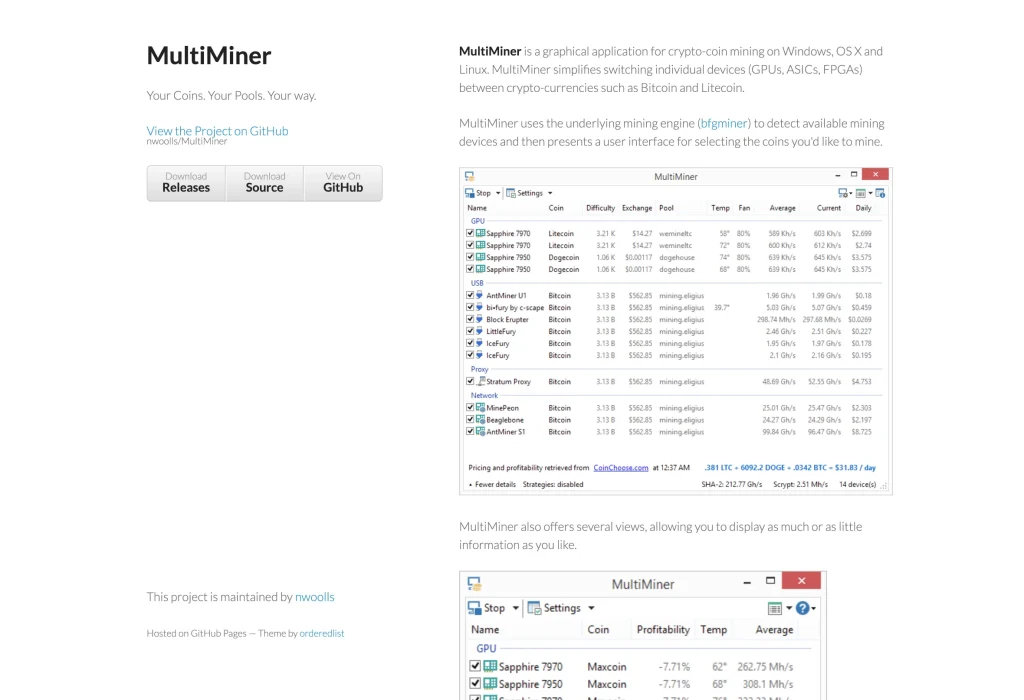
MultiMiner is another good pick if you’re new to mining and don’t want to touch a terminal. Nate Woolls launched it in 2013. It runs on top of BFGMiner but swaps the text-heavy interface for a full graphical UI, so it feels built for humans rather than for people who enjoy config files.
It works on Windows out of the box and can run on macOS and Linux, though those need extra tinkering. On hardware, it supports ASICs, GPUs, and even FPGAs. Once installed, it detects your mining hardware and suggests the most profitable coins to mine.
You can mine with SHA-256, Scrypt, X11, Ethash, and other common algorithms, so coins like Bitcoin, Litecoin, Ethereum, Monero, and Zcash are all on the table.
MultiMiner can also switch coins automatically based on profitability, something many beginner-focused tools skip. Let it switch on its own, or set alerts and decide yourself. Remote monitoring is included, so you can check and control your rig from your phone or another computer when you’re away.
It’s free and open-source, with no hidden fees, premium plans, or feature locks. No major breaches have been reported, and because the code is open, bugs tend to get caught and patched quickly.
Payouts depend on the pools you connect to. MultiMiner doesn’t handle payments itself, but it supports most major pools, so you can set things up however you like.
Next to CGMiner or BFGMiner, this is far more beginner-friendly. You give up some deep customization, but you also skip hours of command-line debugging.
On Reddit, users recommend it for first-timers and casual miners who want a cleaner experience without a steep learning curve. It’s not the most powerful option, but it gets the job done without a headache.
5. Kryptex, Best for Ease of Use and Automation

Kryptex is a clean option if you don’t want command lines and configs but still want your machine to mine efficiently. It has been around since 2016 and built its name on simplicity and automation. Its track record on stability and security is decent, with no major breaches or shady reports.
It runs on Windows 10 and 11, supports both CPUs and GPUs, and handles most of the setup for you. It picks the most profitable coin for your hardware and switches algorithms when it makes sense, so you’re never stuck mining something that doesn’t pay.
Kryptex supports common algorithms like Ethash and KawPow, runs miners such as XMRig, and can mine Bitcoin, Ethereum, Ravencoin, Monero, and a few more, depending on what your rig can handle.
Mined XMR needs somewhere to land, and the best Monero wallets compares the options that hold it.
The interface is beginner-friendly: install it, let it benchmark your system, and it works. There’s no deep customization, which is fine for most people who just want idle hardware to earn something.
Payouts can be made in Bitcoin, bank transfer, or gift cards, depending on your location and balance. It uses a PPS+ payout model, which smooths out rewards and avoids the wild swings of pool variance. Kryptex is free to install and use, but it takes a fee on payouts, so factor that into your math.
If you want to mine without spending hours tweaking scripts or reading docs, Kryptex is a reliable place to start.
Methodology: How We Chose the Best Bitcoin Mining Software
To find the best Bitcoin mining software in 2026, we reviewed the leading tools used across mining operations of every size, from hobbyists to large mining farms.
Our rankings draw on hands-on testing, open-source code audits, mining community feedback (mainly Reddit and GitHub), and interviews with operators running real-world rigs. We scored each tool on these criteria:
- Hardware Compatibility: We favored software that supports a broad range of hardware: ASIC, GPU, CPU, and FPGA miners. Whether you run one rig at home or a professional farm, the software has to work with what you already own.
- Algorithm and Coin Support: Top software had to support major algorithms like SHA-256, Scrypt, and Ethash. That gives you the flexibility to mine Bitcoin or other coins, or to switch coins as the market moves.
- Scalability and Control: We looked at how well each platform handles small and large operations. Some picks, like Awesome Miner, are built for large farms, with full control, real-time stats, and central management of thousands of devices. That matters for enterprise-scale mining.
- Operating System Support: The best software had to run reliably on Windows 10/11, Linux, and in some cases macOS.
- Usability and Interface Design: We weighed both user-friendly interfaces and advanced features. Beginners tend to prefer a simple web interface or dashboard, while advanced users want full control through the command line. We accounted for both, depending on the user’s skill level and how complex their mining setup is.
- Profitability Optimization: Software that can tune hash rate, hashing power, or electricity costs, whether through automatic benchmarking or smart algorithm switching, scored higher. Features that get you mining quickly without technical hurdles also earned points.
- Security and Transparency: We favored platforms with strong reputations, regular updates, and no history of major breaches.
- Cost Structure and Licensing: We favored software with transparent pricing and no hidden fees. Free and open-source tools scored well for offering full functionality at no cost. For freemium options, we checked whether the paid tiers add real value for users running multiple rigs, cloud mining setups, or large operations.
FAQ
What is the best mining software to use?
CGMiner and BFGMiner give advanced users with ASICs full control and top performance. For beginners or solo miners, Awesome Miner, MultiMiner, and Kryptex offer simpler setups, auto coin switching, and user-friendly dashboards, which makes them the easier way in.
What is crypto or Bitcoin mining software?
Mining software is a program that puts your device’s processing power to work solving the cryptographic puzzles that secure a blockchain. It manages your hash rate, connects you to a pool for payouts, and often switches to the most profitable coin automatically.
Is it worth it to mine Bitcoins?
Only if you have ASIC hardware, cheap electricity, and well-tuned software. Bitcoin mining difficulty is high, so you need an efficient setup and smart tools to stay profitable.
What kind of hardware do I need for Bitcoin mining software?
Serious Bitcoin mining needs ASICs because of the power and hash rate involved. Software like CGMiner or BFGMiner works best with dedicated rigs. CPUs and GPUs are too weak for BTC.
Is it still profitable to mine Bitcoin?
It can be, with efficient ASICs, low power costs, and profit-optimized software. Auto-switching tools and a mining pool improve your odds of earning consistently.
Are there any legal restrictions on Bitcoin mining?
Laws vary by country. In most places mining is legal as long as you follow energy and tax rules. Check your local laws before you start. To stay safe, use established software with a clean security record, download it only from official sources, and avoid unverified builds that could trip your antivirus or break compliance rules.
Final Thoughts
We hope this guide has helped you sort through the best crypto mining software options of 2026.
Whether you want to maximize earnings, squeeze more from your hardware, or just mine without a headache, one of these five fits your goals.
Good luck with your mining, and may your hash rates stay high and your power bills low!
How I review: Reviewed by Andrei B. I buy the hardware wallets I review, test every product myself and score it on security, UI/UX, ease of use, price and supported coins. Before I publish, I also check recent user reviews and any hack reports.
The whole process is explained on the How We Review page. You can read more about me, or contact me with corrections, from the links at the bottom of this page. For general safety advice, see the FTC guide to cryptocurrency scams.