Foundation’s Passport Prime costs $349, and calling it a Bitcoin wallet undersells it. The same device keeps your 2FA codes, your FIDO security keys and up to 50GB of encrypted files behind a single PIN. Foundation markets that combination as Human Authority Hardware; we’d call it a hardware wallet that also does the job of a YubiKey, an authenticator app and an encrypted thumb drive.
If you already run self-custody and you’re tired of trusting your phone with everything else, this is aimed squarely at you. If it’s your first wallet, or most of your money sits in Ethereum or Solana, look elsewhere, because those chains currently run through a beta feature.
This review works through the hardware, the setup flow, the audit record, what the device stores, the price, and the three alternatives we’d weigh against it before spending $349.
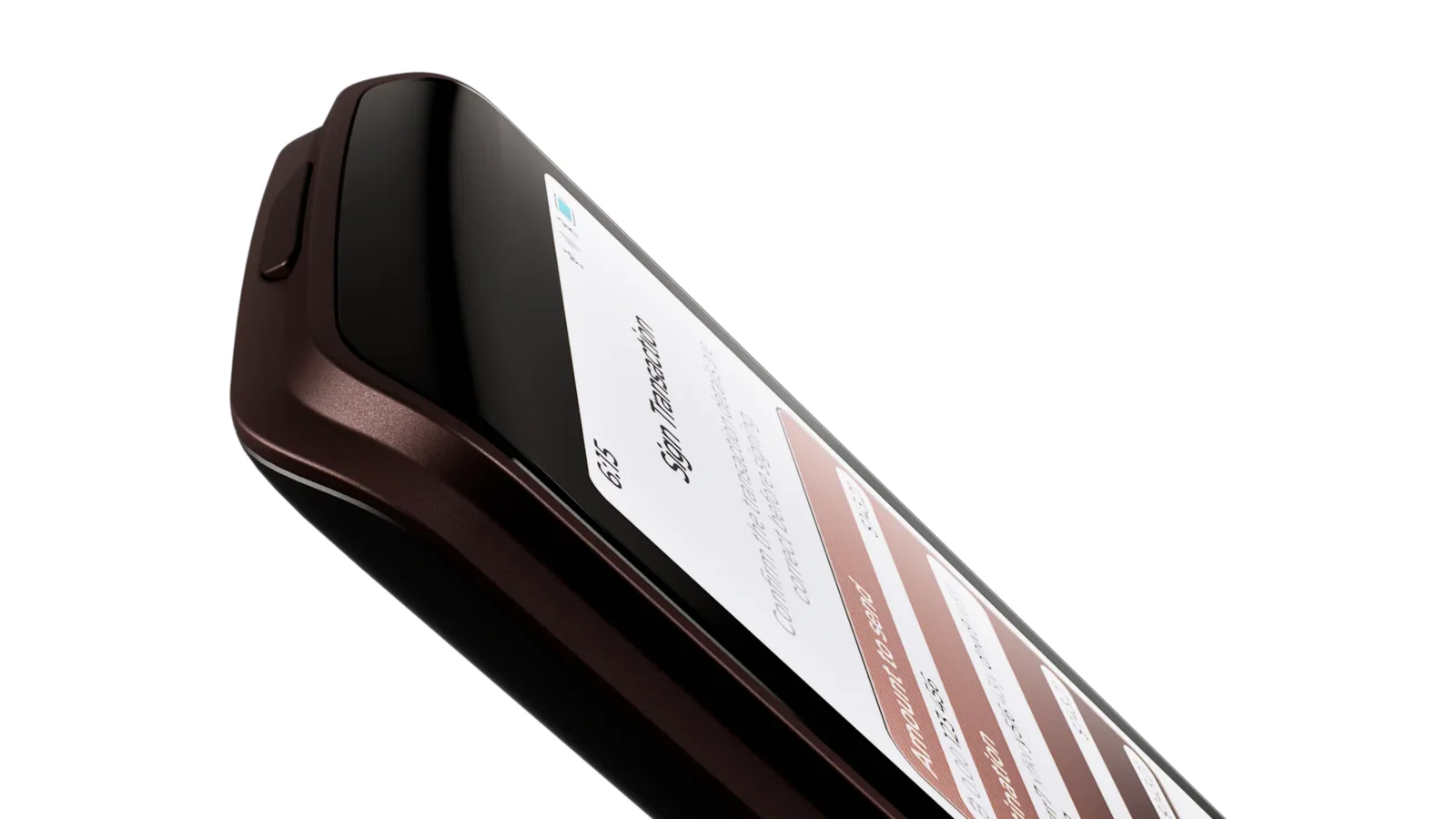
Table of contents
So What Exactly Is the Foundation Passport Prime?
Passport Prime is the device Foundation Devices sells today, and the company assembles it in an ITAR facility in the United States. It was announced on December 18, 2024, but general sales only opened on May 21, 2026, alongside news of a $6.4 million round led by Fulgur Ventures with Arche Capital. That brought total funding to $16.5 million.
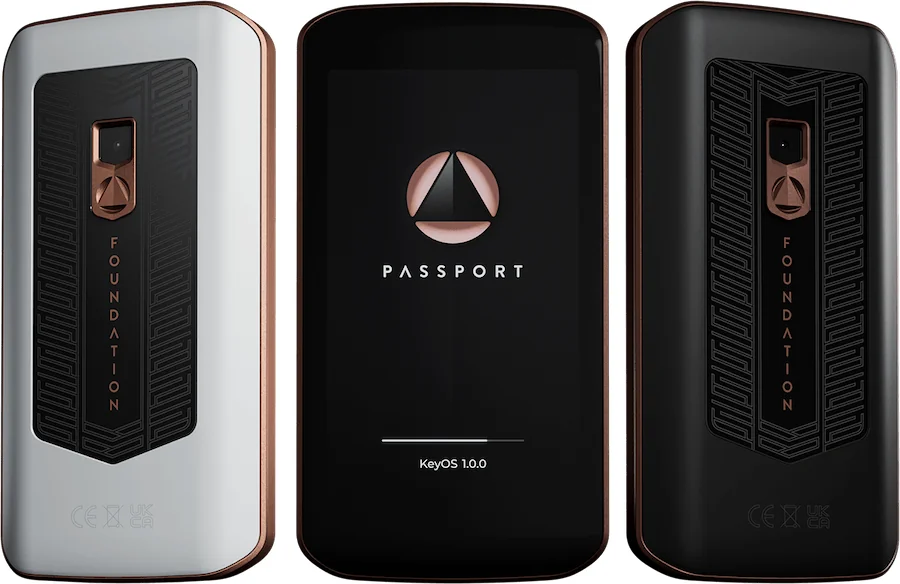
Two colorways are offered, Midnight Bronze and Arctic Copper, and both cost $349 at the time of writing (September 2026). The Prime took over from the Passport Core, which Foundation has discontinued and no longer sells, although Core units bought while it was on sale still carry their warranty.
Foundation Passport Prime: The Spec Sheet | |
|---|---|
| What it costs | $349, checked September 2026 |
| Screen and body | 3.5-inch IPS touchscreen under Gorilla Glass Anodized aluminum, 55.5 x 104.8 x 11mm, 93g on the scales |
| How it connects | USB-C handles charging and data QuantumLink Bluetooth, NFC and a camera for QR codes |
| Where the keys live | A secure element paired with a security processor, plus active tamper protection |
| Source code | Public. KeyOS, Envoy and the Prime hardware files all sit on GitHub |
| Assets it handles | Bitcoin out of the box Ethereum and Solana through Legacy Mode, still in beta |
| How you back it up | Magic Backup spreads 2-of-3 Shamir shares over two Keycards and your phone Or keep all three shares on Keycards and skip the cloud |
| Phone app | Envoy, for iOS, Android and F-Droid |
| Who it suits | Bitcoin holders who also want codes, keys and files off their phone |
The Passport Prime Features That Matter
- Everything happens on a 3.5-inch touchscreen, so a full Bitcoin address or a transaction summary fits on one screen, which beats squinting through two lines at a time.
- KeyOS, the Rust microkernel running the device, sandboxes each app and isolates processes, so one app can’t reach another’s data or touch the master key.
- QuantumLink, the encrypted Bluetooth link, runs on its own chip, separate from the processor running KeyOS. You can switch it off from the control panel whenever you’d rather go quiet.
- Your 6-digit TOTP codes live offline in the 2FA app, and pulling them across from Google Authenticator, Aegis or Proton Authenticator takes one step.
- Virtual FIDO keys get labels and colors, and Magic Backup covers them, so there’s no need to buy a second physical key as a spare.
- The Vault app derives BIP-85 child seeds and NIP-06 Nostr keys from the master key, which means one backup can stand behind a whole shelf of wallets.
- Behind your PIN sits 50GB of hardware-encrypted storage, plus an Airlock area that a connected computer can read but, by default, cannot write to.
Living With It: Is Passport Prime Easy Enough for a Beginner?
Setup runs through Envoy, the companion app Foundation publishes for iOS, Android and F-Droid. You power the device on, scan the QR code it shows, tap “Continue”, then “Connect with QuantumLink”, and from there the phone and the device stay in step. A security check fires automatically and asks Foundation’s validation server whether the unit is genuine.
Once you’re past that, the touchscreen behaves like a small phone. Swipe down from the top and a control panel appears with toggles for Bluetooth, NFC and USB data transfer. One press of the power button locks the screen, and holding it for 10 seconds forces a reboot.
The friction deserves naming, though. Envoy only handles single-signature accounts and won’t set up or coordinate multisig, so anyone running multisig has to pair Sparrow, Nunchuk, Specter, Electrum or Blue Wallet instead. It also sticks to on-chain Bitcoin.
Magic Backup holds the other trap, and this one annoys us. Tapping “Advanced” on the “Create Magic Backup” screen is how you leave the cloud path, and Foundation’s own documentation says that choice appears once and once only. Tap “Continue” past it and you’re on the cloud-backed route.
Battery life we won’t complain about: Foundation expects 2-4 weeks of ordinary daily use per charge from the 1100 mAh cell, and at least 5 years before the cell itself wears out.
Passport Prime Security: What Holds Up, and What Doesn’t
Keys sit inside a secure element, a tamper-resistant chip that stores secrets and signs with them without ever handing them over. Alongside it the Prime runs a separate security processor and active tamper protection. Your PIN is 6 to 12 digits, or you tap “Switch to Password” for an alphanumeric one, and 10 wrong attempts wipe the master key.
Keylabs did the audit, and that name carries weight: its researchers were behind the wallet.fail work that exposed flaws in Ledger and Trezor devices. The report went public on October 16, 2025. Nothing critical or high severity turned up, and every observation it did make needed physical access to the device plus specialist tools.
Foundation didn’t simply publish the report and move on. It randomized PIN verification timing, cleared memory more aggressively on boot and after failed attempts, improved how Shamir shares are wiped, and added SECURAM zeroization once PIN retries run out. The audit itself covered the ATECC608C secure element, SECURAM memory, tamper detection and the PCB layout.
Bluetooth on a signing device always raises eyebrows, so QuantumLink is the part most buyers will poke at. Every message gets encrypted before it ever reaches the Bluetooth chip, with CRYSTALS-Kyber handling key exchange, ChaCha20-Poly1305 handling the payload, and a fresh ephemeral public key for each message. A compromised radio chip sees ciphertext and nothing more, and KeyOS lets you power the radio down completely.
Open source is the headline claim, and it mostly survives scrutiny. KeyOS, Envoy and the Passport Prime hardware design files all sit on Foundation’s GitHub, KeyOS files carry the GPL-3.0-or-later identifier, and the build runs from a pinned Nix environment.
Then comes the caveat, which Foundation writes down itself. Release-only keys encrypt the shipped bootloader, so nobody outside can reproduce it byte for byte, and there is currently no public self-service archive of released binaries, meaning an outside verifier has to ask Foundation for them. For anyone who buys open hardware precisely so they can check the build, that’s a real gap.
WalletScrutiny did verify the older Passport Core, which suggests the intent is there. We found no public record of any Passport device being compromised. Foundation asks for vulnerabilities to reach it privately before disclosure, and Keylabs looked at Passport Core back in 2021 too.
What Can You Actually Keep on a Passport Prime?
Bitcoin is the only chain the native wallet speaks. You get multisig, Taproot, testnet, SeedQR import and export, labeled accounts, address checking by QR scan, message signing and passphrases. A full stateless mode is listed as coming soon.
Ethereum and Solana turned up on September 15, 2026 through Legacy Mode, which runs open-source coin apps originally written for Ledger and talks to software wallets over USB. It’s beta, with the full release penciled in for this fall. Installing it is manual work: Settings > Apps > Install App, copy the .app file into the Airlock, then add the coin apps afterwards.
Legacy Mode wants KeyOS 1.4 or newer. BIP39 passphrases aren’t supported there yet, and neither is Seed Vault integration. Foundation has tested Rabby for Ethereum and other EVM networks plus Phantom for Solana, and warns that other wallets may or may not behave.
So a broad altcoin portfolio isn’t what this device is for, at least not today. There’s no NFT gallery and no DeFi browser built in. Anyone who wants dozens of chains in one place should start with a hardware wallet that pairs with MetaMask.
What fills the space where altcoins would be is the rest of your digital life: TOTP codes, virtual security keys, BIP-85 child seeds, Nostr keys, passwords, and as much as 50GB of encrypted files.
One limitation catches people out, so read this twice. Files kept in Internal or Airlock storage sit outside Magic Backups, which means a lost, damaged or wiped device takes them with it. Treat the Prime as a secure offline copy, never the only copy.
Security Keys has a gap of its own. Passport Prime registers as a U2F key today, and services that insist on FIDO2 or passkeys, Amazon among them, throw an error and refuse it. Full FIDO2 support is promised in a future firmware release, and promised is not the same as shipped.
What Passport Prime Costs, and What Else You’ll Pay For
Passport Prime is $349 at the time of writing (September 2026), whichever color you pick. In the box you’ll find the device, three NFC Keycards with Faraday sleeves, a setup card and a USB-C cable.
Nothing here runs on a subscription. Envoy is free, KeyOS updates are free, and the extras are priced on their own: $199 for the Concierge setup service, $49 for a Seed12 Steel Backup Capsule.
Warranty is one year from purchase and covers defects in materials and workmanship. Accidents, misuse, liquid damage, unauthorized opening and lost or stolen devices are all out, as is any loss of your coins. Early Access orders get a two-year extension.
Buy from Foundation’s own store, or from one of the resellers Foundation publishes, a list that includes Bitcoin Brabant and BTC Direct in the Netherlands and PlebStyle in Germany. A device bought through a marketplace listing can be opened and altered before it reaches your door. No discount is worth that.
Delivery takes 7 to 21 business days internationally and 2 to 7 inside the EU, where Foundation may ship through a regional partner. Your device box arrives inside a plain outer overpack, sealed first with adhesive bubble wrap and then with shrink wrap.
Passport Prime Pros and Cons, Side by Side
Our take: the security work is serious, and this is the best hardware Foundation has built. The price, though, assumes apps that are still being filled in.
Want a Bitcoin signer and nothing else? Cheaper devices already do that job well. If the 2FA, security-key and file features are what tempt you, check that the FIDO2 gap and Legacy Mode’s beta status don’t bother you before you pay.
Setting Up Your Passport Prime, Step by Step
Before anything else: your master key is the only thing standing between you and total loss. Don’t type it into a computer, a website or a software wallet, and don’t photograph it either. Foundation will never ask for it, so anyone who does is running a scam.
- Unbox it slowly. The device box travels inside a plain outer overpack, sealed with adhesive bubble wrap under shrink wrap, and inside you should count a Passport Prime, a setup card, three NFC Keycards with Faraday sleeves and a USB-C cable. Anything that looks opened or resealed means you stop and contact Foundation before the device ever gets power.
- Get Envoy onto your phone from the App Store, Google Play or F-Droid. Power the Prime on, read the terms of use, scan the QR code it shows, and tap “Set Up a Passport Device” in Envoy.
- Pair the two over QuantumLink. Tap “Continue”, then “Connect with QuantumLink”, and grant Bluetooth permission; Envoy’s camera opens and the Prime shows an animated QR series to scan, which builds the encrypted tunnel. The security check then runs by itself, and any waiting firmware update installs automatically.
- Pick a PIN of 6 to 12 digits, or tap “Switch to Password” if you’d rather use letters and numbers. Choose something you won’t forget, because 10 wrong attempts erase the master key and nobody can undo that for you.
- Tap “Create Master Key” and the device generates one from hardware randomness. Coming from another wallet? Tap “Restore” instead and bring it in by SeedQR, BIP39 words, an encrypted backup or Keycards.
- Decide how you’re backing up. Magic Backup cuts the key into three Shamir shares, two written to Keycards and one held by your phone and copied into iCloud Keychain or Android Auto-Backup, with any two enough to rebuild it. To keep the whole thing offline, tap “Advanced” on the “Create Magic Backup” screen and all three shares go to Keycards, a choice you are offered exactly once.
- Split the Keycards up. Foundation advises against keeping two in the same place, since two shares rebuild the key on their own. Then connect a wallet: open the Bitcoin Wallet app, tap the account, tap “Connect Wallet” and scan the descriptor QR from Sparrow, Nunchuk or Specter, or use “Export Config” if you’re running multisig.
Send a small test amount before you move anything real, and confirm the receiving address on the Prime’s screen rather than on your computer. Get the address or the network wrong and the funds are gone, with nobody able to reverse it. Our guide to what a wallet address is explains the formats if any of it looks unfamiliar.
Three Passport Prime Alternatives Worth a Look
Three devices cover most of what the Prime does for less money. None of them touch the 2FA or file-storage side.
Trezor Safe 5: Cheaper, and It Speaks More Chains
At $129 at the time of writing (September 2026), the Safe 5 is the open-source comparison everyone reaches for, and it undercuts the Prime by a wide margin. You get a 1.54-inch color touchscreen, an NDA-free EAL 6+ secure element, and Trezor Suite managing thousands of coins and tokens instead of Bitcoin alone, which makes it the easier call for a mixed portfolio.
Missing, of course, is the app platform: no encrypted file storage, no TOTP app, no security keys. Our Trezor Safe 5 review goes deeper.
Keystone 3 Pro: No Radios at All
Keystone takes the opposite line on wireless, and the 3 Pro costs $149 at the time of writing (September 2026). The company describes it as 100% open source and air-gapped, moving data only by QR code and microSD, with a 4-inch touchscreen, three secure element chips and fingerprint unlock. If Bluetooth on a signing device bothers you at all, that’s the trade worth making.
Our Keystone 3 Pro review has the detail, and our roundup of the best air-gapped wallets puts it in context.
Ledger Flex: Closer on Price, Further on Openness
Price-wise the Flex is closest, at $249 at the time of writing (September 2026), with a touchscreen and multi-chain support through the Ledger Wallet app. Transparency is where it falls down. Ledger says its operating system is only partially reviewable, because an agreement with STMicroelectronics stops the company publishing the low-level code that talks to the secure element, which is precisely what Passport Prime buyers are paying to avoid.
You’ll find more on that trade-off in our Ledger vs Trezor comparison.
Questions People Ask About Passport Prime
Is the Foundation Passport Prime actually safe?
Yes, as far as any hardware can be. Keys live in a secure element behind a separate security processor and active tamper protection, and Keylabs published its audit in October 2025 without a single critical or high-severity finding. Ten wrong PIN attempts wipe the master key. What no device can protect you from is typing your recovery words into a website, so that part stays your job.
What does Passport Prime cost?
It’s $349 at the time of writing (September 2026), in either Midnight Bronze or Arctic Copper. Three NFC Keycards with Faraday sleeves, a setup card and a USB-C cable come in the box, and there’s no subscription attached.
Which coins can Passport Prime hold?
Bitcoin, natively, with multisig, Taproot and testnet. Ethereum and Solana run through Legacy Mode, which arrived in beta on September 15, 2026 and needs KeyOS 1.4 or newer.
Can I log in to websites with Passport Prime?
Partly. It registers as a U2F key, which plenty of services still take as a second factor, but anything demanding FIDO2 or passkeys, Amazon included, rejects it with an error. A later firmware release is meant to bring full FIDO2 support.
What if I lose my Passport Prime?
With Magic Backup the master key is split into three Shamir shares, and any two rebuild it, whether that’s one Keycard plus Envoy or two Keycards. Foundation holds none of them. Files stored on the device are a different story, since they aren’t backed up at all and can’t be recovered.
Does Passport Prime work with Sparrow or other desktop wallets?
It does. Open the Bitcoin Wallet app, tap the account, tap Connect Wallet, then scan the descriptor QR from Sparrow, Nunchuk, Specter, Electrum or Blue Wallet. Envoy on its own sticks to single-signature accounts, so multisig needs coordinating in third-party software.
So is Passport Prime really open source?
Mostly. KeyOS, the Envoy app and the Passport Prime hardware design files are published on GitHub, and KeyOS files carry the GPL-3.0-or-later identifier. The shipped bootloader is encrypted and can’t be reproduced byte for byte, though, and Foundation doesn’t yet publish released binaries for outside verifiers to check.
Whatever happened to the Passport Core?
Discontinued. Core launched at $199 in March 2025 as a Bitcoin-only device and is no longer sold, though units bought while it was available keep their one-year warranty. Passport Prime is what replaced it.
Our Verdict on the Passport Prime
Buy the Passport Prime if you hold Bitcoin yourself, you care that the firmware is public, and you’d rather your TOTP codes, security keys and sensitive files sat on one audited device than on your phone. Few hardware wallets can point to a report as clean as the Keylabs one. The big screen makes checking an address quick, and Magic Backup answers the awkward question of where the seed goes without handing anything to Foundation.
Skip it if your portfolio is spread across altcoins, if you need a working FIDO2 key this month, or if $349 is a big slice of what you’re protecting. Put simply, it’s an excellent Bitcoin signer with an unusual app platform bolted on, priced as though you’ll use both halves. For something cheaper and Bitcoin-only, see our list of the best Bitcoin hardware wallets.
This article is for general information only and is not financial, legal, or investment advice. Prices and features change; check the vendor’s official page before buying.