Withdrawing money from Crypto.com should be simple. In practice, withdrawal limits, fees, and verification steps trip up plenty of people, whether they are sending cash to a bank account or crypto to an external wallet.
One mistake, like pasting the wrong withdrawal address or missing the confirmation window, can delay your transfer or lose the funds for good. Rejected requests, slow bank transfers, and confusing app menus add stress at the exact moment you want your money out.
This guide walks you through the current Crypto.com App, updated for 2026. You’ll learn how to sell crypto, withdraw it to a bank account, and send it to an external wallet without losing control of your funds.
Table of contents
Before You Withdraw: Key Preparations
Before you submit a withdrawal request, check these six things inside the Crypto.com App. Each one removes a common cause of rejected or delayed withdrawals.
- Verify your account. Finish every KYC step. Crypto.com won’t process fiat withdrawals until your identity is verified.
- Link your bank account. Add your bank under the Fiat Wallet (or Cash) section. Use the same bank account you deposited from. A new account can trigger extra checks and slow things down.
- Check withdrawal limits. Look up your region’s daily and monthly limits so you know the most you can move in one go.
- Understand withdrawal fees. Check the fee for your currency and network before you send. Fiat USD withdrawals usually cost little. Crypto withdrawal fees depend on the network you choose.
- Secure your login. Turn on two-factor verification with an authenticator app. It is your last line of defense if someone gets hold of your password.
- Prepare your external wallet. If you plan to withdraw crypto, whitelist the destination address on your accounts page first. Whitelisting means funds can only go to addresses you have already approved.
Once your account is verified and your bank or wallet is linked, pick the withdrawal method you need below.
How to Withdraw Money from Crypto.com to a Bank Account
Moving funds to your bank account is straightforward once your fiat wallet is set up. Follow these five steps.
Step 1. Log in to the Crypto.com App
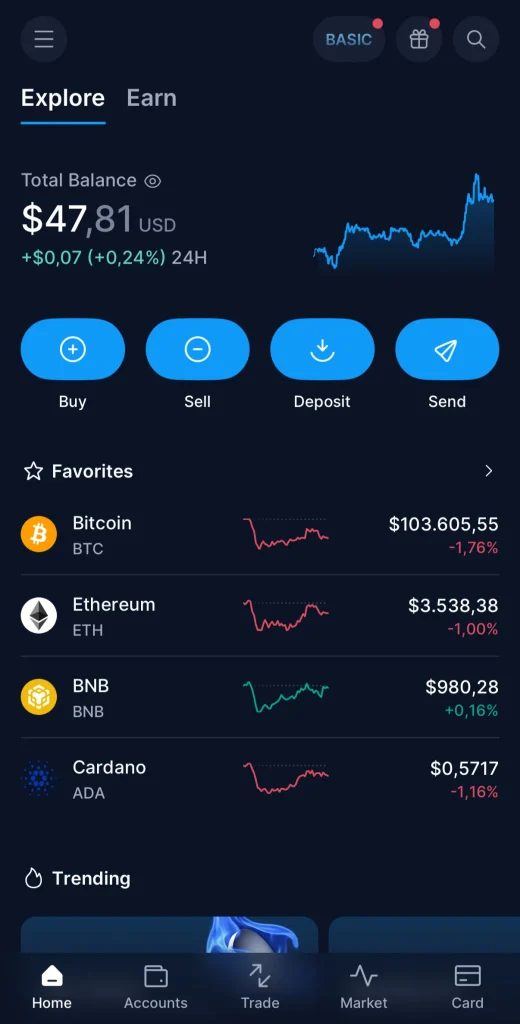
Open the Crypto.com App on your phone and tap the Accounts tab on the home screen. You’ll see your Fiat Wallet (Cash) and your Crypto Wallet listed there.
Step 2. Sell Crypto for Fiat Currency
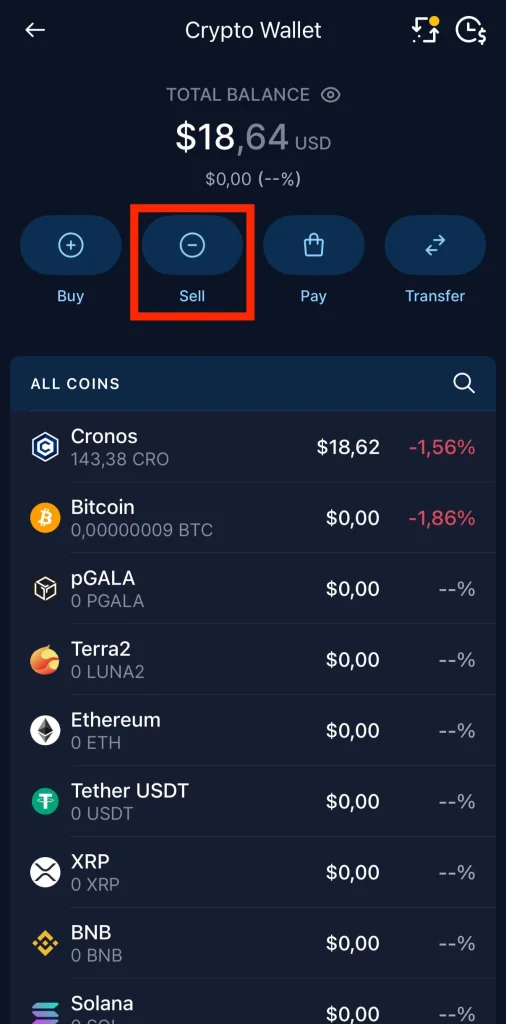
To withdraw USD or another fiat currency, you first need to sell your cryptocurrency. Skip this step if your cash balance is already funded:
- Go to your Crypto Wallet and tap Sell Crypto.
- Choose the coin you want to sell.
- Pick the fiat currency, such as USD, and enter the amount you want to sell.
- Review the quote and confirm. The cash lands in your fiat account.
Step 3. Start the Withdrawal Request

- Tap Accounts → USD Account (or whichever fiat account you are withdrawing from) → Withdraw.
- Choose your fiat wallet, then select your bank account. If you have several bank accounts linked, pick the same bank account you used for deposits.
Step 4. Enter Withdrawal Details
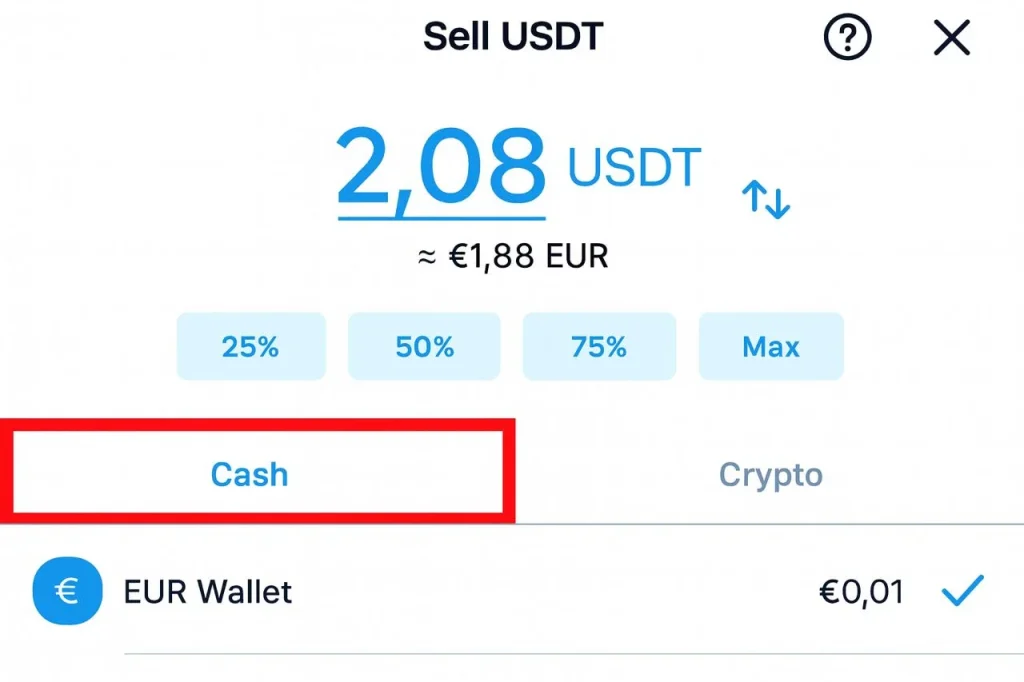
- Enter the withdrawal amount. The app suggests the maximum available based on your withdrawal limits.
- Check the withdrawal fee, then confirm the amount in the confirmation window. The figure you see here is what leaves your account.
Step 5. Confirm the Withdrawal Request and Wait for the Funds to Arrive
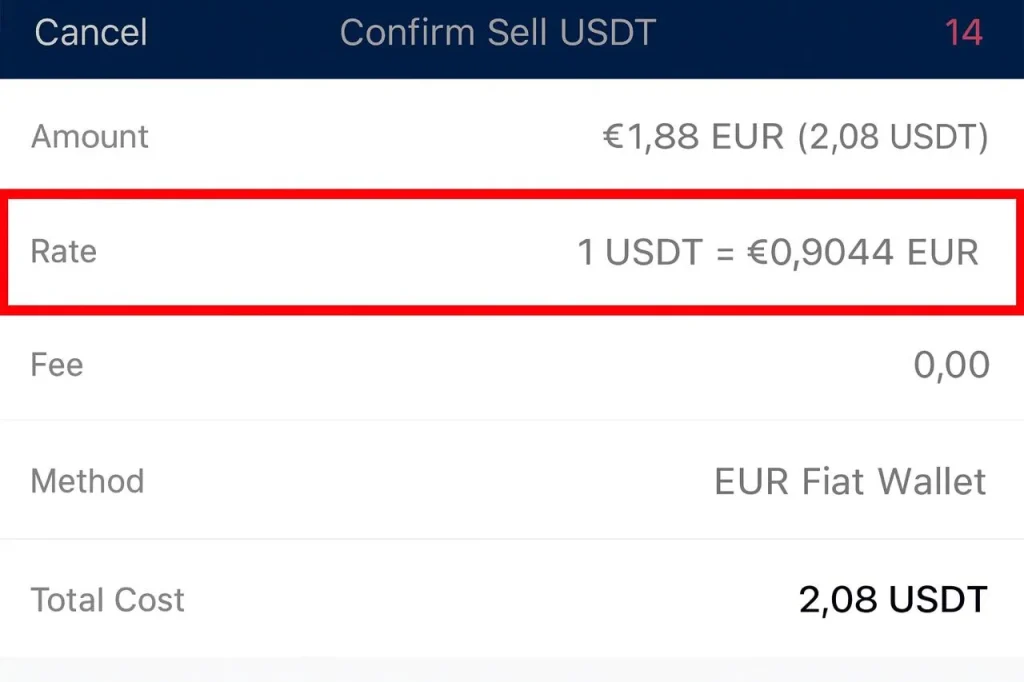
- Tap Confirm.
- Approve the transaction with your authenticator app. The app shows a success message and a status for your withdrawal request.
Most bank withdrawals arrive within 1–3 business days.
Note: Bank transfers can take longer over holidays or when Crypto.com asks for extra verification.
Also, learn how to send BTC to another crypto wallet.
How to Withdraw Money from Crypto.com to an External Crypto Wallet
Want your assets off the exchange and in a wallet you control? Here’s how to withdraw crypto from the Crypto.com App safely.
Step 1. Access Your Crypto Wallet
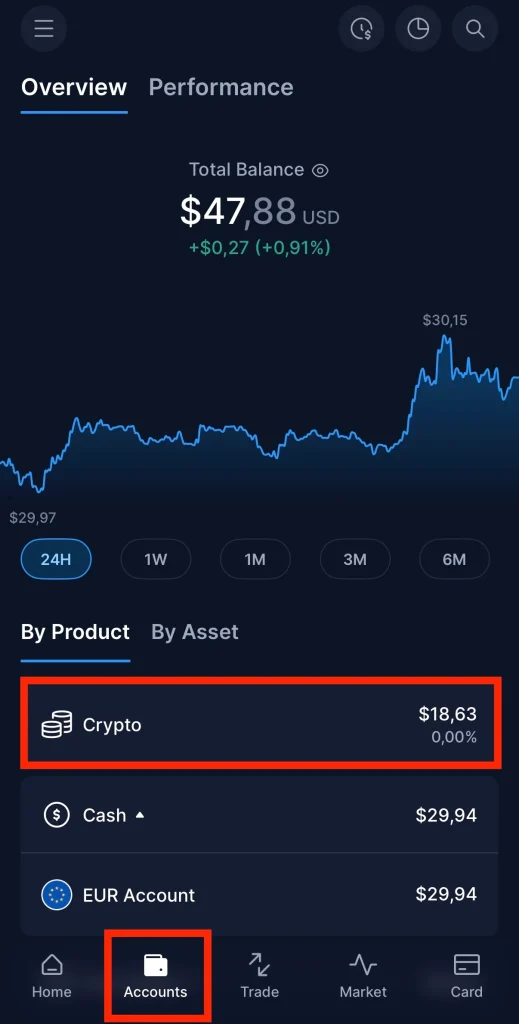
From the home screen, go to Accounts → Crypto Wallet. Select the coin you want to withdraw.
Step 2. Select the Withdrawal Option

Tap Transfer → Withdraw → External Wallet.
Step 3. Add or Select Withdrawal Address

- Tap the Add button next to Wallet Address, then select the cryptocurrency.
- Paste the withdrawal address or scan it with the blue QR code icon. Scanning avoids copy-and-paste typos.
- Choose the correct blockchain network and fill in any other details the app asks for. Coins sent on the wrong network may never arrive.
- Give the new address a label so you can recognize it next time.
Step 4. Enter Withdrawal Details
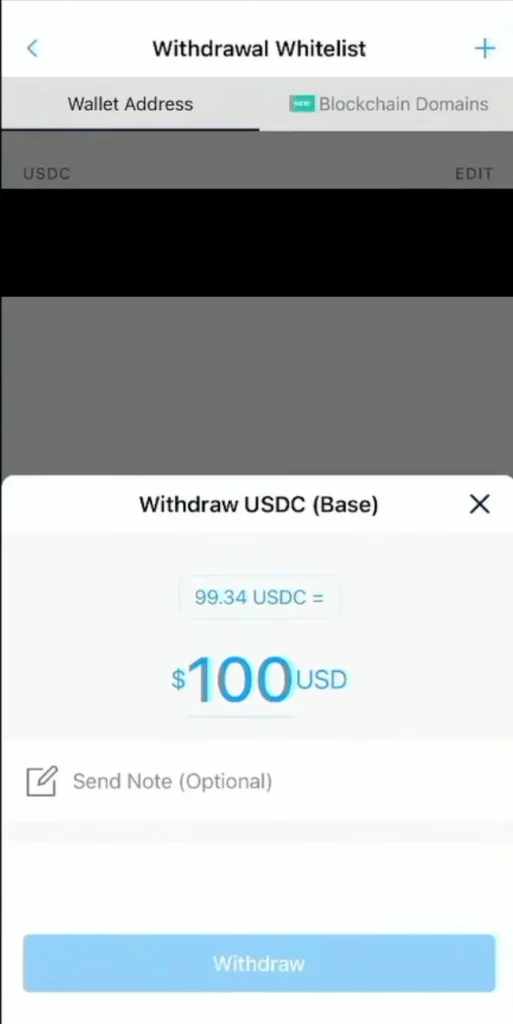
- Enter the withdrawal amount and review the network fee. The app suggests the maximum you can send based on your withdrawal limits.
- Check that the withdrawal address matches your destination wallet, character by character.
Step 5. Review and Confirm
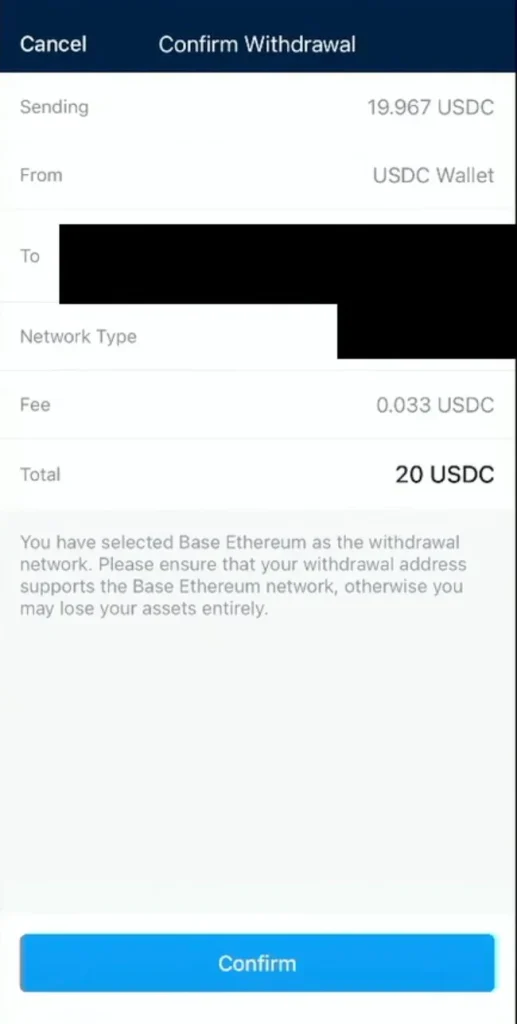
- Recheck the withdrawal address, fee, and network one last time. Tap Review and Confirm.
- Approve the withdrawal request with your authenticator app. Once the withdrawal is processed, a transaction ID appears on your accounts page. Use it to track the transfer on the blockchain.
Note: Make sure your external wallet is secure before you send anything. Crypto sent to a compromised address is gone for good; there is no bank to call.
FAQ
What is Crypto.com?
Crypto.com is an exchange and payment platform where you can buy, sell, trade, and hold cryptocurrencies alongside fiat currencies such as USD and CAD. Inside the Crypto.com App you can withdraw funds, check transaction details, and send crypto to external wallets.
How do I link my bank account in the Crypto.com App?
Open the Crypto.com App and tap the menu button in the top-right corner of the home screen. Go to your Fiat Wallet and choose the option to add a new account. Enter your account and routing details carefully. Once the link is confirmed, usually with a test deposit, you can withdraw funds straight to that account in USD or CAD, within your withdrawal limits.
Can I convert cryptocurrency directly to USD before transferring it?
Yes. You can convert crypto to USD or CAD inside the app before you withdraw. Open your Crypto Wallet, tap the amount field, enter how much you want to sell, and choose the cash option to confirm. The proceeds land in your fiat wallet, ready to withdraw.
Why can’t I withdraw money from Crypto.com?
The usual causes are incomplete KYC, missing bank account details, or a typo in the withdrawal form. Sometimes system maintenance pauses withdrawals, or a flagged transaction puts a temporary hold on your account. Be wary of messages claiming to be Crypto.com support. Scammers use fake withdrawal pages to steal your login details and your funds.
What are some alternatives to withdrawing money from Crypto.com?
If a fiat withdrawal is unavailable, you can send crypto to another verified exchange or an external wallet and withdraw from there. You can also convert your holdings to stablecoins first, then move them to a platform that supports CAD withdrawals.
Final Thoughts
Withdrawing money from Crypto.com safely takes patience and attention to detail. Whether you’re sending cash to your bank or crypto to an external wallet, read every withdrawal request twice before you confirm.
The app itself keeps the process simple. Stay within your withdrawal limits, verify your accounts, and protect your login with an authenticator app, and most withdrawals go through without a hitch.
In most cases your money arrives within a few days. For official, up-to-date withdrawal fees, limits, and supported currencies, check Crypto.com’s official support page.
Your money and crypto deserve proper care. Follow the steps above and every withdrawal stays secure, traceable, and hassle-free.
How I review: Reviewed by Andrei B. I buy the hardware wallets I review, test every product myself and score it on security, UI/UX, ease of use, price and supported coins. Before I publish, I also check recent user reviews and any hack reports.
The whole process is explained on the How We Review page. You can read more about me, or contact me with corrections, from the links at the bottom of this page. For general safety advice, see the FTC guide to cryptocurrency scams.