You’ve got someone ready to send you crypto, and they’re asking for your Phantom wallet address. I’ll show you where Phantom keeps that address in the mobile app and in the Chrome extension, how to land on the correct network, and how to hand the address over without putting the transfer at risk.
It’s quicker than reading this page. You’ll want Phantom installed, a way into your wallet, and the name of the network your sender plans to use. If the whole idea is new, I’d start with our explainer on what a wallet address is and then come back.
Table of contents
What you need before you look for your Phantom address
Think of a wallet address as a public label for your wallet. Exchanges, other wallets and friends use it to send you tokens, and Phantom hands every account its own address on each network it supports.
- Get Phantom from the App Store, Google Play or phantom.com, since those are the only places Phantom tells people to download it.
- Use Chrome, iOS or Android, which is what Phantom is built for. Safari and Tor aren’t supported, and the Firefox extension doesn’t get updates anymore.
- You’ll need to be able to unlock the wallet. If you’re restoring it, keep the Secret Recovery Phrase written on paper and offline.
- Ask the sender which network they’re using. Phantom handles Solana, Ethereum, Base, Polygon, Robinhood Chain, HyperEVM and Bitcoin (Native SegWit and Taproot).
- Later on, when you send from Phantom yourself, keep a little SOL, ETH or MATIC around for the network fee.
Get the address or the network wrong and the money’s gone for good, with nobody able to reverse it. Phantom is self-custodial, which means it can’t move your funds, freeze your account or get anything back for you.
BSC, Arbitrum, Optimism, Avalanche, Unichain and Linea aren’t on Phantom’s list. So don’t let anyone send to your Phantom address over any of them. If self-custody still feels abstract, our comparison of custodial vs non-custodial wallets explains what you’re signing up for.
How to find your Phantom wallet address, step by step
Step 1. Open Phantom and make sure the right account is selected
Launch the Phantom app, or click its icon in Chrome, and unlock it the way you normally would.
Next, glance at the account name. One Phantom wallet can contain several accounts, each with its own addresses, and whichever account is selected does the sending, receiving and signing until you switch to another one. Grabbing the address from the wrong account is an easy slip, and it’s the first thing I’d rule out.
Step 2. Tap “Receive” in the Phantom mobile app
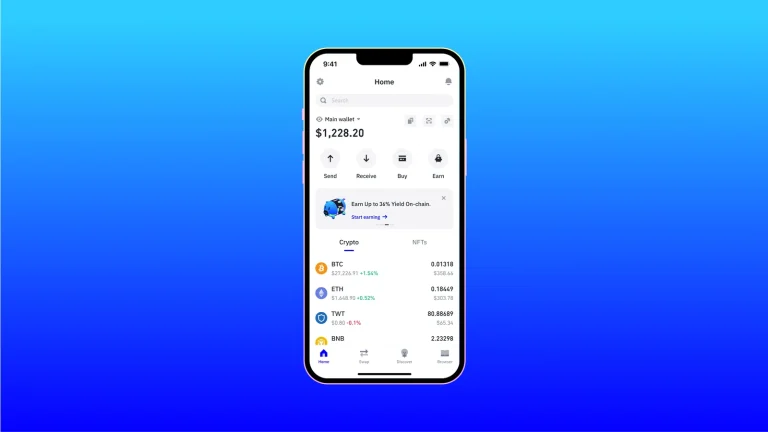
On your phone, open Phantom and tap “Receive” on the home screen.
Phantom’s screens change from version to version. If “Receive” isn’t where I describe it, update the app from your app store and try again.
Step 3. Select the asset you want to receive
Pick the token you’re expecting from the list, SOL, USDC or ETH for example. Phantom then shows the address for that asset, so check it matches the network your sender is using.
Every network gets a single address that takes all the tokens on that chain. So your Solana address collects SOL, USDC, USDT and every other Solana token.
Solana addresses don’t look like Ethereum ones. Ethereum, Base, Polygon, HyperEVM and Robinhood Chain, though, all use one shared format, and that’s exactly why you still have to name the network, because the string is identical while the chain decides where your tokens actually end up.
Step 4. Copy your Phantom address or show the QR code
Either copy the address or let the sender scan the code. Phantom’s advice here is blunt: don’t type an address out yourself, paste it and then look at it again.
It’s worth matching the opening and closing characters of what you pasted against what Phantom displays. Any mismatch means you stop right there and copy it again.
Step 5. Find your address in the Phantom browser extension
You get two ways in the extension. Quickest is hovering over your account name, which pops up the addresses so you can copy the one for your network.
The other way begins on the “Home” tab. Click “Receive”, and pick the QR icon for a code someone can scan or the copy icon to grab the text.
Rushing that hover is how people end up with a Solana address when they wanted Ethereum. Read the label first.
Step 6. Choose which Bitcoin address type Phantom shows
Bitcoin has a twist. Phantom supports two kinds of address, Native SegWit beginning with bc1q and Taproot beginning with bc1p, and a brand-new wallet starts out on Native SegWit.
Does a service want one type in particular? Tap your profile avatar and head to “Settings > Preferences > Preferred Bitcoin Address”, where you can pick Native SegWit, Taproot or both. Our walkthrough on sending Bitcoin to another wallet covers the other end of the transfer.
Step 7. Share your Phantom username or Cash address when that makes sense
When the sender is on Phantom too, you don’t strictly need the address. Your username (the @handle) is tied to one address per network, and whatever someone sends to it lands at the linked address on that network.
Cash is separate and has an address of its own. In the mobile Receive screen it sits on the “Cash” tab beside “Tokens”, or you can go “Home” > “Cash” > “Add Cash” > “Receive Cash”. It takes USDC, USDT or PYUSD on Solana and turns them into CASH tokens.
Phantom’s own wording on this is clear: “Don’t send SOL or other tokens to your Cash address”. Should it happen anyway, try Settings > Profile > “Recover Cash Assets”, though you’ll need at least 1 CASH in the account first.
Step 8. Look up your Phantom address when you can’t log in
Can’t get into Phantom right now? Go to an exchange or wallet that has sent tokens to it in the past, find that transfer, and copy the transaction ID.
Paste the ID into a block explorer, Solscan for Solana or Etherscan for Ethereum. Your address sits in the “Recipient” or “To” field.
I wouldn’t hand that address out for fresh deposits until you’re back inside Phantom and can confirm it there.
Phantom settings worth a quick look
Looking up an address costs nothing, so you won’t find a fee table here. What matters instead are the settings that control which addresses appear, and I checked all of them against Phantom’s help center in September 2026.
| Setting | Where it lives | Why it matters |
|---|---|---|
| Active networks | Tap your profile avatar, then “Settings > Active networks” | Switches networks on or off across the wallet. You can’t turn Solana off. |
| Preferred Bitcoin Address | Your profile avatar, then “Settings > Preferences > Preferred Bitcoin Address” | Picks Native SegWit (bc1q), Taproot (bc1p), or both at once. |
| Username | In your Phantom profile | Phantom users can send straight to your @handle, and you’re limited to one change every 14 days. |
| Selected account | Your list of accounts | Controls whose addresses show up on the Receive screen. |
One catch: network settings cover every account in the wallet, even ones you added with a private key or a Ledger. There’s no way to enable a network for just a single account.
How long does a Phantom transfer take?
Copying the address? A few seconds.
What takes time is the transfer itself. Solana slots run about 400ms, sometimes up to 600ms, and finalized blocks tend to sit at least 32 slots behind the newest confirmed block.
There’s a clock on every Solana transaction too, because its blockhash expires after roughly 60 to 90 seconds, and a transaction that isn’t processed inside that window simply expires.
Exchanges bring their own wait. Phantom says processing times depend on the exchange and the network, and that some exchanges spend a while verifying deposits before they show up.
Phantom address problems and how to fix them
- Can’t find the asset you want after tapping “Receive”? Switch its network on in “Settings > Active networks”.
- A network that’s switched on but empty usually just means you don’t hold anything there yet, and Phantom says assets show up on their own once they arrive.
- Tokens sent over BSC, Arbitrum or another EVM network Phantom doesn’t support aren’t necessarily lost, since Phantom says you may get them back using a different EVM-compatible wallet.
- SOL that went to your Cash address may come back through Settings > Profile > “Recover Cash Assets”, as long as you hold at least 1 CASH.
- When an exchange withdrawal seems stuck, look at its status on the exchange before anything else, because timing varies by exchange and network.
- Locked out entirely? Dig up an earlier transfer to Phantom and read the “To” field on Solscan or Etherscan.
- No “Receive” button usually means an old version of the app, so update it.
Safety tips for sharing your Phantom address
- Receiving from an exchange or wallet you haven’t used before? Ask for a small test transfer first.
- Paste, don’t type, and then read the whole address.
- Skip your transaction history as a place to copy from. Scammers seed it with near-identical addresses (that’s address poisoning), and Phantom will warn you if you copy one you’ve never sent to.
- Your address can go to anyone. Your Secret Recovery Phrase can’t, because whoever holds it gets full, permanent access to your funds.
- Phantom Support never asks for that phrase, so treat anybody who does as a thief.
- Stick to the App Store, Google Play or phantom.com when you install Phantom.
Phantom wallet address FAQ
Can I share my Phantom wallet address safely?
Yes. It’s public by design and only lets people send you tokens. The thing to guard is your Secret Recovery Phrase, since whoever has it controls the funds.
Why are my Solana and Ethereum addresses different in Phantom?
Different formats. Solana uses its own, while EVM chains like Ethereum, Base and Polygon share a separate one.
Does my Phantom Ethereum address work on Base and Polygon too?
It does. Ethereum, Base, Polygon, HyperEVM and Robinhood Chain all use that same format, but the sender still has to choose a network Phantom supports, or you’re into recovery territory.
Do separate Phantom accounts get separate addresses?
Yes, automatically. Every account is its own set of addresses across the supported networks.
What kind of Bitcoin address does Phantom give me?
Native SegWit (bc1q) on a new wallet. If you’d rather have Taproot (bc1p), or both, change it under Settings > Preferences > Preferred Bitcoin Address.
Can people send to my Phantom username rather than my address?
Phantom users can. Your username points to one address on each network.
Will Phantom undo a transfer to the wrong address?
No. It’s a self-custodial wallet, so Phantom can’t get funds back, and once they’ve left a wallet they’re gone.
Phantom wallet address: the short version
On your phone it’s “Receive”, then the asset, then share the address. In Chrome, either hover over the account name or hit “Receive” on the Home tab.
Copy the address, read it back, and make sure your sender is on the same network you picked, because that last check is the one that saves transfers. If you’re weighing Phantom against other options, it helps to know how Polygon and Solana compare, and our list of the best mobile crypto wallets is a sensible next stop.
This article is for general information only and is not financial, legal, or investment advice. Prices and features change; check the vendor’s official page before buying.