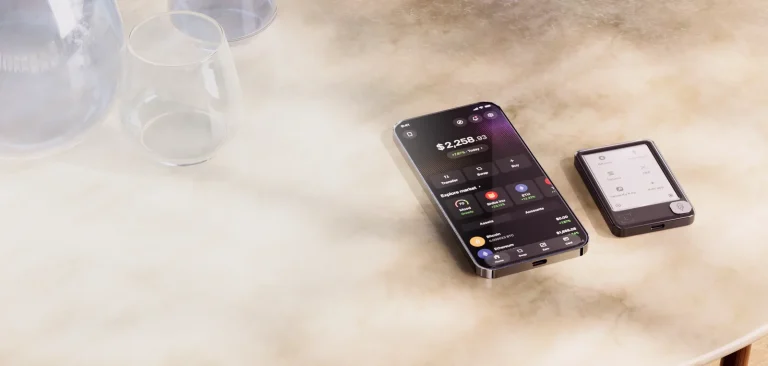
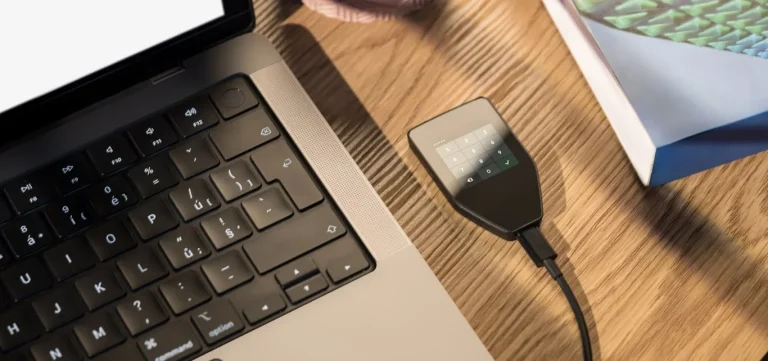
Coinkite’s Coldcard Mk5 is a hardware wallet that only does Bitcoin, and it’s designed so you can sign transactions without ever plugging it into a computer, using a numeric keypad and a pair of secure elements to guard the keys. It’s the successor to the Coldcard Mk4. Coinkite has stopped selling that one.
Who’s it for? Bitcoin holders who like the idea of a signer that never has to meet a computer, and who don’t mind learning a few extra steps to get there. If you own other coins, want a touchscreen, or want a single app that handles everything, we’d look elsewhere.
Below we go through the hardware and how it protects your keys, then Coinkite’s July 30, 2026 seed-generation advisory, followed by price, setup and the rivals we’d compare it with. Mk4 owners should head for the upgrade section, since it explains what the advisory means for a seed you’ve already created.
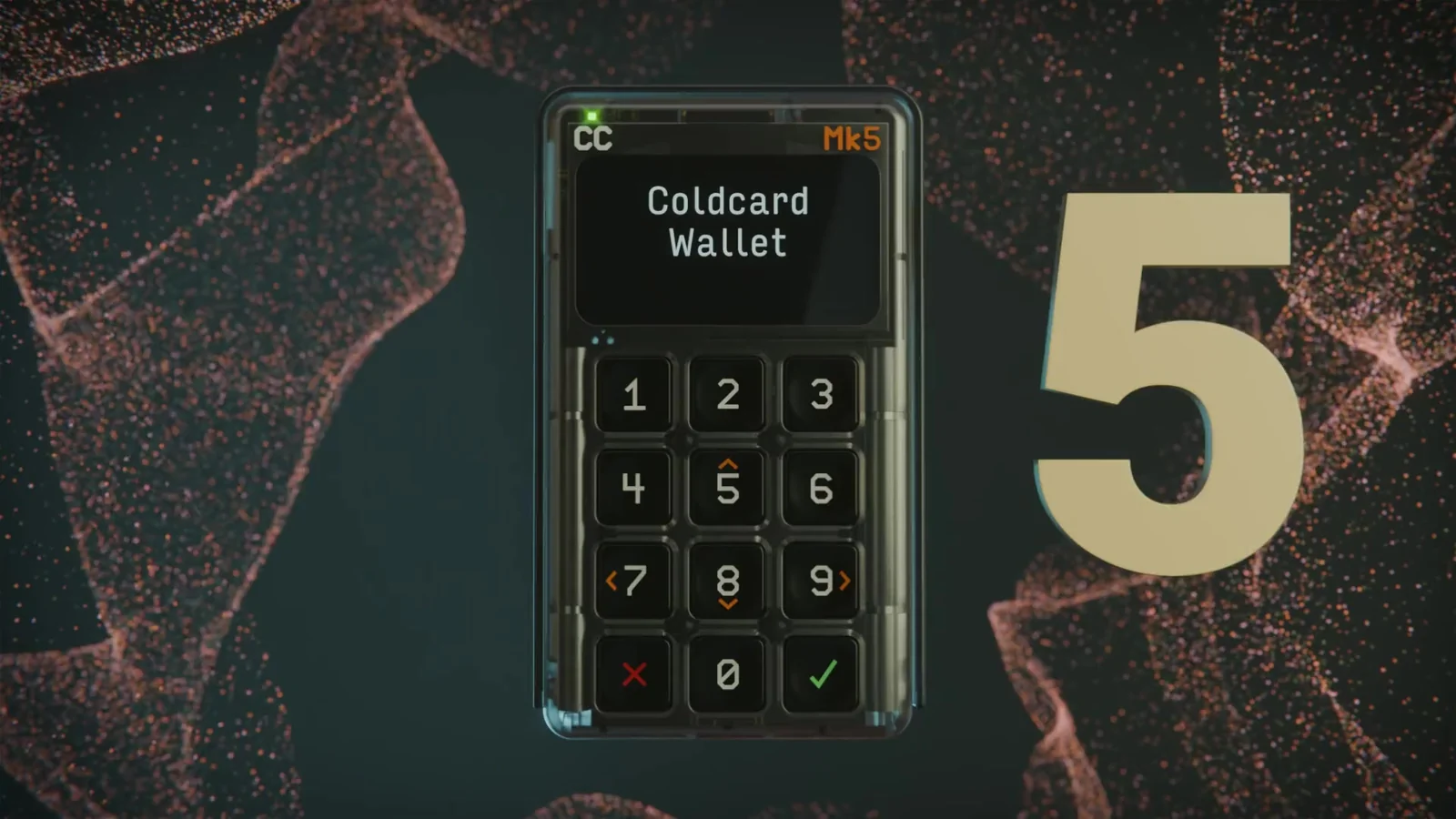
Table of contents
So what is the Coldcard Mk5, exactly?
Within Coinkite’s Coldcard Mk line of Bitcoin signing devices, the Mk5 is the latest model. You’ll pay $189 at the time of writing (September 2026) on Coinkite’s official store.
Support for the Mk5 landed in Coinkite’s public firmware tree in March 2026. Visit the old Mk4 product page today and a banner tells you the Mk4 “has been replaced by Mk5, which keeps the same features and adds an improved screen and keyboard.”
Coinkite also sells a larger Coldcard Q for $289, with a QWERTY keyboard, a QR scanner and battery power on top. From other brands, the obvious rivals are the Trezor Safe 5 and the Keystone 3 Pro.
Coldcard Mk5 at a glance | |
|---|---|
| Price | $189 from store.coinkite.com as of September 2026 |
| Screen and build | A 1.54-inch monochrome LCD behind Gorilla Glass, a 12-key numeric keypad, a clear case and a sliding cover, at roughly 55 grams |
| Connections | USB-C on the bottom edge plus MicroSD, NFC and USB Virtual Disk, every one of them off until you turn it on |
| Where the keys live | Two secure elements, Microchip’s ATECC608 and Maxim’s DS28C36B |
| Open source? | The firmware source is on GitHub and the builds are reproducible |
| Coins | Bitcoin (and Bitcoin Testnet), nothing else |
| Backups | A 12- or 24-word BIP-39 seed, an optional BIP-39 passphrase, Seed XOR, encrypted backups, or a clone onto another Coldcard |
| Companion app | You don’t need one; Sparrow, Nunchuk, Electrum, BlueWallet and other PSBT wallets all work |
| Who it’s for | Bitcoin-only holders who want to sign air-gapped |
What changed between the Coldcard Mk4 and the Mk5
Think of the Mk5 as the Mk4’s insides in a new shell. Coinkite names five hardware differences:
- There’s a new 1.54-inch screen under Gorilla Glass.
- The keypad has been redesigned, and the keys are more precise.
- USB-C has moved down to the bottom edge.
- NFC is quicker and more dependable, and you tap in the top-right corner.
- The case uses a new, tougher plastic.
Nothing changed with the processor, the pair of secure elements, the sliding cover or the firmware. According to Coinkite, the Mk4 runs exactly the same firmware image and will keep receiving every update the Mk5 gets, which means sticking with an Mk4 costs you no features at all.
It’s heavier, though. By Coinkite’s figures the Mk5 weighs about 55 grams, where the Mk4 was roughly 30.
The Coldcard Mk5 features we’d actually use
- The master secret sits in two secure elements made by different companies. Coinkite’s reasoning is that this minimizes the risk from an unknown weakness in either chip.
- You can sign by carrying a MicroSD card back and forth, so the Mk5 never has to touch a computer, and a USB power bank will run it.
- With NFC PushTX, tapping any NFC phone that’s online broadcasts a signed transaction, and the phone needs no companion app.
- Trick PINs cover the grim scenarios: a duress PIN that opens a separate wallet, a PIN that bricks the device, and enforced delays at login.
- Once you’ve typed the first half of your PIN, two anti-phishing words show up. If they’re wrong, the device may have been swapped, and you’ll know before you enter the rest.
- COLDCARD Co-Signing sets up a 2-of-N multisig wallet with limits on amounts, timing and destinations, which lets you put rules around your own spending.
- You don’t create an account, and there’s no app you’re forced to use; you pick the wallet software.
Is the Coldcard Mk5 easy enough for a beginner?
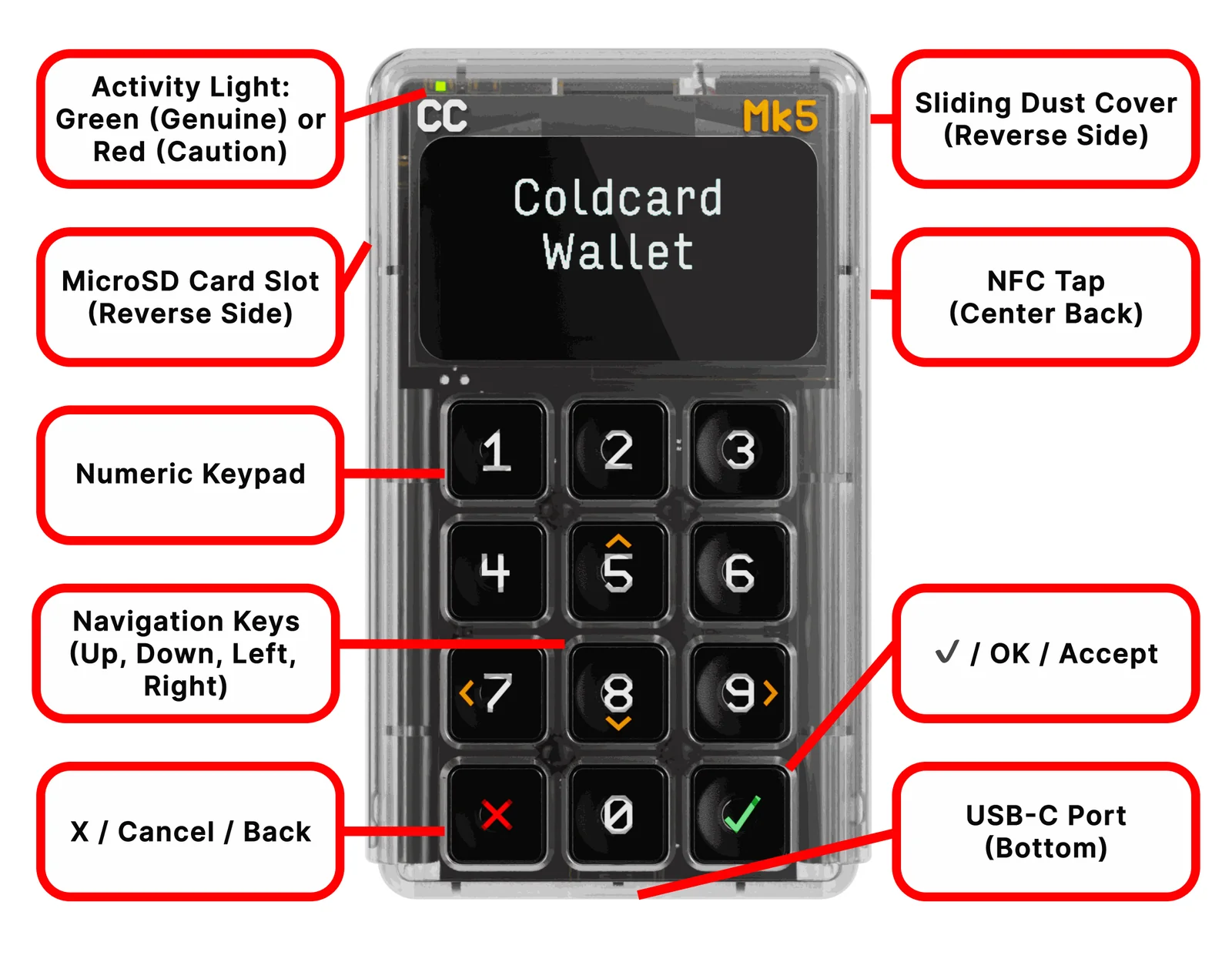
Not especially, and Coinkite doesn’t claim it is. There’s no touchscreen, no battery and no app of its own. Everything happens on the 12-key keypad, where ✓ confirms, X backs out and the 5, 8, 7 and 9 keys scroll.
Power has to come over USB-C the whole time you’re using it. Plug it in and it wakes up on its own; to shut it down you go into the Settings menu. Coinkite leaves the USB cable out of the box, which annoys us a little at $189, so have one ready.
In normal use a wallet like Sparrow builds the transaction and the Mk5 signs it. The file travels over MicroSD, USB or NFC, you approve it on the device, and it goes back the same way. QR codes only work in one direction: the Mk5 can display them, but without a camera it can’t read them.
Expect some friction. Even Coinkite’s setup guide admits the 12-key input is slower than a full keyboard when you’re working through the seed quiz. For a first hardware wallet, we’d think twice and probably point you to something with a touchscreen.
Where the Mk5 clearly beats the Mk4 is the display. It’s larger, it’s covered by Gorilla Glass, and Coinkite promises “significantly improved clarity.” We care about that more than any other change, since the screen is where you confirm each address.
How secure is the Coldcard Mk5 in practice?
Two secure elements, Microchip’s ATECC608 and Maxim’s DS28C36B, hold the Mk5’s master secret. (A secure element is a chip designed to resist tampering while it keeps secret keys.) We couldn’t find certification levels for either chip on Coinkite’s pages.
Every boot, the device checks the firmware’s factory-key signature. Green, marked Genuine, tells you the flash memory hasn’t changed; if the red Caution light is on, Coinkite’s instruction is simple: don’t type your PIN. And because the case is clear, you can inspect it for anything implanted inside.
PINs come in two halves. Type the first half and your device shows its own pair of anti-phishing words. You get 13 attempts before the secure element bricks the Mk5 permanently, and nobody, Coinkite included, can reset it.
Since 2018 the firmware source has been public, and because builds are reproducible, anyone can compile it and check they get identical bytes. What you pay for all this is complexity. Seed XOR, BIP-85, multisig spending policies: the menus go deep.
What Coinkite’s July 30, 2026 seed advisory means for the Coldcard Mk5
Coinkite’s security advisory went up on July 30, 2026, and it concerned weak seed generation. Nobody hacked the devices themselves. Instead, a firmware bug produced weaker seeds, and attackers used that to recreate private keys offline and steal funds.
A build mistake was to blame. After a code change in March 2021, seeds were being created with MicroPython’s Yasmarang software random-number generator rather than the hardware generator Coinkite intended. The Mk4, Mk5 and Q fared better than older models because their secure elements mixed in extra randomness, but their seeds still ended up with about 72 bits of entropy when 128 bits was the target.
If an Mk5 or Mk4 created your seed on standard firmware older than 5.6.0, or on Edge older than 6.6.0X, it’s affected. Coinkite currently recommends standard release 5.6.2. Don’t expect the update to rescue an old seed, though, because Coinkite is clear that new firmware doesn’t change or repair one.
One exception exists. Seeds made with 50 or more fair, private dice rolls entered through Add Dice Rolls aren’t considered at risk from this bug on its own. Passphrase users get partial comfort: a strong BIP-39 passphrase puts another barrier in an attacker’s way, yet Coinkite still wants them to migrate.
If you’re buying new, update the firmware first and only then make your seed. Coinkite ships new units with corrected firmware, but its own setup guide still has you halt at the main menu once the PIN is set and install the latest release before anything else.
Should the incident put you off? Coinkite’s security status page is candid that independent reviewers ran targeted checks on the fix rather than a complete audit, and it says outright that no hardware wallet is risk-free.
We’d call the response open. Still, a flaw that lived in seed generation for about five years is a serious mark against the brand.
Moving from a Coldcard Mk4 to the Mk5
Coinkite has discontinued the Mk4 and made the Mk5 its successor. Got savings on an Mk4? Read this section twice.
Security alone isn’t a reason to buy new hardware, since your Mk4 runs the same firmware and receives the same updates.
Your seed’s origin is what counts. An Mk4 seed generated before firmware 5.6.0 is affected, and carrying it over to an Mk5 won’t cure it. In Coinkite’s migration guide, a seed like that “remains affected if it is later restored, imported, or cloned.”
So the convenient route is off the table. Cloning copies a wallet between two Coldcards over MicroSD, and Coinkite built it with model upgrades in mind, yet for an affected seed it specifically tells you not to treat cloning as the fix.
Coinkite’s preferred approach turns the new Mk5 into your second device. Put fixed firmware on it, create a brand-new seed, then check the backup and confirm a receive address on the Mk5’s own screen. A small test payment goes first; the remaining funds follow once it arrives.
Do it again for each funded passphrase wallet, BIP-85 child wallet and multisig policy linked to the old seed. Hold on to the old backup until you’ve seen every balance land. Coinkite spells out each step in its seed migration guide.
Made your Mk4 seed on 5.6.0 or newer, or qualify for the dice exception? Then cloning is the route Coinkite designed for upgrades. Bear in mind that your PIN, your anti-phishing words and any Co-Signing policy stay behind, and the clone turns USB, NFC and Virtual Disk off.
What can you keep on a Coldcard Mk5? Just bitcoin
Only bitcoin. According to Coinkite’s FAQ, the device handles Bitcoin and Bitcoin Testnet and doesn’t support any altcoins.
Ethereum, stablecoins, NFTs and DeFi are all out. Anyone who needs them should browse the multi-coin devices in our guide to the best crypto hardware wallets.
For Bitcoin software, though, you’re spoiled. Coinkite’s compatibility list includes Sparrow, Nunchuk, Electrum, BlueWallet, Bitcoin Core, Casa, Cove, Specter Desktop, Unchained and Wasabi Wallet, and it adds that any wallet following BIP-174 (the standard for partially signed transactions) ought to work too.
We rate it highly for multisig. There’s no cap on Bitcoin transaction size, and coordinators like Unchained and Nunchuk support it. For the wider field, see our roundup of the best multisig wallets.
What the Coldcard Mk5 costs, and where to buy it
On store.coinkite.com the Mk5 is $189 at the time of writing (September 2026), and all nine colors cost the same. It’s listed as in stock, with a note that high demand may mean some delays.
Inside the box you get the Mk5 and a paper Wallet Backup Card, but no USB cable. You won’t pay a subscription or sign up for an account.
Spending $100 more gets you the $289 Coldcard Q, with its keyboard, QR scanner and battery power.
Stick to Coinkite’s store or an approved reseller. Units leave with corrected firmware, but you should still update the moment it arrives. Then compare the bag number on screen with the one on the tamper-evident bag, because that bag is your proof that no one got into the device before you.
You won’t find the Mk4 on Coinkite’s store any more.
Coldcard Mk5 pros and cons, in short
We see the Mk5 as the pocket-sized Coldcard, and its screen puts right what we found weakest about the Mk4. It rewards people who read manuals. A new unit on current firmware isn’t unsafe because of the advisory, but we’d follow Coinkite’s setup order to the letter.
Setting up a Coldcard Mk5, step by step
- Look over the tamper-evident bag first for tears or signs it’s been resealed, and write down the bag number. Anything off? Leave the device unpowered.
- Connect USB-C power, ideally from a wall charger or power bank, which is what Coinkite suggests because the Mk5 needs power here and not data. It starts up without a button press and shows the Terms of Sale, which you scroll with 5 and 8 before pressing ✓.
- Check that the bag number on screen is identical to the one on the bag and on its tear-off tab, then pick “Choose PIN Code”.
- Pick your PIN: a prefix of 2 to 6 digits, then note the two anti-phishing words it produces, then the suffix. Coinkite suggests four digits in each half, and if you forget the PIN, it’s gone for good.
- Now update. From the main menu, install the current standard release (5.6.2 at the time of writing) from coldcard.com/downloads and verify the signed file; leave “New Seed Words” and “Import Existing” alone until the new version shows as installed.
- Select “New Seed Words”, choose 12 or 24 words, and finish one of the entropy methods (65 key presses, 50 dice rolls or 128 coin flips). Dice rolls are the one Coinkite labels as recommended, and it’s what we’d use.
- Copy the words onto the Wallet Backup Card and get through the quiz. Afterwards, unplug and replug the Mk5 to confirm the PIN and anti-phishing words work, and you should land on a main menu showing “Ready To Sign”.
Treat those words as the only key back to your bitcoin. Don’t photograph them, don’t type them into any phone or computer, and don’t hand them to anyone who says they’re from support. Whenever you send, compare the address on the Mk5’s screen, because if the address or the network is wrong the funds are gone and nobody can reverse the transfer.
After that, connect it to a watch-only wallet like Sparrow. For the sending part, our guide on how to send Bitcoin to another wallet walks you through it.
Coldcard Mk5 alternatives worth a look
For more air-gapped choices, our list of the best air-gapped crypto wallets has plenty. Here are the three we’d weigh first.
Coldcard Q, the bigger sibling
For $289 the Q gives you everything the Mk5 does, plus a 320×240 pixel LCD, a QWERTY keyboard, a QR scanner, a second MicroSD slot and the option of running on 3x AAA batteries. It’s a lot larger. Coinkite lists it at 120 x 75 x 22 mm.
Because it runs on the same codebase, the advisory covers the Q too. We’d choose it over the Mk5 if QR signing matters to you, or if tapping out words on a keypad sounds tedious.
Trezor Safe 5 if you’d rather tap a screen
At $129, the Trezor Safe 5 undercuts the Mk5 by $60. You get a 1.54-inch color touchscreen, an EAL 6+ secure element and thousands of supported coins, and Trezor sells a Bitcoin-only edition as well.
Beginners and anyone with more than bitcoin will probably get on with it better. Our Trezor Safe 5 review has the details.
Keystone 3 Pro for QR signing on a touchscreen
Keystone’s 3 Pro is listed at $149.00, so it’s $40 cheaper than the Mk5. Signing happens air-gapped through QR codes, and the hardware includes a 4-inch touchscreen, three secure element chips and a fingerprint sensor. Keystone describes it as 100% open source.
If you like the air-gapped idea but want to sign by QR on a touchscreen, this is the one. More in our Keystone 3 Pro review.
Coldcard Mk5 questions people ask
Can I trust a Coldcard Mk5 after the 2026 seed bug?
Yes, provided it’s set up on fixed firmware. A seed created on Mk5 standard firmware 5.6.0 or newer falls outside the advisory, and Coinkite wants you on 5.6.2 before you make one.
What’s the price of the Coldcard Mk5?
$189 from Coinkite’s store as of September 2026, with no USB cable in the box.
Which coins can the Coldcard Mk5 hold?
Just Bitcoin and Bitcoin Testnet. Altcoins aren’t supported.
Can I use the Coldcard Mk5 with MetaMask?
No. It’s Bitcoin-only, so MetaMask is out; pair it with Sparrow, Nunchuk, Electrum or another wallet that handles PSBTs instead.
What if my Coldcard Mk5 gets lost?
Get a new Coldcard and restore your seed words, along with any passphrase you used. If you never wrote the seed down, nobody can recover the funds for you.
Has Coinkite discontinued the Coldcard Mk4?
Yes. Coinkite has replaced it with the Mk5, although the Mk4 still runs the same firmware and receives the same updates.
Will updating firmware fix a seed my older Mk4 or Mk5 created?
No. Updates only affect seeds generated from then on. Unless the 50-dice-roll exception covers you, Coinkite says to create a new seed on fixed firmware and move your funds across.
Our final verdict on the Coldcard Mk5
We’d recommend the Mk5 to someone who holds only bitcoin, wants to sign air-gapped and will actually use a duress PIN or multisig. Its screen and keypad make it more pleasant to live with than the Mk4. Anyone holding other coins, or hoping for an app that guides them, should look at a Trezor Safe 5 or a Keystone 3 Pro instead.
There’s one asterisk, and it’s the July 2026 advisory. A new Mk5 on current firmware sits outside the affected range; Mk4 owners with older seeds have to migrate rather than clone. In one line, it’s a strong Bitcoin-only signer for careful people, as long as you set it up in the order Coinkite lays out.
This article is for general information only and is not financial, legal, or investment advice. Prices and features change; check the vendor’s official page before buying.