Two free Bitcoin wallets. Both open source, both built for a desktop, and both good enough to guard coins you never plan to touch again.
Swapping one for the other isn’t a wash, though. Sparrow showed up in 2020 and was shaped around signing devices, multisig quorums and privacy tooling. Electrum’s been securing Bitcoin payments since 2011, and it now drags Lightning and an Android app along behind it.
Go with Sparrow when your coins sit on a hardware device, especially an airgapped one that never plugs into a computer, and you care about exactly which coins leave the wallet when you spend. Electrum makes more sense when you want the same wallet on a laptop and a phone, Lightning in the same window, or a 2-of-3 two-factor setup that needs no hardware whatsoever.
What follows compares how each one handles keys, what they’re like to live with, which address types they’ll build, what they cost you, and who ends up happier with which. Every figure below came out of the two projects’ own sites, documentation and release notes, re-checked in September 2026.

Table of contents
Sparrow vs Electrum at a Glance
Most of the gaps between these two show up in one table.
Scan it first, then read whichever sections matter to you.
Sparrow vs Electrum: Comparison Chart | |
|---|---|
| <strong>What it costs</strong> | Sparrow: nothing. Apache 2 license, donations keep it going <br> Electrum: nothing. MIT license, published by Electrum Technologies GmbH |
| <strong>How long it has been around</strong> | Sparrow: first builds in 2020 <br> Electrum: securing Bitcoin payments since 2011 |
| <strong>Where it runs</strong> | Sparrow: macOS 11+, Windows 10+, Linux on Intel and ARM64, and a headless Sparrow Server <br> Electrum: Windows 10 (1809)+, macOS 11+, a Linux AppImage, and Android 8.0+ |
| <strong>On your phone</strong> | Sparrow: no phone build at all <br> Electrum: Android through Google Play and F-Droid. Nothing for iOS |
| <strong>How it reads the chain</strong> | Sparrow: your own Bitcoin Core node or an Electrum server. SPV is deliberately skipped <br> Electrum: SPV checks run against Electrum servers |
| <strong>Address types it builds</strong> | Sparrow: every legacy and SegWit type, single sig or multisig, taproot included <br> Electrum: p2pkh, p2wpkh, p2wpkh-p2sh, p2wsh and p2wsh-p2sh. No taproot wallet type |
| <strong>Recovery words</strong> | Sparrow: BIP39, and it can rebuild a wallet from SLIP39 shares <br> Electrum: a house 12-word seed carrying 132 bits of entropy. BIP39 phrases restore too |
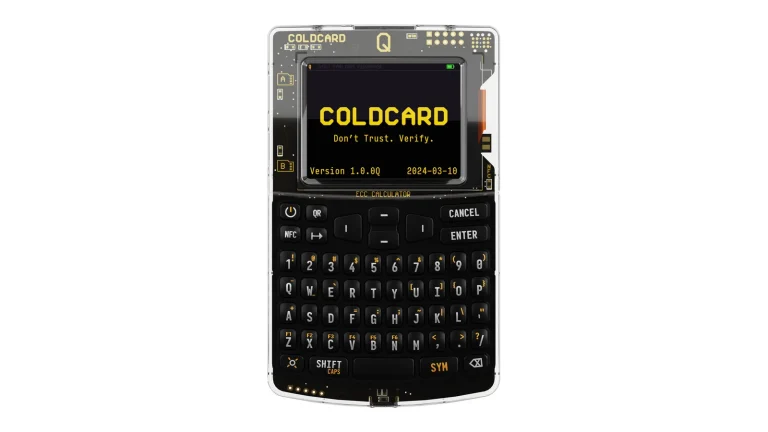
| <strong>Signing devices</strong> | Sparrow: USB, QR airgap, SD card and smartcard devices <br> Electrum: plugins covering BitBox02, Coldcard, Digital Bitbox, Jade, KeepKey, Ledger, Safe-T and Trezor |
| <strong>Multiple signers</strong> | Sparrow: built in, with a miniscript spending policy <br> Electrum: built in, and a 2-of-3 two-factor wallet co-signed by TrustedCoin |
| <strong>Lightning</strong> | Sparrow: nope <br> Electrum: yes, since release 4.0.1 in July 2020, plus submarine swaps |
| <strong>Privacy kit</strong> | Sparrow: Tor baked in, PayNyms (BIP47), a Stonewall privacy toggle, payjoin and silent payments <br> Electrum: coin control, and your own server if you would rather not leak addresses |
| <strong>Newest release</strong> | Sparrow: 2.5.4, August 2026 <br> Electrum: 4.8.2, September 2026 |
So What Is Sparrow Wallet, Exactly?
Sparrow’s own repository sums it up as a desktop Bitcoin wallet focused on security and privacy, which is about as honest a one-liner as you’ll find. It’s Java code under the Apache 2 license, and a single developer who goes by @craigraw writes it. Donations keep the lights on, and the project promises it’ll always be free to use.
That repository went up in March 2020, with the first public builds following later the same year. Version 2.5.4 landed in August 2026.
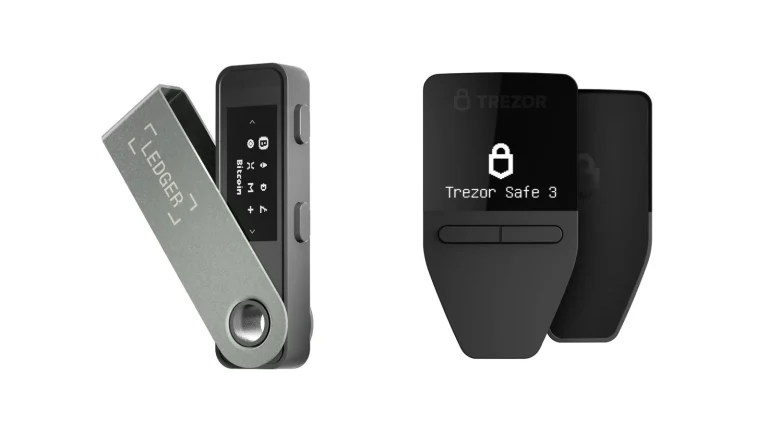
You’re expected to bring your own signing device. If you haven’t picked one yet, our rundown of the best Bitcoin hardware wallet options will narrow it down.
What Sparrow Gives You
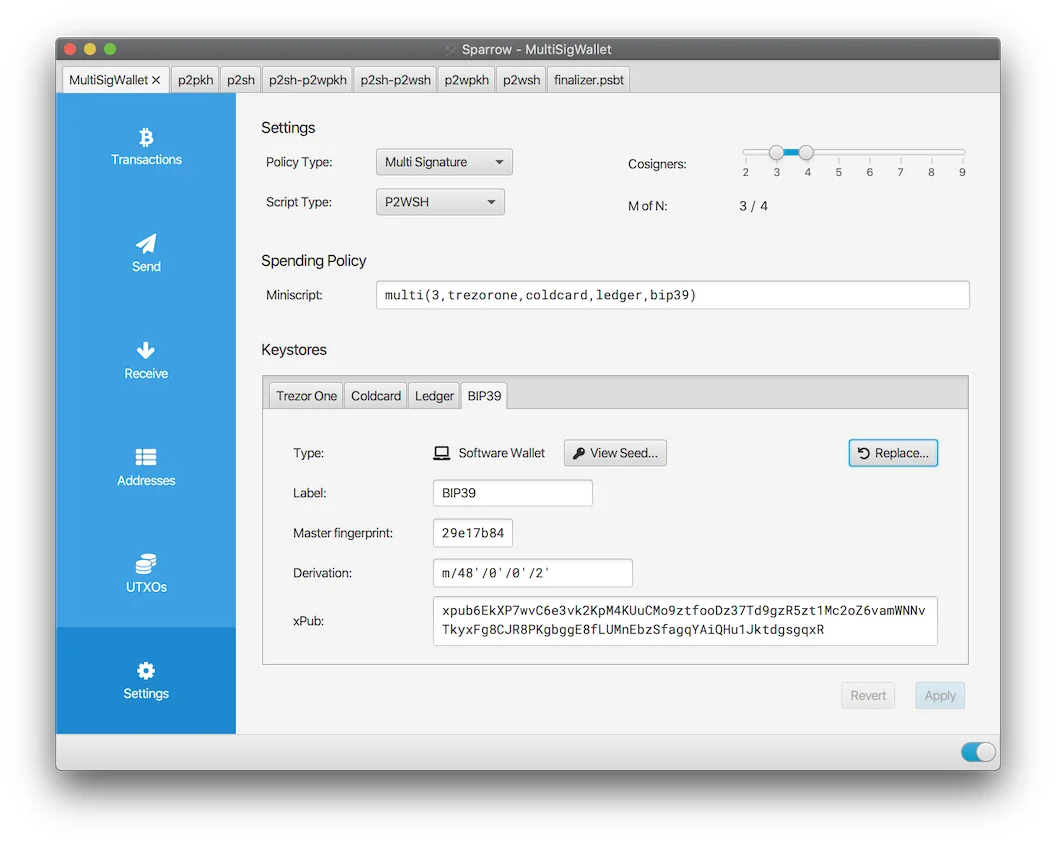
- Wallets with one key or several, across the usual script types, and you control every decision while the wallet is being created. Several keys signing before coins can move is what people mean by multisig.
- Plenty of ways to reach the chain: public servers, your own Bitcoin Core, or a private Electrum server running Fulcrum, ElectrumX, Electrs, Electrs-Esplora, EPS or BWT.
- PSBTs everywhere. That’s the part-signed transaction file, and it’s the trick that lets a device with no internet connection add its signature.
- You pick the coins and the fee, with the Branch and Bound and Knapsack selectors that Bitcoin Core itself uses.
- Every transaction, input and output can carry a label, and the transaction viewer works as a block explorer you keep to yourself.
- Tor ships inside the app, PayNyms work directly (BIP47) and collaboratively, and testnet, regtest and signet are there when you want to rehearse.
One design choice is worth flagging. Sparrow stays away from browser technology on purpose, and its reasoning is that the sheer breadth of what a browser can do makes for a big attack surface. Hard to argue with that when private keys are involved.
Electrum, the Wallet That Has Been Around Since 2011
Thomas Voegtlin wrote Electrum in Python, it carries the MIT license, and Electrum Technologies GmbH publishes it. The site’s own line is that it has been securing Bitcoin payments since 2011, and the public commit history bears that out.
Release 4.8.2 arrived on September 11, 2026. Ask whether it’ll hold anything besides Bitcoin and the FAQ gives you a flat no, with no softening around it.
We looked at the wallet on its own terms in our full Electrum wallet review, which digs further into setup and everyday use.
What Electrum Gives You
- Keys are encrypted and stay on your machine, and the secret phrase you write down at setup brings the whole wallet back.
- Nothing in your history is taken on faith. SPV checks each transaction against block headers, so a lying server gets caught.
- The Coins tab hands you coin control and lets you freeze individual UTXOs, the separate chunks of Bitcoin your wallet is made of. Dynamic fees, Replace by Fee and Child Pays for Parent are all there too.
- Watching-only wallets and offline signing keep the keys on a machine that never sees a network cable.
- Plugins cover BitBox02, Coldcard, Digital Bitbox, Jade, KeepKey, Ledger, Safe-T and Trezor.
- Lightning has been in the app since release 4.0.1 in July 2020, and submarine swaps move value between on-chain and Lightning balances.
Then there’s the two-factor wallet, which Sparrow has no answer to. A remote service named TrustedCoin acts as the third signer in a 2-of-3 arrangement, and the plugin is upfront that a small fee gets charged on every transaction that leans on it. No figure is published anywhere, which is mildly irritating.
Sparrow vs Electrum on Security: Who Do You Trust?
Neither project ever touches your coins, and you can read all of both. So the question isn’t really which is safer in the abstract. It’s what each one has built around the keys, and what each one quietly asks you to trust.
Argon2 protects Sparrow’s wallet files, tuned so that turning your password into a key takes at least 500ms on current hardware. SPV gets skipped entirely in favor of your Bitcoin Core node or an Electrum server, because the project treats SPV as a privacy cost rather than a shortcut. Release 2.5.4 added a verified block header store that spots reorgs, plus Merkle proof checks on transactions as they confirm.
Something we rarely see from a wallet project: Sparrow’s best practices page tells you to scale the setup to the balance. Under $10,000, going by its September 2026 wording, it suggests a hardware wallet and a single-signature setup on a public Electrum server. Past that it wants you running Bitcoin Core yourself.
Larger balances get a firmer recommendation: at least a 2-of-3 multisig, with hardware wallets from different vendors making up the quorum, stored in separate places. That’s concrete advice, and the project gains nothing by giving it.
Electrum’s record runs far longer, which also means a longer list of things caught and patched. Its GitHub repository carries five published security advisories. Both of the newest, dated April 28, 2026, describe local problems rather than remote ones: an external plugin authorization bypass rated medium, and a Nostr Wallet Connect spending limit bypass rated low.
A phishing wave also left permanent marks on how the wallet behaves. Anti-phishing measures were backported in release 3.2.4 in December 2018, and release 3.3.3 in January 2019 stopped showing users whatever text a server felt like sending. That same release began checking release announcements against a hardcoded Bitcoin address.
Which is why the site opens with a warning not to download Electrum from anywhere except electrum.org. Please take it literally. Fake wallet downloads are still one of the cheapest ways anyone has ever lost Bitcoin.
Distribution is where Electrum pulls clearly ahead. Its binaries are reproducible, five named builders sign them, and the project spells out why signatures beat published hashes. Sparrow signs a manifest instead, and since version 1.8.3 you can drag those files onto the app itself to bring up its Verify Download dialog.
Now the rule that outranks everything above, and it applies to both wallets and to every Bitcoin payment you’ll ever make. Get the address or the network wrong and those coins are gone for good, and nobody, these two projects included, has any way to claw them back.
New to this? Read up on what a wallet address is before a single satoshi moves.
Living With Sparrow vs Electrum Day to Day
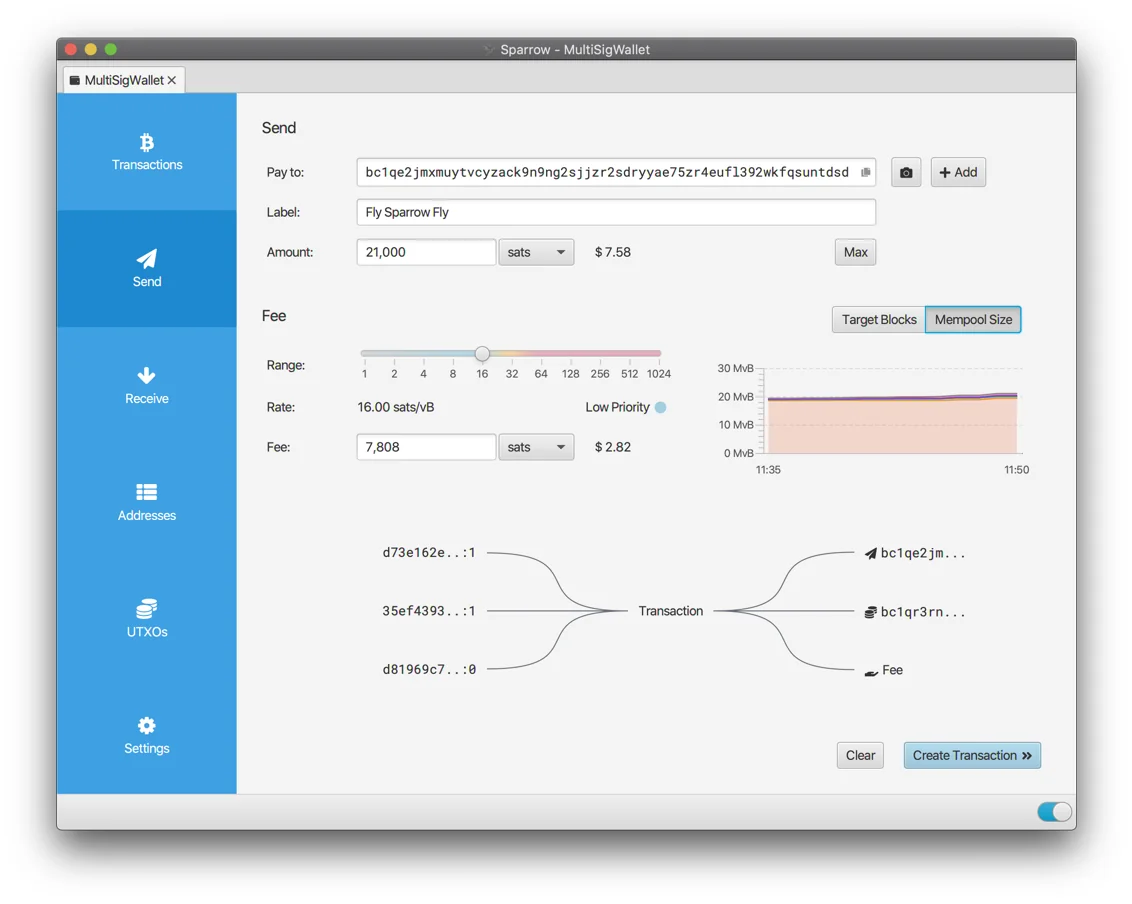
Sparrow is the better looking of the pair, with a tab strip running down the left edge: Transactions, Send, Receive, Addresses, UTXOs and Settings. Open the Send tab and you get a Pay to field, a Label field, an Amount in sats, a fee Range slider and a live Mempool Size chart. Underneath all that sits an editable picture of your inputs and outputs as the transaction takes shape.
That picture alone is worth the install, in our view. Watching which coins feed a payment, and what change bounces back to you, drags coin control out of the abstract.
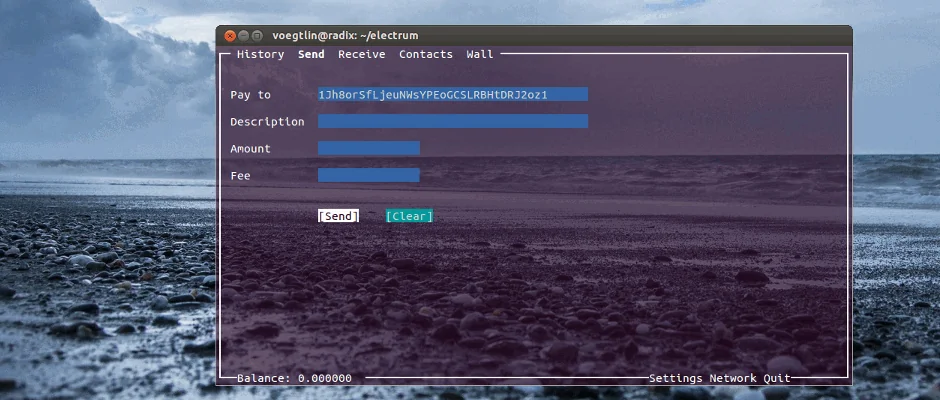
Electrum, by contrast, looks like it stopped caring about appearances years ago. Its send screen wants Pay to, Description, Amount and Fee, then you hit Send. Bitcoin doesn’t get much simpler than that, and we’d rather have blunt than clever.
The offline signing flow reads the same way. Wallet then Information shows the master public key, File then New/Restore builds the watching-only copy, and Tools then Load transaction then From file carries unsigned and signed files back and forth.
Convenience, though, belongs to Electrum, because of the phone. There’s an Android build on Google Play and F-Droid for Android 8.0 and up, so one wallet comes with you. Sparrow offers desktop builds and a headless Sparrow Server for machines with no display, and that’s the lot.
Help is scarce either way, and scarcer with Sparrow. Its FAQ says outright that no support team exists and sends you to a community Telegram group. Set aside an evening for the documentation.
What Sparrow vs Electrum Will Actually Hold
Short section, this one. Bitcoin.
That’s the whole list for both of them, so anything else in your portfolio needs a second wallet, and our picks for the best non-custodial wallet are a sensible starting point.
Where they genuinely part ways is script types, meaning the address formats a wallet is willing to create. Single sig or multisig, every legacy and SegWit type, all fine in Sparrow, and taproot wallets arrived there in release 1.4.3 back in July 2021. Connected wallet imports picked up the taproot script type in 1.7.8.
Electrum builds p2pkh, p2wpkh, p2wpkh-p2sh, p2wsh and p2wsh-p2sh wallets. Sending to a taproot address is fine, but no taproot wallet exists for you to receive into, which is the kind of gap that quietly ages software.
Recovery words are a second sticking point, and they catch people out. BIP39 mnemonics are what Sparrow uses, and it can also rebuild a wallet from SLIP39 shares. Electrum rolls its own 12-word seed holding 132 bits of entropy, which is not BIP39, although a BIP39 phrase you bring in will still restore.
Switching between the two turns out to be painless. Electrum wallets import and export in Sparrow, encrypted ones included, and your labels and gap limit travel along with them.
The remaining gap is Lightning, and it’s a one-sided one. Electrum has had it since release 4.0.1 in July 2020 and later added submarine swaps, while Sparrow simply doesn’t play. Just remember that an Electrum seed won’t bring Lightning balances back, so channel backups matter.
What Sparrow and Electrum Cost You
Nothing, in both cases. Donations fund Sparrow under the Apache 2 license, and Electrum is MIT licensed free software. Mining fees are the only Bitcoin either one passes along, they go to miners, and you set the rate yourself in both apps.
A couple of features do carry their own small charges. Linking a PayNym contact in Sparrow costs a one-time notification transaction of 546 sats on top of mining fees. Electrum’s TrustedCoin two-factor wallet skims a small fee off every transaction the remote server touches.
So value comes down to what each one spares you. With Sparrow you skip vendor-specific software entirely, since it’ll talk to nearly any hardware wallet, airgapped ones included. With Electrum you skip running two apps, because desktop, phone and Lightning all live in one.
The Good Parts and the Annoying Parts
Where Sparrow Wins and Where It Grates
Electrum’s Strengths and Its Sore Spots
So Which One Should You Install?
Coins parked on a hardware wallet, and cold storage you want done properly? Sparrow, without much hesitation. It signs over USB, QR, SD card and smartcard, and its multisig setup with a miniscript spending policy bends further than anything Electrum offers.
One wallet across a laptop and a phone? That’s Electrum. Between the Android build and Lightning it’s the one that suits spending rather than hoarding, and our guide to sending Bitcoin to another wallet applies to either app.
Assembling a multi-vendor vault? Sparrow again, and take the project at its word: 2-of-3 or better, devices from different makers, backups in separate buildings. Our roundup of the best multisig wallets lays out the rest of the field.
Sparrow vs Electrum FAQ
Which is safer, Sparrow or Electrum?
Depends on you. Your keys never reach either project, so the habits around the wallet count for more than the wallet itself. Sparrow locks its files with Argon2 and refuses SPV, talking to your node or an Electrum server instead. Electrum counters with the longer record, published advisories and reproducible builds that five named people put their signatures on.
Will my Electrum wallet open in Sparrow?
Yes, and it is one of the nicer touches here. Sparrow imports and exports Electrum wallets, encrypted ones included, and carries your labels and gap limit across at the same time.
Can either wallet hold altcoins?
No. Bitcoin only, both of them, and Electrum’s FAQ does not soften the answer at all.
Has Sparrow added Lightning yet?
No, and nothing suggests it is coming. Everything Sparrow does happens on-chain. Electrum picked up Lightning in release 4.0.1 in July 2020 and later bolted on submarine swaps, but tread carefully there: a seed alone will not restore Lightning balances, so keep channel backups.
Does Sparrow run on a phone?
It does not. You get desktop builds for macOS, Windows and Linux, plus a headless Sparrow Server for boxes with no screen. Electrum does ship an Android app through Google Play and F-Droid, though iPhone owners are out of luck.
What do Sparrow and Electrum cost?
Nothing. Donations pay for Sparrow under the Apache 2 license, and Electrum is MIT licensed free software. Mining fees are the only money leaving your wallet, and you choose the rate in both.
Which signing devices does each one talk to?
Sparrow has the longer list: Trezor, Ledger, BitBox02 and Jade over USB, then Passport, Jade, SeedSigner, Keystone and Krux by QR code, then Coldcard, Keystone and Passport by SD card, and finally Tapsigner, Satschip, Satochip and Keycard as smartcards. Electrum ships plugins for BitBox02, Coldcard, Digital Bitbox, Jade, KeepKey, Ledger, Safe-T and Trezor.
Our Verdict: Sparrow or Electrum?
Cold storage goes to Sparrow, and it isn’t especially close. More devices work with it, the airgapped routes are better thought through, multisig bends further, and pointing the wallet at your own node strips out the privacy tax that comes with SPV. You do pay for that: no phone, no Lightning, and nobody to email at two in the morning.
For ordinary spending, Electrum hasn’t been displaced. Releases reaching back to 2011, an Android app, Lightning, offline signing and that two-factor option cover more situations than Sparrow manages, even if the whole thing looks a decade out of date.
A lot of people simply keep both, spending from Electrum and leaving the cold storage to Sparrow.
Given that neither costs a cent, that’s a perfectly reasonable place to land.
This article is for general information only and is not financial, legal, or investment advice. Prices and features change; check the vendor’s official page before buying.