SafePal’s X1 costs $69.99, signs your transactions over a Bluetooth link, and ships with its firmware code sitting in a public GitHub repository. No other Bluetooth wallet from a big-name vendor does that last part. Those two facts together are the pitch.
Who’s it for? Anyone who juggles coins across a dozen chains from a phone and wants their keys kept off anything that touches the internet. You’ll want something else if a colour screen matters to you, if you refuse to have any radio inside your wallet, or if you need firmware you can compile and check yourself.
Below you’ll find the specifications and a setup walkthrough with the on-screen labels quoted exactly. You also get the security model and what that open-source badge is worth in practice. We cover the August 2026 customer data breach and three rival devices too.
Table of contents
What Is the SafePal X1, and Who Makes It?
Bluetooth is the X1’s job in SafePal’s catalogue. Veronica Wong started the company in 2018 with two co-founders, and SafePal names Binance among its backers.
The X1 launched at Token2049 in Singapore on September 13, 2023. It cost $69.99 then, and that is still what you pay at the time of writing (September 2026).
Nothing was retired to make room for it. The S1 costs $49.99 and the S1 Pro costs $89.99, and both of them talk through QR codes rather than a radio.
Those two also carry smaller 1.3 inch colour panels at 320×320, while the X1 goes the other way. You get a roomier 1.8 inch display that is monochrome at 128×64, plus Bluetooth 5.0 for the talking.
SafePal X1: The Numbers That Matter | |
|---|---|
| Price | $69.99, before VAT and any duty you owe (September 2026) |
| Screen and body | A 1.8 inch monochrome LCD at 128*64, with 3 backlight settings Tempered glass over ABS, 12 keys and a D-pad |
| Connectivity | Signing runs over Bluetooth 5.0 (BLE) The USB-C port only charges the thing |
| Chip and key storage | A separate secure element holds your keys. The store page calls it CC EAL6+, the launch post CC EAL5+ Hardware random numbers, tamper sensors, and a self-destruct that wipes the chip |
| Open source | The firmware lives at github.com/SafePalWallet/safepal-x1 under GPL-3.0 Nothing is tagged, and no build steps are published |
| Supported assets | “200+ blockchains” on the store page, 100+ on the about page |
| Backup options | A BIP39/BIP44 seed phrase, and you choose the word count on the device A passphrase up to 60 characters, which the device never keeps |
| Companion app | SafePal App on iOS and Android, currently V4.11.10 SafePal Extension on Chrome, Firefox and Edge |
| Best for | Phone-led holders spread over many chains who’d rather not pay flagship prices |
SafePal X1 Key Features
- Bluetooth 5.0 takes over from the QR-scanning routine the S1 line uses. Approving a payment means pressing OK and tapping in your PIN, with no camera to line up and no cable to hunt for.
- Nothing else SafePal sells has a screen this big, monochrome or not. More of a transaction fits at once, which is exactly what you want while you squint at a long address.
- Those 12 keys sit in an old phone layout, letters printed beneath the digits. Punching in a 60-character passphrase this way beats nudging a character wheel by a mile.
- GPL-3.0 firmware on GitHub is close to unheard of for a wireless wallet. Treat what SafePal published as code you can read, because it is not a project you can build.
- Adding a passphrase spins up a whole separate wallet behind the same recovery words. You get up to 60 characters with upper and lower case counting as different, and SafePal says the device never stores it.
- SafePal App 4.11.6 brought batch signing, which bundles approvals that would otherwise come one at a time. Renting TRON Energy so a USDT transfer has gas is the worked example in SafePal’s docs.
Living With the SafePal X1: Is It Beginner-Friendly?
Four steps get you going. Install the SafePal App, pair over Bluetooth, make or restore a wallet on the device, then hook the two together. Version V4.2.0 of the app is the minimum.
Give yourself twenty minutes, because the part where you copy down recovery words should not be rushed.
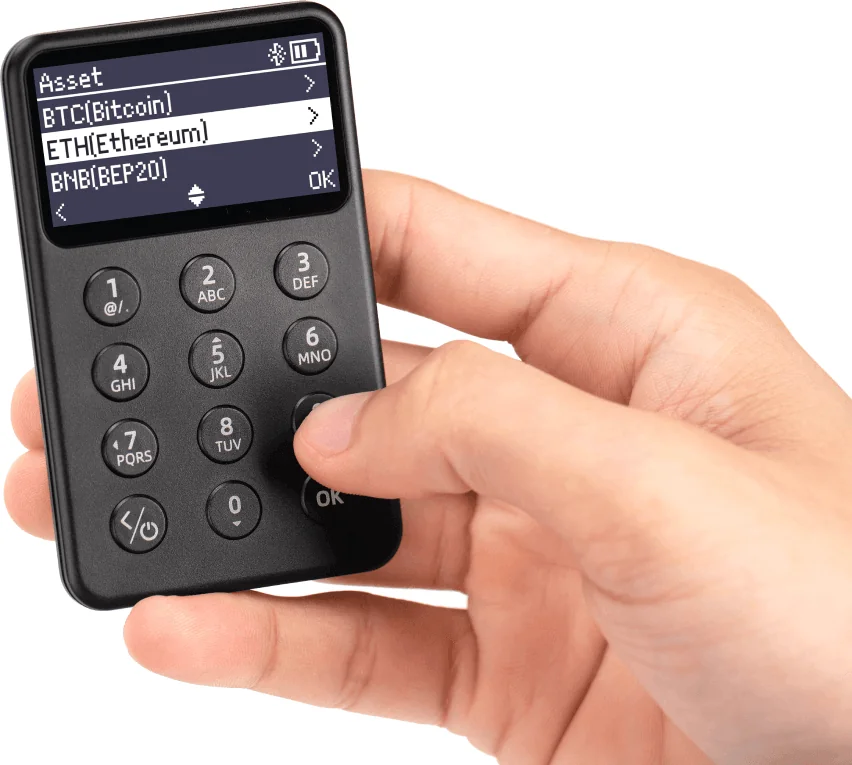
That keypad won us over. A dozen physical keys carrying both digits and letters means you type a passphrase instead of scrolling it, and your thumb finds ‘OK’ without looking. The navigation logic takes a minute to click: the manual has you pressing ‘5’ and ‘0’ to walk up and down a list, since those are the keys wearing the arrow marks.
In normal use your phone handles the looking and the wallet handles the signing. Pick an asset and hit ‘Send’, fill in the address and the amount, hit ‘Next’, then hit ‘Send’ again.
‘Awaiting confirmation’ appears in the app while you punch your PIN into the X1.
A few rough edges are better known up front. Because the X1 sits entirely offline, live balances are not something it can display, so those come from the app once you have paired.
Pulling in a non-EVM coin like SOL, LTC or XRP asks for your PIN on the device. EVM coins and tokens get added with no signature at all.
One extra hurdle waits for Android owners. Before the SafePal App can spot an X1 over Bluetooth you have to grant it location permission, which is just how Android gates scanning for nearby devices.
Seeing a wallet app ask for your location is still unnerving when nobody has explained why.
How Secure Is the SafePal X1, Really?
Your keys sit inside an independent secure element, a second chip built purely to store private keys and use them. Around it SafePal puts a true random number generator, a bank of security sensors and an anti-tampering self-destruct.
The sensors watch voltage, frequency, light, pulse and temperature. A metallic shield sits in there too, and tripping any one of them makes the chip wipe its own security data.
Certification is the part where SafePal contradicts itself. The X1 product page advertises a “CC EAL6+ Chip”. Yet the 2023 launch post calls it a “CC EAL5+ secure element chip”, and the help centre article on the secure element records EAL5+ for the S1.
Levels in Common Criteria go from EAL1 up to EAL7, and SafePal notes that your bank card probably sits at EAL4+. Both numbers are good, so this reads as sloppy documentation rather than a weak product.
We’d still email support and ask which chip is in the batch you are ordering from.
Bluetooth is the part everyone squints at. SafePal’s reply is that the radio is only a courier, and pairing runs an Elliptic Curve Diffie-Hellman exchange, which is a way for both ends to reach the same AES key without ever sending it.
From then on every message travels encrypted under that key, and firmware V1.0.16 went further still. It puts a matching verification code on the app and on the device while you sign, so you can spot data that changed in transit.
Now the open-source claim, which is why half of you are reading this. It is not vapour. The X1 firmware repository is GPL-3.0, went up in September 2023 and last saw a push in July 2026.
Inside you get signing code for Bitcoin, Ethereum, Solana, TON and roughly two dozen other chains, plus wallet management and the passphrase code.
Missing, though, is anything that would let you prove this code is what your device runs. Twenty-nine commits, zero tagged releases, no build instructions, no makefile. Issues asking for those have been open since January 2024, and the more recent ones push for reproducible builds and a published audit report.
SafePal’s line is that Keylabs audited the X1 and that anything significant got fixed before shipping. That report is not anywhere we could find it. So the honest reading of the label is “the logic is open to inspection”, not “your device is verifiable”.
One recent incident belongs in the balance too, though the hardware had nothing to do with it. SafePal published a security update on August 16, 2026 about unauthorized access to customer order records.
Roughly 39,798 customers were caught up in it, across orders placed from March 2, 2025 to April 11, 2026. Out went names, email addresses, shipping addresses, phone numbers and what people bought.
Seed phrases, private keys and wallet passwords all stayed safe, according to SafePal. So did bank details, card numbers and government ID numbers. Blame landed on an authorization flaw in the order-tracking part of a plug-in.
By SafePal’s account the hole is now patched, retention is down to 90 days and an outside auditor is involved. More than 30 fake sites and phishing links have been pulled down.
A customer list in the wrong hands is fuel for targeted phishing, and this industry has watched that film before.
Ordered during those dates? Then read every message about your SafePal order as an attack until you have shown otherwise. No honest party ever needs your recovery words, and firmware updates certainly do not.
Every unit does ship with one useful defence. The first thing a new SafePal wallet does is authenticate itself. You get a 6-digit code that tells you whether the device is genuine and whether somebody has used it already.
Run it. A failure means stop, put the wallet down and contact SafePal rather than setting anything up.
Which Coins Can You Keep on the SafePal X1?
“200+ blockchains” is the figure on the X1 product page. Head to the about page, though, and it drops to 100+, which is what the 2023 launch post said as well.
Bigger still is the asset directory’s 100+ million assets, a number that adds up every token on every chain SafePal touches rather than telling you anything about the device.
Counting the firmware is more honest. The repository carries its own signing code for these chains:
- Bitcoin, Ethereum and the Binance chains
- Solana, Cardano, TON, Tron, Polkadot, Cosmos
- Sui, Aptos, Kaspa, Alephium, Chromia, Venom, Nervos CKB
- Ripple, Stellar, Near, Neo, VeChain, Theta
- Filecoin, Harmony, Injective, MultiversX
Anything EVM-compatible reuses the Ethereum code, so your Base or Arbitrum tokens ride along on that path.
Firmware has steadily widened that list. The Core network, BRC20 tokens and BTC taproot addresses came with V1.0.4. Then V1.0.8 added Bitcoin Testnet, the Runes protocol and Bitcoin DApps.
TON NFTs arrived in V1.0.13 and Kaspa in V1.0.14, then native Filecoin followed in V1.0.24, with WLD and HBAR landing in V1.0.31.
Anything involving NFTs or DeFi happens in the app, not on the little screen. There you get cross-chain swaps, yield programs, NFT management, fiat on and off ramps and a DApp browser.
The SafePal Extension brings the same to Chrome, Firefox and Edge, where a QR scan logs you in.
Holding mostly TRC20 USDT? Then the TRON Energy rental flow is a real convenience, and SafePal says a normal transfer wants roughly 7 to 14 TRX (September 2026) in your wallet to cover it.
Some blanks are worth naming. How many assets the device can hold at once is not published anywhere, only the claim that you can manage unlimited tokens. Neither the dimensions nor the weight appear either.
The store page and the user manual also quote different operating temperature ranges.
What the SafePal X1 Costs, and What You Get
Expect to pay $69.99 at the time of writing (September 2026), with VAT and duty left off, so where you live decides the final bill. Three years on, that is unchanged from launch day.
Open the box and you get the X1, a USB cable, a cleaning cloth, three mnemonic phrase cards, two stickers, a manual and a download card.
Three seed cards is thoughtful if you plan to split a backup across locations. No subscription applies, and your warranty runs a year from whenever you activate the device.
Stick to official channels. SafePal points to its own site, Amazon and resellers spread across more than 40 countries and regions. Buy from a random marketplace seller and the device can turn up already set up with a stranger’s recovery phrase.
That is the whole reason the authentication check exists. Given what leaked in August 2026, we’d also send your X1 to a pickup point rather than your front door where that is an option.
SafePal X1 Pros and Cons
Where we land on all that: the price is fair, but the open-source badge is doing more for marketing than for your security. The build quality is there and the keypad is genuinely good. The secure element is no gimmick, and signing is the smoothest SafePal has managed.
Absent is the reproducible-build story that “fully open-sourced” leads you to expect.
Setting Up Your SafePal X1, Step by Step
Read this before anything else, because it holds for every wallet you will ever touch. Those recovery words are the wallet itself. Whoever reads them can drain it, and losing them means nobody on earth can get your funds back.
Paper only. No photographs. Never typed into a phone, a web page or a support chat.
- Get the SafePal App onto your iPhone or Android phone and run through its own setup first. V4.2.0 is the floor for X1 support, and V4.11.10 is what’s current.
- Hold the power button on the X1 until it wakes up. Walk to your language with the ‘5’ and ‘0’ keys, then press ‘OK’.
- Back in the app, tap ‘Hardware Wallet’, then ‘SafePal X1’, then ‘Start Connection’. Do what the device prompts to finish Bluetooth pairing. Leave it powered on the whole time.
- Hit ‘Activate’ in the app. Authentication runs, and afterwards the app displays the SN code and the activation time. Your device says so on its own screen as well.
- Over on the X1, pick ‘Create New Wallet’ and then ‘Create Now’. Choose how long you want the mnemonic phrase and press ‘OK’. Copy each word in order onto one of the cards from the box.
- Prove the backup by ticking the words back in sequence, then choose a PIN code. Every transaction and every DApp login goes through that PIN. Make it memorable to you and used nowhere else.
- Give the wallet a name and confirm it with ‘OK’. Then tap ‘I have created wallet’ in the app and press OK on the device to seal the pairing. Bringing an old wallet over instead? Pick ‘Recover My Wallet’, key in your BIP39 words, and an S1 wallet lands here intact.
Coins get added in the app afterwards. Tap the three-dot icon, tap ‘Manage coins’, find your asset and tap ‘+’. An ‘Added’ message pops up.
Always fire off a tiny test amount before the real balance follows, and re-read the address, the network and any memo every single time. Crypto sent to the wrong network or the wrong address is gone for good, and nobody can pull it back.
New to hardware wallets? Our explainer on what a wallet address is walks through the formats you will be pasting around. The piece on custodial versus non-custodial wallets spells out why an X1 shifts the responsibility onto you.
Three Alternatives to the SafePal X1
Three devices deserve a look beside it, and SafePal builds one of them.
SafePal S1 and S1 Pro
Priced at $49.99 and $89.99, these two swap Bluetooth for QR codes. That makes them air-gapped, which simply means no wireless link of any sort, and plenty of owners will never want anything else.
Their 1.3 inch colour screens are sharper at 320×320. The S1 Pro throws in an aluminium alloy shell and a 500mAh battery next to the X1’s 200mAh.
All three follow the BIP39 and BIP44 standards, so a wallet born on an S1 comes back on an X1, and the reverse works too. Our SafePal S1 review is the place to look if QR-only appeals, and the best air-gapped crypto wallets covers the rest of that field.
Ledger Nano X
Ledger’s $99 Nano X is the other Bluetooth option most people consider, and its software is slicker than SafePal’s. Transparency is what you pay for that with. Ledger keeps its firmware closed, so there is nothing to read at all.
Anyone drawn to the X1 by the open-source angle is walking backwards here. Where it still wins and where the years show is all in our Ledger Nano X review.
Trezor Safe 3
Cheaper than the X1 at $59, the Safe 3 also publishes firmware with reproducible builds. That is precisely what SafePal has not done. Bluetooth goes away completely, and you will be typing on two buttons instead of twelve.
Our Ledger vs Trezor guide digs into how the two ecosystems compare.
FAQ
Can you trust the SafePal X1 over Bluetooth?
Mostly, yes. SafePal’s position is that the radio just moves bytes. Pairing has both sides run an ECDH exchange and settle on an AES key, and everything afterwards travels encrypted, signatures included. You still press OK and enter your PIN on the device for every payment. Since firmware V1.0.16 the app and the wallet each show a verification code you can compare.
What’s the SafePal X1 price?
$69.99 as we write this (September 2026), with VAT and duty on top. It hasn’t budged since the September 2023 launch. Its siblings sit at $49.99 for the S1 and $89.99 for the S1 Pro.
Is the SafePal X1 genuinely open source?
Partly. You’ll find the firmware at github.com/SafePalWallet/safepal-x1 under GPL-3.0, and the signing and wallet code is all there to read. What’s absent is any tag or build recipe, so you cannot rebuild the firmware and check it against your device. People have been asking for those in the repository’s issues since January 2024.
How many chains does the SafePal X1 handle?
Depends which SafePal page you believe. The store page advertises 200+ blockchains, while the about page and the 2023 announcement both say 100+. Counting signing code in the repository instead gives you Bitcoin, Ethereum, Solana, TON and roughly two dozen more, with every EVM chain reusing the Ethereum path.
Will the SafePal X1 pair with MetaMask?
No, not in anything SafePal documents. Your route to DApps is either the browser inside the SafePal App or the SafePal Extension on Chrome, Firefox and Edge. A QR scan signs you in, and each transaction goes to the device for approval. Ask SafePal support first if MetaMask is a deal-breaker.
I lost my SafePal X1. Now what?
You’re fine, provided the recovery words are somewhere safe. Seeds follow BIP39 and BIP44 here, so the same wallet reappears on a fresh X1, on an S1, or on any other BIP39 wallet. Whoever picks up the device cannot open it without your PIN, and a passphrase wallet needs the passphrase as well.
Did the 2026 breach touch my SafePal X1?
Not the device. Order data was what leaked. SafePal counts roughly 39,798 customers who ordered between March 2, 2025 and April 11, 2026, and their names, emails, shipping addresses, phone numbers and purchase details were exposed. Seed phrases, private keys and passwords stayed out of it. Notification emails went to affected buyers on August 16, 2026.
The SafePal X1 Verdict: Should You Buy One?
Get one if you want cold storage you will genuinely reach for, on a phone, across a pile of chains, at $69.99. No other input method SafePal has shipped beats this keypad, and the secure element is the real thing.
Signing over Bluetooth is also far less fiddly than lining up QR codes in a badly lit room. If your portfolio is mixed and your phone runs it, you are getting your money’s worth.
Look elsewhere if auditing a device from end to end is your requirement, since the absent build instructions rule that out today. Anyone who wants zero radio should take the S1 or a Trezor instead. So should anyone who cares about a colour screen.
Our verdict: a fairly priced Bluetooth wallet with genuine security engineering inside, carrying an open-source label its repository has not fully earned yet.
This article is for general information only and is not financial, legal, or investment advice. Prices and features change; check the vendor’s official page before buying.