Two Ledgers, one lineup, $80 apart. The Ledger Nano Gen5 earns that money with a touchscreen, a threat check that runs before you approve anything, and a spare backup card sitting in the box. The Ledger Nano X asks less of your wallet and assumes you’ve done this before.
Same company, same app, both still for sale. Four things actually separate them: how big the screen is, which grade of secure element sits inside, how long the battery lasts, and a handful of protections Ledger has kept for its touchscreen range.
We’ll go through the specs, the security story, what each is like to live with, what they’ll hold, and whether the price difference is worth it. Everything quoted here came off Ledger’s own store, support desk and blog in September 2026.
Table of contents
Ledger Nano Gen5 vs Nano X at a Glance
Every difference worth knowing, in one table. We pulled each row from Ledger’s product pages and help articles on September 7, 2026.
Ledger Nano Gen5 vs Ledger Nano X: Comparison Chart | |
|---|---|
| Price | The Nano Gen5 costs $179. The Nano X costs $99, checked on the Ledger store in September 2026. |
| Screen | Nano Gen5: a 2.8-inch monochrome E Ink touchscreen, 300 x 400 px. Nano X: a 1.1-inch monochrome OLED, 128 x 64 px, and you drive it with two buttons. |
| Secure element | Nano Gen5: an ST33K1M5, certified CC EAL6+. Nano X: an ST33J2M0, certified CC EAL5+. |
| Connectivity | Nano Gen5: USB-C, Bluetooth and NFC. Nano X: USB-C and Bluetooth. There’s no NFC radio. |
| Battery | Nano Gen5: 190 mAh, good for up to 10 hours of use. Nano X: 100 mAh, up to 5 hours, and Ledger won’t replace it. |
| Size and weight | Nano Gen5: 79.4 x 53.3 x 8.6 mm, 46 g. Nano X: 72 x 18.6 x 11.7 mm, 34 g. |
| Finish | Nano Gen5: a plastic frame with a plastic back. Nano X: brushed stainless steel over plastic. |
| Transaction Check | The Nano Gen5 has it. The Nano X doesn’t, and Ledger says so itself about classic Nano signers. |
| Ledger Recovery Key | One comes in the Nano Gen5 box. The Nano X can’t use one at all, since the card needs NFC. |
| Assets | Identical on both: 500+ through the Ledger Wallet app, thousands more through outside wallets, and room for up to 100 apps. |
| Companion app | Both talk to Ledger Wallet on Windows, macOS, Linux, iOS and Android. |
| Best for | Nano Gen5: newcomers, and anyone who signs contracts. Nano X: people who’ve done this before and want Bluetooth for less. |
So What Exactly Is the Ledger Nano Gen5?
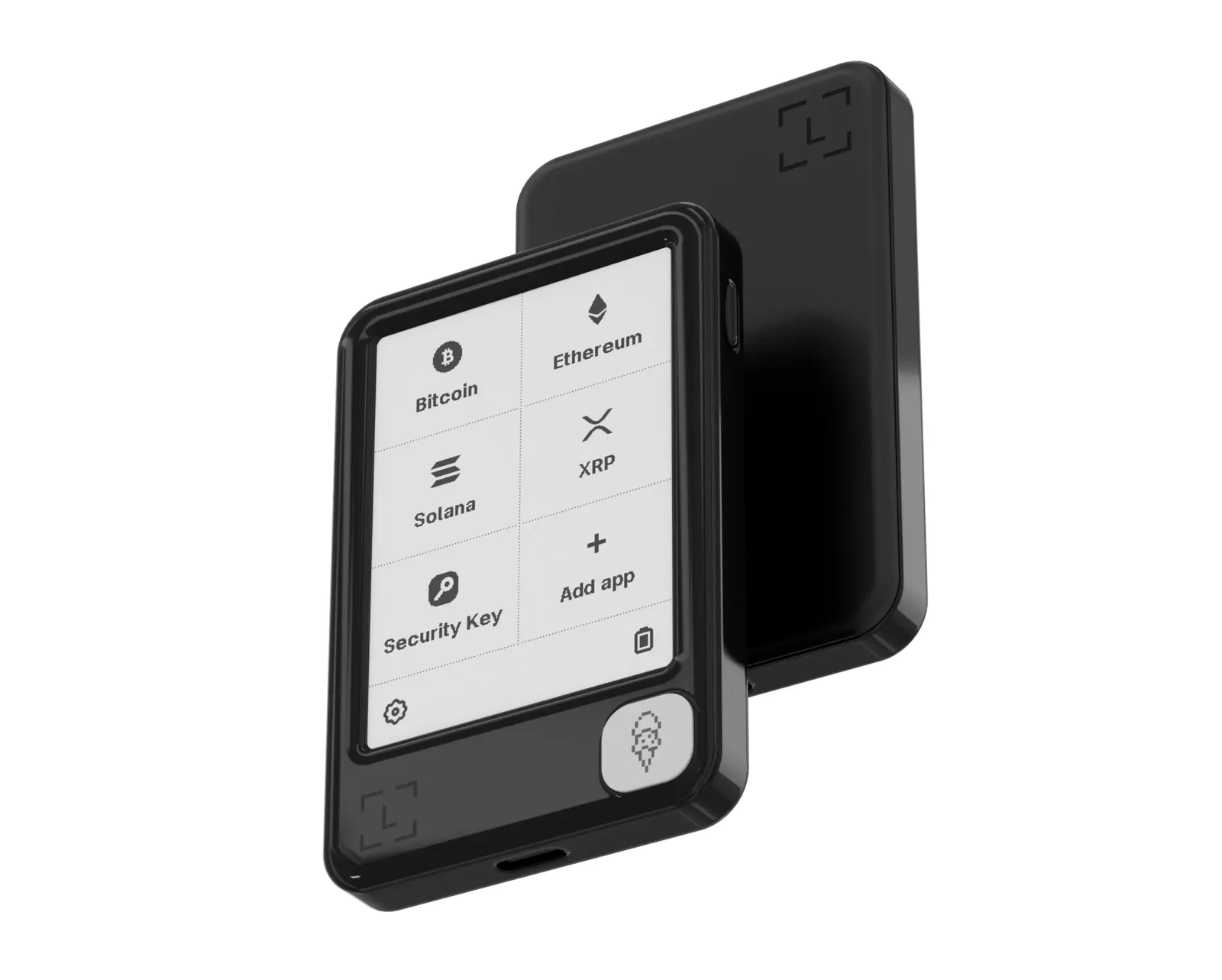
It’s the cheapest way into a Ledger with a touchscreen. Ledger unveiled the Nano Gen5 at its Op3n event on October 23, 2025 and started selling it that same day for $179 at the time of writing (September 2026). No Nano before it had a touchscreen, and Ledger pitches it as “an ideal signer for those early in their crypto journey”.
At 79.4 mm by 53.3 mm by 8.6 mm and 46 g, you’re holding something nearer a credit card than a memory stick. Plastic frame, plastic back. Above it in the range sits the Flex at $249.
What You Actually Get With the Nano Gen5
- That 2.8-inch monochrome E Ink touchscreen runs at 300 x 400 px behind scratch-resistant glass with an anti-glare coating, which is enough room to show a whole address without making you scroll.
- Inside is an ST33K1M5 secure element certified to CC EAL6+, running Ledger OS. If the term is new to you, a secure element is a tamper-resistant chip that keeps your private keys and refuses to hand them over.
- You get USB-C, Bluetooth BLE 5.2 and NFC. That NFC radio is the bit the Ledger Recovery Key and the Security Key app depend on.
- The 190 mAh lithium-ion cell is rated for up to 10 hours per charge, which Ledger’s comparison page also translates into roughly 150 transactions.
- Open the box and you’ll find a Ledger Recovery Key, three Recovery Sheets, a USB-C to USB-C cable and a leaflet.
- Jet Black, Cherry Red, Matcha Green and Glacier White all cost the same. Susan Kare designed nine snap-on badges for it, and those are a separate purchase.
There’s more on setup and the app in our Ledger Nano Gen5 review.
And Where Does the Ledger Nano X Sit Now?
Ledger has been shipping the Nano X since May 28, 2019, and it hasn’t left the lineup: it’s $99 today. In Ledger’s own signer comparison it’s described as “the perfect everyday device for an everyday crypto user”.
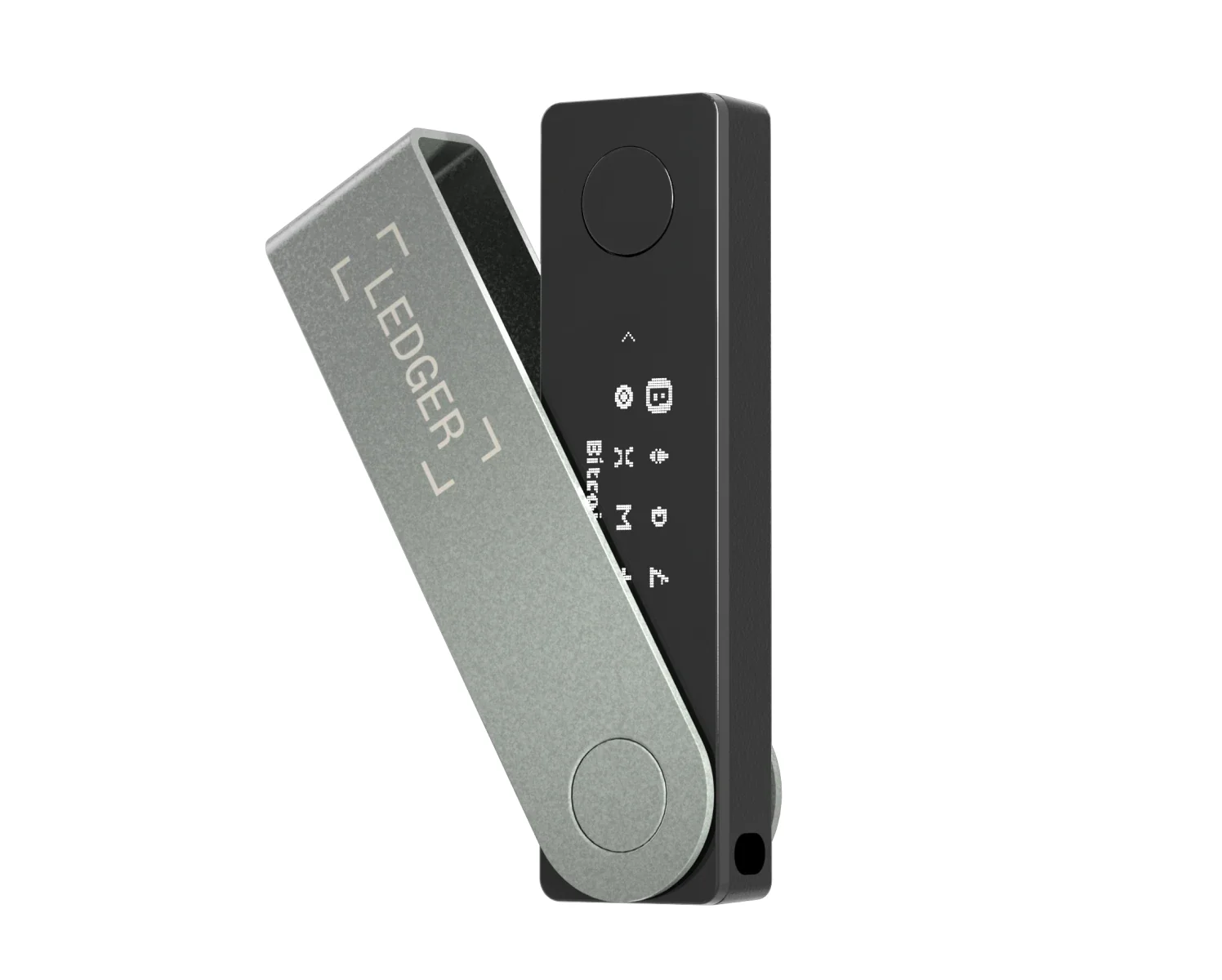
Physically it’s a stick, 72 mm by 18.6 mm by 11.7 mm and 34 g, wrapped in a brushed stainless steel cover that swivels around the body. Two physical buttons do the driving, and a 1.1-inch OLED does the talking. Ledger throws a keychain strap in the box, which tells you plainly where it thinks the thing belongs.
What You Actually Get With the Nano X
- The display is a 1.1-inch monochrome OLED at 128 x 64 px, with two buttons underneath it.
- Its secure element is an ST33J2M0 certified to CC EAL5+, also running Ledger OS.
- Connections are USB-C and Bluetooth. Worth flagging: the store spec sheet says BLE 5.2 while the Nano X FAQ still lists Bluetooth Low Energy 5.0, and Ledger hasn’t reconciled the two.
- A 100 mAh battery gives you up to 5 hours of normal use, or a few months sitting idle. Ledger states flatly that it can’t be replaced.
- In the box: three Recovery Sheets, a USB-C to USB-A cable, a keychain strap and a leaflet.
- Color choice is Onyx Black, and that’s the list.
We went through the whole device in our Ledger Nano X review, and put it up against the cheaper model in Ledger Nano S vs Nano X.
Security: Where the Nano Gen5 Pulls Ahead of the Nano X
Private keys live inside a certified secure element on both, and both boot Ledger OS. Where they split is the certification grade: ST33K1M5 at CC EAL6+ in the Nano Gen5, ST33J2M0 at CC EAL5+ in the Nano X. According to Ledger, no signer of theirs has been compromised since the secure element arrived.
Honestly, the chip grade isn’t the thing that’ll cost you. What will is the set of protections Ledger has chosen to give each line. Its signer comparison puts it bluntly: “Classic Nano signers remain secure, but they don’t support newer protections like Transaction Check and Ledger Recovery Key.”
Think of Transaction Check as a dry run that warns you about known threats before you tap approve. Clear Signing is the other half: it spells out, in language you can read, what you’re about to authorize. The Nano Gen5 does that on 2.8 inches of screen, while Ledger’s own wording for the Nano X calls the same review a multi-step process on a much smaller display.
Backups are the second fork in the road. Ledger’s Recovery Key only pairs with touchscreen models that carry NFC, meaning the Nano Gen5, the Stax and the Flex. No NFC in the Nano X, so no card.
What the card does is keep your 24-word phrase on its own EAL6+ secure element, locked behind a PIN of 4 to 8 digits, erasing itself after three failed tries. Nothing extra to pay either, because one ships inside the Nano Gen5 box. Ledger still insists on paper alongside it: “You absolutely need to write down your Secret Recovery Phrase.”
Neither one saves you from yourself. Fire coins at the wrong address, or pick the wrong network on a withdrawal, and they’re gone for good, with nobody on earth able to claw them back. Those 24 words carry the same finality, because whoever reads them owns the coins.
As for Ledger’s track record, it lands on both devices the same way. Back in July 2020 someone got into its e-commerce and marketing database through an API key, which put roughly 1 million email addresses and the details of 9,500 customers in the wrong hands. That December the dump went public, covering around 272,000 customers with fuller records attached.
December 2023 brought a different problem, when malicious code replaced the Ledger Connect Kit library after phishers took over a former employee’s npm account. Then in January 2026, order data held by its payment partner Global-e was accessed without permission. Ledger’s line each time is that devices, keys and funds stayed untouched, and we’ve seen nothing that contradicts it.
The lasting cost is phishing, and it’s relentless. That’s exactly why Ledger now steers buyers toward pickup points and retail partners rather than a home address on the parcel.
Openness works out identical for both. Ledger describes its operating system and software as “95% OpenSource and/or available for you to review”, while explaining that its deal with STMicroelectronics legally bars it from publishing the low-level secure element code. Should that bother you, it bothers you on both models equally, and our Ledger vs Trezor piece is the more useful read.
Living With Them: Nano Gen5 vs Nano X Day to Day
The steps match up closely; how you perform them doesn’t. A one-second press on the right-side button wakes the Nano Gen5, which greets you with “Welcome to Ledger Nano Gen5, your digital signer”. From there you choose between “Set up with Ledger Wallet mobile” and “Set up with Ledger Wallet desktop”.
Next come taps on “Set name”, “Confirm name” and “Choose my PIN”, followed by “Set it up as a new Ledger” and “I understand” before the 24 words appear. Keyboard, taps, done. It behaves like a phone, which is the point.
Waking the Nano X means holding the button beside the USB port until the logo shows up. Forward is the right button, back is the left, and pressing both together confirms. Both buttons at “Set up as new device”, both again at “Choose PIN code”, then you pick out each digit with left and right.
After that comes 24 words, one screen at a time, and a confirmation round using the same button dance. Nothing about it is broken. It’s just slower, and our Ledger Nano X setup guide covers every screen if you want to see it first.
PINs run from 4 to 8 digits on either device, and Ledger nudges you toward 8. Both also carry the same warning: a unit that shows up with a PIN or a phrase already filled in has been handled by someone else, so don’t touch it.
Once you’re past setup, the Nano Gen5 asks less of you. Two glances will get you through a long address at 300 x 400 px, whereas 128 x 64 px turns it into scrolling.
One Nano X quirk catches people out, though: Bluetooth pairs with the mobile app only, so a laptop always means the cable. And no, you can’t join a Nano X to an iPhone over USB.
Battery life tilts the same way. Ledger rates the Nano Gen5’s 190 mAh cell at up to 10 hours, against 100 mAh and up to 5 hours in the Nano X. Since Ledger also says that older battery can’t be swapped out, there’s a quiet clock running on the device, which annoys us more than the screen size does.
Supported Assets: Nano Gen5 vs Nano X Is Basically a Tie
Try to separate them here and you’ll struggle. Word for word, the two spec sheets say the same thing: “500+ crypto supported via the Ledger Wallet app” plus “Thousands of coins, tokens, and NFTs supported via third-party wallets”.
A louder number sits on both product pages: 15,000+ supported crypto. That one is counting what you can reach through other wallets rather than what Ledger’s app handles natively, so the two figures answer different questions and neither is wrong.
Up to 100 apps fit on either device, depending on how large those apps are. Ledger says the Nano Gen5, Flex and Stax have large memory designed to hold many apps at once, but it never prints a megabyte figure for either model, and we’re not about to make one up.
Outside wallets behave identically too. MetaMask, Phantom, Rabby Wallet and Electrum all get named by Ledger, followed by the caveat that “Ledger does not guarantee such compatibility”. Ledger Wallet, which used to be called Ledger Live, drives both from Windows, macOS, Linux, iOS or Android.
For the Solana side of that list, see the Phantom wallet review.
Firmware is where we half expected the older device to be neglected, and it isn’t. Ledger OS 1.1.1 covers the Nano Gen5 and 2.7.1 covers the Nano X, both dated 11 May 2026, both carrying the same Bluetooth fix. If you’re buying something to sit in a drawer for years, that’s reassuring.
What the $80 Between the Nano Gen5 and Nano X Buys You
You’re looking at $179 against $99, so $80 either way. For context, the range starts at $59 with the Nano S Plus and tops out at $399 with the Stax, and the Flex slots in at $249 between the Gen5 and that flagship.
Part of that gap refunds itself immediately. Buy a Ledger Recovery Key separately and it’s $39, yet one turns up in every Nano Gen5 box. Run that subtraction and you’re really paying about $40 for the touchscreen, the EAL6+ chip, the fatter battery and Transaction Check.
Existing owners have a shortcut. Ledger’s upgrade offer takes 20% off a touchscreen signer for anyone with a classic Nano, so moving up from a Nano X costs noticeably less than the shelf price implies.
Nothing here drags you into a subscription. Ledger Recover is entirely optional at $9.99 a month, and both devices work fine if you never touch it.
If you’re considering it, Ledger Recover explained covers how the service works and what it asks of you.
The Case For and Against Each Ledger
Ledger Nano Gen5: What We Liked and What We Didn’t
Ledger Nano X: What We Liked and What We Didn’t
So Which Ledger Should You Buy?
First hardware wallet? Get the Nano Gen5. Between the touchscreen, the Recovery Key in the box and Transaction Check, it closes three of the trapdoors beginners fall through.
Signing contracts, minting, poking around DeFi? The Nano Gen5 again. We’d argue that squinting at a contract call on 128 x 64 px is precisely how people fall into blind signing.
Buying cold storage for a handful of coins you’ll barely touch, on the tightest budget you can manage? Then the Nano X is the level-headed choice, because $99 gets you the same assets, the same firmware and something that clips to a keyring.
FAQ: Nano Gen5 vs Nano X
Does the Ledger Nano Gen5 beat the Nano X on security?
Slightly, on paper. An ST33K1M5 certified to CC EAL6+ sits in the Nano Gen5, while the Nano X carries an ST33J2M0 certified to CC EAL5+. In practice the wider gap is elsewhere: Ledger itself says classic Nano signers get neither Transaction Check nor the Ledger Recovery Key, and checking a transaction on 2.8 inches beats checking it on 1.1.
Has Ledger discontinued the Nano X?
No. It’s still listed at $99, and Ledger is still writing firmware for it. Version 2.7.1 of the Nano X OS landed on 11 May 2026, the very same day the Nano Gen5 got its update.
Will a Ledger Recovery Key work with a Nano X?
It won’t. Ledger limits the Recovery Key to touchscreen models with NFC, which means the Nano Gen5, the Stax and the Flex. Since the Nano X has no NFC radio, your backup choices there are the paper Recovery Sheets and, if you want it, a Ledger Recover subscription.
Do both devices handle the same coins?
They do. The two spec sheets both quote 500+ crypto through the Ledger Wallet app and thousands more through outside wallets, and both devices hold up to 100 apps. MetaMask, Phantom, Rabby Wallet and Electrum are the third-party wallets Ledger names, though it stops short of guaranteeing that compatibility.
Is the Ledger Nano Gen5 worth $80 more than the Nano X?
For a first-time buyer, we think so. A Recovery Key on its own is $39 and one is already in the Gen5 box, which brings the genuine premium down to roughly $40 for a touchscreen, an EAL6+ chip, double the battery life and Transaction Check.
Which of the two is better with a phone?
Either will do the job, since both pair to the Ledger Wallet mobile app over Bluetooth. Reading and confirming on the Nano Gen5’s own touchscreen is the nicer experience. The Nano X wins on portability at 34 g, but remember it can’t connect to an iPhone over USB.
Did Ledger’s data breaches put either device at risk?
Not the hardware. Customer records or outside code were what got hit in the July 2020 e-commerce breach, the December 2023 Connect Kit incident and the January 2026 Global-e incident, and Ledger maintains that private keys and funds were never exposed in any of them. Phishing is the real hangover, so treat unsolicited messages as hostile and never type your 24 words into anything.
Our Verdict: Nano Gen5 or Nano X?
We’d spend the extra and take the Ledger Nano Gen5. It comes down to the screen, because you can’t check what you can’t read, and 300 x 400 px wins that argument against 128 x 64 px every single time you approve something. Throw in Transaction Check, the EAL6+ chip and a $39 card in the box, and $80 stops looking steep.
None of which makes the Nano X a bad buy at $99. It holds up if you already know what you’re signing and just want Bluetooth and cold storage for as little as possible. Walk in with your eyes open, though: no Transaction Check, no Recovery Key, a cramped screen, and a battery Ledger has said it won’t replace.
Prefer metal over plastic with your touchscreen? Look at the Ledger Stax or the Flex instead.
Treat all of the above as general information, not as financial, legal, or investment advice. Prices and features shift; check the vendor’s official page before you buy.
How I review: Reviewed by Andrei B. I buy the hardware wallets I review, test every product myself and score it on security, UI/UX, ease of use, price and supported coins. Before I publish, I also check recent user reviews and any hack reports.
The whole process is explained on the How We Review page. You can read more about me, or contact me with corrections, from the links at the bottom of this page. For general safety advice, see the FTC guide to cryptocurrency scams.