You buy a Nano Gen5 for the screen. It’s Ledger’s least expensive touchscreen wallet, built around the very same 2.8-inch E Ink display the Ledger Flex has, but wrapped in plastic and priced at $179 on Ledger’s store as of September 2026. A Flex will set you back $70 more; the button-operated Nano X, $100 less.
Two kinds of people will get the most out of it. The first signs transactions all the time and is fed up with squinting at two lines of text on a little OLED. The second is buying a hardware wallet for the first time and wants something that feels like a phone rather than a thumb drive.
If you’re neither, and you just want somewhere safe to leave a few coins, the Nano S Plus does that job for less. And if you care about being able to read all of the firmware yourself, you want a Trezor, not a Ledger.
If you do go with Ledger, how to update Ledger firmware safely covers the one maintenance job you’ll repeat.
We’ll cover what’s inside the device, how it behaves day to day, where the security is strong and where Ledger’s own history lets it down, what it supports, what it costs, how to get it running, and when you’d be better off with something else.
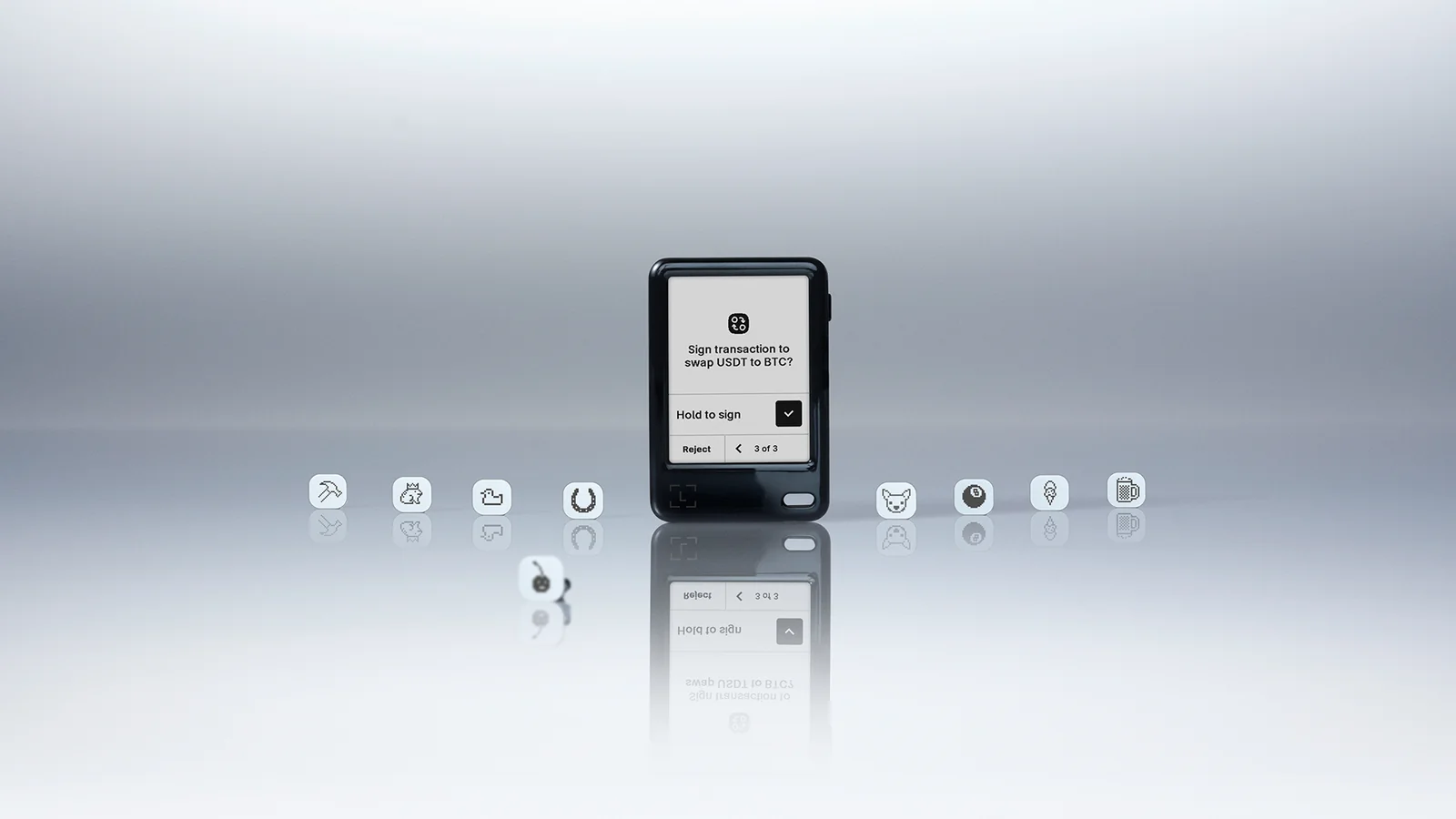
Table of contents
So What Exactly Is the Ledger Nano Gen5?
Ledger, the French firm that makes the Nano S, Nano X, Flex and Stax, added the Nano Gen5 to that family as its latest hardware wallet. These days Ledger prefers the word “signer” to “hardware wallet,” and while that’s branding, it does describe the thing correctly.
Your coins never sit inside the device; they’re on the blockchain. The Gen5 keeps hold of the private keys and uses them to sign whatever you tell it to.
The device was shown off at Ledger’s Op3n event in Paris on October 23, 2025, and started reaching customers on October 27. Launch pricing was $179, and as of September 2026 that number hasn’t moved on the official store.
Ledger pitches it as an affordable daily driver, slotting it in above the two button-driven models, the Nano S Plus and Nano X, and beneath the Flex and the Ledger Stax. None of the four older devices were retired; you can still buy every one of them.
Ledger Nano Gen5 at a Glance | |
|---|---|
| What it costs | $179 on Ledger’s store as of September 2026 |
| Display and size | E Ink touchscreen, 2.8 inches, black and white, 300 x 400 px Plastic case measuring 79.4 x 53.3 x 8.6 mm and weighing 46 g |
| How it connects | USB-C cable, Bluetooth 5.2 (BLE), and NFC for the Ledger Recovery Key and the Security Key app |
| Where the keys live | Inside an ST33K1M5 secure element with a CC EAL6+ rating, running Ledger OS |
| Open-source status | Mixed: the coin apps, the SDK and the Ledger Wallet app are open; the code closest to the secure element is not |
| Coins and tokens | Over 500 handled inside Ledger Wallet, and thousands more when paired with other wallets |
| Ways to back up | The 24-word phrase on paper, the bundled Ledger Recovery Key card, and Ledger Recover if you choose to pay for it |
| App | Ledger Wallet, the app formerly known as Ledger Live, for Windows, macOS, Linux, iOS and Android |
| Who it suits | People who sign often, want to read what they sign, and don’t want to pay Flex prices for the privilege |
Standout Features of the Nano Gen5
- The screen. It’s 2.8 inches of E Ink at 300 x 400 pixels, identical in size to the Flex. An entire transaction is readable at once, and a tap approves it. Compare that with a Nano X, where a 128 x 64 display shows you two lines and you scroll for the rest.
- The chip. An ST33K1M5 secure element rated CC EAL6+ holds the keys. That’s the class of tamper-resistant chip you’d find in a passport or a bank card, and nothing gets the keys out of it.
- Three ways to connect. Bluetooth handles iPhones and Android phones, USB-C handles desktops, and NFC is there for the Recovery Key card.
- A Recovery Key card, included. This PIN-locked NFC card carries its own EAL6+ secure element and stores an encrypted copy of your recovery phrase, offline. On its own it’s a $39 purchase, so Ledger is bundling the backup most owners never get around to buying.
- Clear Signing plus Transaction Check. The first puts a smart contract’s intentions into plain words on the screen; the second has the app simulate the transaction and flag anything that matches a known threat. A large share of wallet-drainer scams get stopped right here.
- Passkeys. Install the Security Key app and the Gen5 doubles as a hardware passkey for website logins, sparing you a separate security key.
- A battery. The 190 mAh cell is rated for as much as 10 hours of use. Useful, though it’s one more component that will age, and the Nano S Plus avoids the problem by having no battery at all.
Ease of Use: Can a Beginner Handle the Nano Gen5?
Easily, and for a lot of buyers that alone decides Gen5 versus Nano X. Ledger’s support site describes it as an ideal signer for people early in their crypto journey, which for once isn’t just support-page cheerfulness.
The whole setup runs on the device’s own display: tap from screen to screen, type a name and a PIN on the on-screen keyboard, copy down 24 words, done. The two-button tapping routine of the older Nanos never comes into it.
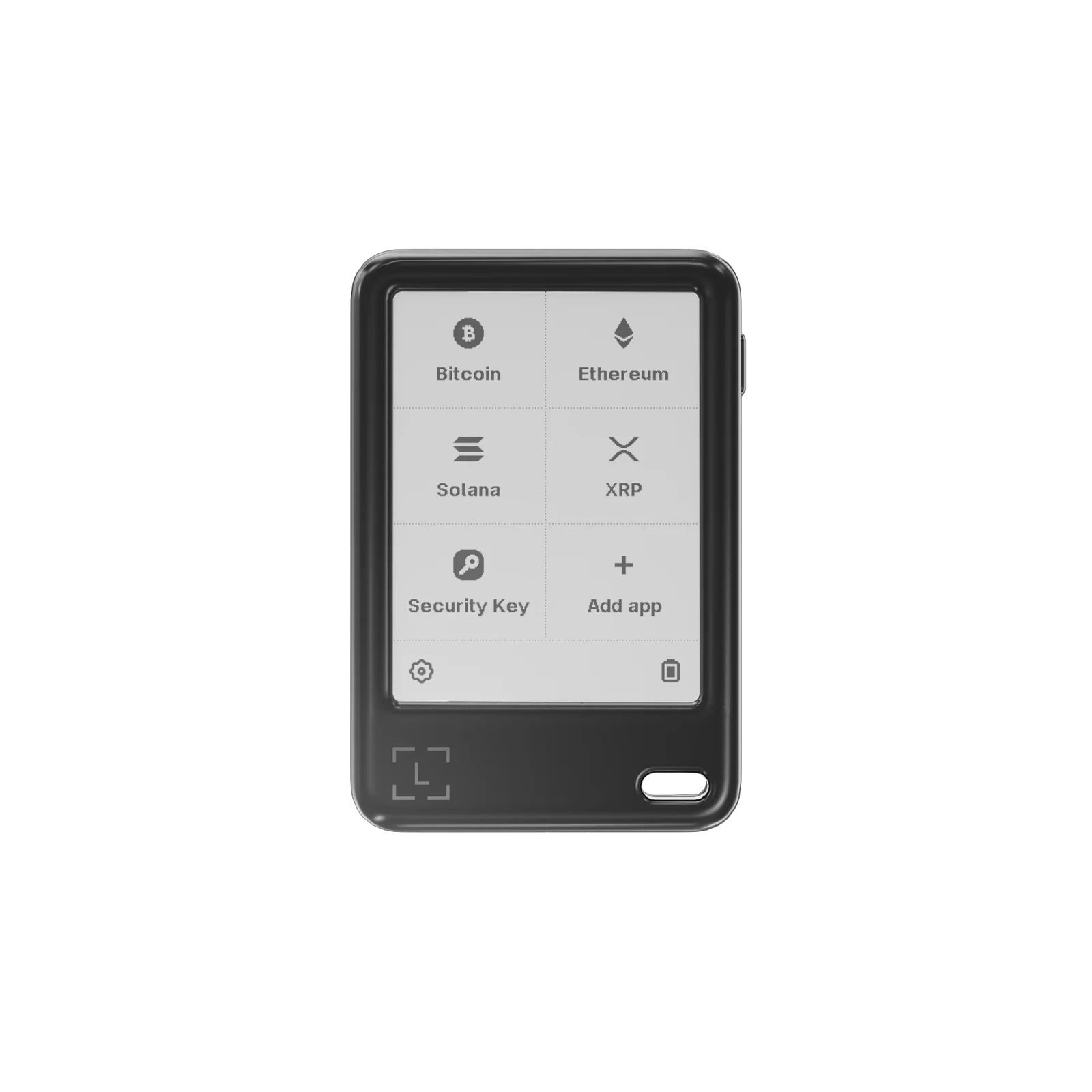
The slow part of setup has nothing to do with the hardware; it’s writing out the recovery phrase and then confirming it word by word. Once you’re through that, the home screen shows a grid of tiles for apps like Bitcoin, Ethereum, Solana, XRP and Security Key, ending with an “Add app” tile. Each coin you hold needs its own app, and those come from Ledger Wallet.
From then on the routine is simple. Build the transaction in Ledger Wallet on your phone or computer, then confirm it on the Gen5. That’s where the E Ink screen pays off: a swap or a contract approval sits on one screen with a “Hold to sign” control beneath it, and the amount, the address and the fee are all visible before you commit.
There are irritations. E Ink takes its time to redraw, and you’ll sometimes see a faint ghost of the previous screen. Ledger’s release notes for Ledger OS 1.0.5, from January 2026, mention display ghosting improvements, so plenty of owners evidently noticed.
The display is strictly black and white, whereas the Flex manages 16 shades of gray. The case is plastic. And you have a battery to think about.
Over USB-C the device works even when the battery is dead, but away from a cable, on Bluetooth, that 10-hour rating is your limit. A smaller gripe: the 1.0.3 update in November 2025 wiped Bluetooth pairings, so don’t be surprised if a firmware update means re-pairing your phone now and then.
Worth knowing before you go looking for the app: it has a new name. Ledger Live turned into Ledger Wallet at the same October event, with the changeover finished by November 3, 2025.
Older articles, including our own Ledger Nano X setup guide, still say Ledger Live. It’s one and the same program.
Security: Can You Trust the Nano Gen5 With Your Keys?
Nothing about Ledger’s security approach is new here; what’s new is the silicon. Your private keys are generated and stored in an ST33K1M5 secure element certified to Common Criteria EAL6+.
That beats the EAL5+ part in the Nano X and matches what Ledger fits to the Flex and the Nano S Plus. Ledger OS is the software running on it.
Think of the touchscreen as part of the security, not just a nicety. Ledger’s term for it is Secure Screen, meaning the device itself draws everything on it and your computer or phone can’t.
Clear Signing takes a raw contract call and shows it as text a person can read; Transaction Check simulates what the transaction would do and warns you about threats before you approve. If a fake NFT marketplace tries to get you to sign an approval that would empty the wallet, this is where you’d catch it.
Ledger doesn’t mess around with the PIN. It’s 4 to 8 digits, Ledger suggests going with 8, and three wrong guesses reset the device to factory state.
If your recovery phrase is somewhere safe, that’s a nuisance. If it isn’t, that’s your money gone.
Then there’s the open-source question, and the answer is “some of it.” By Ledger’s own count, 95% of its software and operating system is either open source or available for review: the Ledger Wallet app under an MIT license, the SDK, the coin apps, and parts of the OS. What stays closed is the low-level code that speaks to the secure element, and Ledger says its contract with STMicroelectronics, the chip’s maker, forbids releasing it. An outside lab audits the OS ahead of each release, according to Ledger, and its in-house Donjon team attacks Ledger devices for a living.
All of which means you’re trusting a process instead of reading code. Trezor, which publishes the lot, is the alternative if that bothers you.
As for backups, the paper phrase still rules. Ledger’s FAQ is blunt that the Recovery Key doesn’t replace your Recovery Sheet. What the card adds is a second copy, PIN-protected and offline, that can bring a new device back to life with one tap.
Its app code is public on GitHub, and Synacktiv, an independent security lab, has put it through testing. Separately, Ledger Recover is a $9.99-a-month subscription that encrypts your phrase, splits it among three companies, and demands ID verification before a restore. You have to opt in, and our advice for most people is don’t; the paper is enough.
Its trade-offs are laid out in Ledger Recover explained.
Ledger is fond of pointing out that nobody has ever demonstrated a hack of one of its devices, and that’s true. What’s happened around the devices is a different matter. In July 2020, someone with an API key lifted around 1 million customer email addresses from Ledger’s e-commerce database, plus names, home addresses and phone numbers for roughly 272,000 customers, and in December 2020 the whole lot turned up online.
In December 2023, attackers who had phished a former employee used that person’s account to push poisoned versions of Ledger Connect Kit, a JavaScript library dApps depend on; anyone who signed through an affected dApp inside a window Ledger says lasted under two hours was drained. And in January 2026, Global-e, which handles payment for some Ledger.com orders, admitted that names, addresses, emails, phone numbers and order details had been accessed. Ledger’s own write-ups are its Connect Kit incident report and its Global-e incident page.
Not one of those incidents reached keys or funds on a device. Every one of them, though, handed criminals a list of people who own crypto. The practical upshot: treat any email, text, letter or phone call about your Ledger as a scam until proven otherwise.
Ledger’s position is that it never phones, texts or WhatsApps customers and never asks for the 24 words. And if you can have the parcel sent to a pickup point instead of your front door, do.
Supported Assets: Which Coins Work With the Nano Gen5?
Ask Ledger how many coins the Gen5 supports and you’ll get three answers. The banner on the product page claims “15,000+ crypto.” Lower down, the spec sheet on that same page says “500+ crypto supported via the Ledger Wallet app” and then “thousands of coins, tokens, and NFTs supported via third-party wallets.” Ledger Academy, meanwhile, goes with “over 10,000 coins.” Put those together and here’s what you actually get: Ledger Wallet manages the major chains on its own (Bitcoin, Ethereum, Solana, XRP, the big stablecoins), and everything past that involves connecting the device to a different wallet.
That’s less of a limitation than it sounds. MetaMask, Phantom, Rabby and Electrum are all on Ledger’s list of compatible wallets, albeit with a note that Ledger “does not guarantee such compatibility.” In real-world terms that means most EVM chains, Solana and the standard Bitcoin tools are covered, and the Gen5 is a particularly good signer for MetaMask. Our roundup of the best hardware wallets for MetaMask looks at how that pairing stacks up across devices.
Support also grows with each firmware release. Ledger OS 1.1.0, from April 2026, added the cryptography for Zcash (ZIP 32) and Aleo. NFTs appear inside Ledger Wallet, and a screen this big makes approving a marketplace transaction far less nerve-wracking than doing it on a Nano; there’s more on that in our NFT hardware wallet guide.
Keep two caveats in mind. Every chain requires its own app on the device, and Ledger hasn’t said how many apps a Gen5 can hold at once. Check your own coin against Ledger’s supported-assets page before ordering.
Price: What the Nano Gen5 Costs and What’s in the Box
As of September 2026 Ledger’s official store lists the Nano Gen5 at $179, exactly where it started. The standard color is Jet Black; Cherry Red, Glacier White and Matcha Green turned up as limited editions in April 2026. The snap-on badges, the ones Susan Kare designed, are an extra purchase.
Inside the box: the device itself, a USB-C to USB-C cable, three recovery sheets, a single Ledger Recovery Key, and a safety leaflet. There’s no wall charger. Because the Recovery Key retails for $39 by itself, anyone who would have bought one regardless is really paying something like $140 for the wallet.
Ledger’s other devices on the same date: Nano S Plus at $59, Nano X at $99, Flex at $249, Stax at $399. The one recurring charge anywhere in the ecosystem is Ledger Recover at $9.99 a month, which is entirely optional. Buying, swapping and staking from inside Ledger Wallet go through outside providers with their own fees, and Ledger says it isn’t the one running those services.
Order from Ledger’s own store or from a retailer Ledger lists as official. A device that arrives via a marketplace reseller could have been opened along the way, and a box that comes with a PIN already set, or a recovery phrase already printed, means the seller holds your keys.
Ledger’s setup instructions say the same thing: a device supplied with a PIN or a phrase should never be used. With the data leaks above in mind, shipping to a pickup point is the safer call.
Nano Gen5 Pros and Cons
Want a Ledger with a touchscreen but don’t fancy spending $249? Then in 2026 the Gen5 is the one. What you give up is either skin-deep (plastic, no grayscale) or common to every Ledger (closed low-level code, a customer list that keeps ending up in the wrong hands).
The question that matters is whether a screen like this is something you need. If you send a few plain transfers a year, it isn’t, and a $59 Nano S Plus protects your keys with exactly the same chip.
Setting Up the Ledger Nano Gen5, Step by Step
What follows tracks Ledger’s official setup instructions for its touchscreen devices. Set aside about 20 minutes, find a pen, and pick a spot where nobody can look over your shoulder. Don’t take a photo of the recovery phrase, and don’t type it into any app or website, ever.
Step 1: Switch It On and Choose Mobile or Desktop
Press the button on the right edge and hold it for about a second. A welcome message greets you, calling the Gen5 your digital signer.
Tap past the introduction and you’re asked whether to set up with Ledger Wallet on mobile or on desktop. Ledger would rather you use the app than set the device up standalone, because the app confirms the hardware is genuine and brings Ledger OS up to date.
Step 2: Get Ledger Wallet Talking to the Device
Going the phone route, you scan the QR code shown on the device to download the app, turn Bluetooth on, and tap the device once it appears inside Ledger Wallet. Compare the pairing code on both screens and confirm they match.
On Android you’ll be prompted to allow location services, since Android insists on that for Bluetooth scanning. Going the desktop route, you download the app from ledger.com/start, connect the USB-C cable, choose the device in the app, and tap the “I’m ready” prompt on the Gen5.
Step 3: Give the Device a Name
Tap the set-name option, type something in, and confirm it. Pick a name you’ll recognize when it shows up in a list of Bluetooth devices, but leave your real name out of it: while the device is pairing, any phone nearby can see that name.
Step 4: Pick a PIN
Choose the PIN option, key in between 4 and 8 digits, tap the check mark, and type it once more to confirm. Use all 8 digits; that’s what Ledger recommends for the best protection. Remember that three wrong entries erase the device, so settle on something memorable, and keep it away from the sheet with your recovery phrase.
Step 5: Copy Out the Recovery Phrase
Take one of the blank Recovery Sheets from the box. Choose the option to set the device up as a new Ledger, read through the warning, and confirm you understand it. The device then reveals the 24 words a few at a time; write each batch down, tap to continue, and repeat until every word is on paper in the correct order.
Tap to finish, start the confirmation, and pick out the word the device asks for at each check. Those 24 words are the only copy of your keys that exists outside the hardware. Anyone holding them holds your crypto, and if the paper and the device are both lost, the money is unrecoverable, by Ledger or by anyone else.
Step 6: Load the Recovery Key Card
Press the Recovery Key card to the back of the Gen5, give the card its own PIN of 4 to 8 digits, and tap to copy the encrypted backup over NFC. Keep the card and the paper sheet in two different places. Enter the card’s PIN wrong three times and it erases itself, which is precisely why the paper stays as your final fallback.
Step 7: Add Your Coins and Run a Test Transfer
Head to My Ledger inside Ledger Wallet, install an app for every coin you own, and create accounts for them. Before moving anything substantial, send a small amount from your exchange and make sure it turns up. Whenever you withdraw, verify the network and the address on the Gen5’s screen, because a wrong network or a wrong address means the funds are lost and neither the exchange nor the wallet maker can bring them back.
Other Wallets to Consider Instead of the Nano Gen5
Ledger Nano X: The Cheaper Ledger
These days the Nano X sells for $99 (September 2026), which puts it $80 under the Gen5. You still get Bluetooth, a battery and access to the same apps, but the touchscreen is replaced by a 1.1-inch OLED at 128 x 64 pixels with two physical buttons, and the secure element is the older EAL5+ generation.
For an owner who mainly holds and seldom signs contracts, that small screen is an annoyance, not a hazard. Our Ledger Nano X review has the full picture.
Trezor Safe 5: The Open-Source Route
Can’t live with closed firmware? The Trezor Safe 5 is where you go. For $129 you get a 1.54-inch color touchscreen at 240 x 240 pixels, an EAL6+ secure element, and firmware that’s open from top to bottom.
It lacks Bluetooth, so pairing with a phone means using a cable, and it has no direct equivalent of the Recovery Key card, although it does offer 12-, 20- and 24-word backups along with multi-share backup. The bigger philosophical split between the two companies is the subject of our Ledger vs Trezor comparison.
Ledger Flex: The Premium Version
The Gen5 is essentially a Flex with the expensive parts taken out. Spend $249 on the Flex and you get the same 2.8-inch footprint, but with a 16-grayscale 480 x 600 pixel panel behind Gorilla Glass, the same ST33K1M5 secure element, and the same trio of Bluetooth, NFC and USB-C.
Your extra $70 buys sharper pixels and a nicer object in the hand; it buys no additional security whatsoever. For the very top of Ledger’s range, see our Ledger Stax review.
Nano Gen5 FAQ
How safe is the Ledger Nano Gen5?
Where the keys are concerned, very. They come into existence inside a CC EAL6+ secure element, never leave it, and every transaction has to be confirmed on the device’s own screen. The vulnerable part is you receiving phishing messages: Ledger’s customer records have leaked three separate times, in 2020, 2023 and 2026, so expect scams and never enter your 24 words anywhere.
What does the Ledger Nano Gen5 cost?
As of September 2026, $179 on Ledger’s official store, the same price it launched at in October 2025. The Ledger Recovery Key card, which costs $39 separately, is included.
Which cryptocurrencies does the Nano Gen5 support?
Ledger’s spec sheet puts it at more than 500 coins and tokens managed directly in the Ledger Wallet app, Bitcoin, Ethereum, Solana, XRP and stablecoins included, and thousands more through third-party wallets such as MetaMask, Phantom, Rabby and Electrum. Confirm your own coin on Ledger’s supported-assets page before buying.
Can I use the Nano Gen5 with MetaMask?
You can. MetaMask appears on Ledger’s list of compatible third-party wallets. Connect the Gen5, and it signs the transactions MetaMask builds, showing you the details on its own screen via Clear Signing.
What if I lose the Nano Gen5?
Your coins aren’t on it, so you haven’t lost them. Restore onto another Ledger, or any BIP39-compatible wallet, with your 24-word recovery phrase, or hold the Ledger Recovery Key card to a new Ledger touchscreen device and enter the card’s PIN. Without either of those backups, though, the funds are gone.
Should I get the Nano Gen5 or the Nano X?
The Gen5 is simpler to use, has a newer EAL6+ chip, and gives you a 2.8-inch touchscreen instead of the Nano X’s 1.1-inch OLED and buttons. The Nano X costs $99 to the Gen5’s $179, though, so if complex transactions are rare for you it’s the smarter buy.
How much of the Nano Gen5 is open source?
Ledger says 95% of its code is open or reviewable, including the Ledger Wallet app, the SDK and the coin apps. The low-level code that communicates with the secure element stays closed, which Ledger puts down to its agreement with STMicroelectronics, the chip’s manufacturer.
Is Ledger Recover necessary with the Nano Gen5?
It isn’t. Ledger Recover is an optional $9.99-a-month subscription that keeps encrypted fragments of your phrase with three companies and requires ID verification to restore. The bundled Recovery Key card and your paper phrase are all most people need.
Our Verdict: Should You Buy the Ledger Nano Gen5?
Yes, if DeFi, NFTs or swaps are a regular part of your month and you’d like to read what you’re putting your signature to. Your $179 (September 2026 pricing) buys the Flex’s EAL6+ chip, the Flex’s screen size, Bluetooth for your phone, and a hardware backup card in the box. Nervous first-timers will find no Ledger easier to live with.
No, if all you need is long-term storage for a handful of coins; a $59 Nano S Plus gives the same protection for a third of the price. Also no if firmware you can read end to end is non-negotiable, because on that score the $129 Trezor Safe 5 wins outright. Boiled down: for day-to-day signing in 2026 the Nano Gen5 is the Ledger that makes the most sense, and it marks the first time one of Ledger’s touchscreens has cost this little.
Nothing in this article is financial, legal or investment advice; it’s general information. Ledger changes prices and features over time, so confirm the details on the official site before you order.
How I review: Reviewed by Andrei B. I buy the hardware wallets I review, test every product myself and score it on security, UI/UX, ease of use, price and supported coins. Before I publish, I also check recent user reviews and any hack reports.
The whole process is explained on the How We Review page. You can read more about me, or contact me with corrections, from the links at the bottom of this page. For general safety advice, see the FTC guide to cryptocurrency scams.