Picture the designer of the iPod making a crypto wallet, and you get the Ledger Stax. It costs $399, and its curved E-Ink touchscreen makes other wallets look like pocket calculators. A Nano S Plus protects your keys just as well for a fifth of the money.
Is the nicer experience worth that gap? For one kind of buyer, I think it is.
Ledger Stax

Upgrading your wallet? Read our Ledger Stax review to see if its premium design, wireless charging, and secure chip justify the price in 2026.
Product Brand: Ledger
Product In-Stock: InStock
8.5
Table of contents
What is the Ledger Stax?
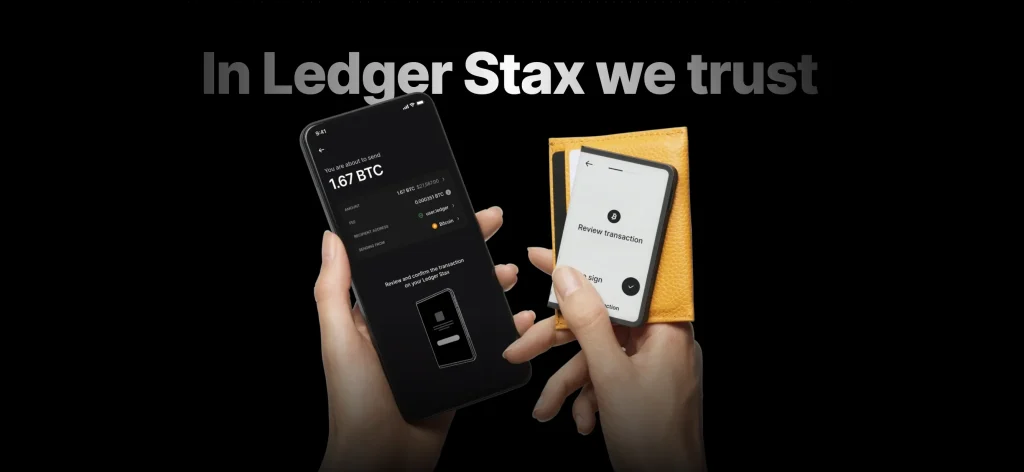
This is Ledger’s top model. It’s the size of a credit card, wrapped in a curved 3.7-inch E-Ink touchscreen, and it has Bluetooth, USB-C, Qi wireless charging and magnets that stack several units like poker chips.
Under the glass you’ll find the chip and software every Ledger runs: a certified secure element and BOLOS. You pay extra for looks and comfort, while the cryptography stays the same.
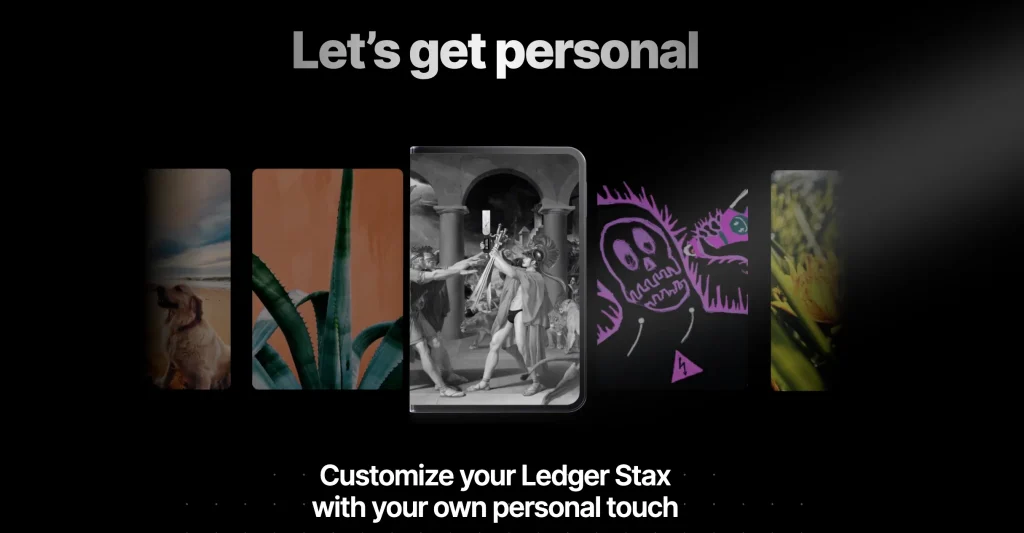
Tony Fadell, the man behind the iPod and Nest, helped design it. That shows, because people leave the Stax out on a desk instead of hiding it in a drawer. Pick a name, a picture or an NFT, and the outer screen keeps showing it even when the device is off.
Price and where to buy
Among hardware wallets, the Ledger Stax sits at the very top of the price range.
1. What it costs
Ledger’s own store sells it for $399, the highest price of any mainstream hardware wallet. Ledgers that cost a fraction of that have the same internals. Most of the extra goes on the display, plus the battery, the charging pad support and the way it’s built.
The popular Ledger Nano X costs about $99 and guards your keys with chips from the same family. Moving up to the Stax gets you a bigger screen, a slicker body and some convenience, but no stronger key protection.
Weighing it against the Flex as well? Our Ledger Flex vs Ledger Stax comparison puts the two side by side.
2. Where to buy it
Buy it from Ledger’s official store or a reseller Ledger lists, and nowhere else. A pricey device makes marketplace tampering more tempting, not less. Ledger has also leaked customer data in the past, so having it shipped to a pickup point instead of your home is a smart habit.
3. Shipping
Ledger ships to most countries from regional warehouses. If customs duties apply, you pay them. The only real advice is to order from Ledger’s real website and not a copycat domain.
4. Warranty and support
You get Ledger’s usual warranty and support, which means help articles first and a ticket system after that. Hold on to your receipt. A genuine support agent will never ask you for your recovery phrase.
Main features
Five features shape what the Stax is like to use:
1. The curved E Ink® touchscreen
Everything about this device revolves around its curved 3.7-inch E-Ink display. You see full addresses and whole transactions on one readable page, you tap in your PIN and passphrase, and the cover screen uses so little power it stays on for weeks.
The catch with E-Ink is speed, since screens change more slowly than on any phone. I noticed it every day at first and stopped minding within a week.
You can read it in any light, even outside in the sun. The screen is wired straight to the Secure Element chip, so what it shows is exactly what you sign. A wallet screen exists for that job alone, and here you can do it comfortably at arm’s length.
You can make the Stax your own, too. Put a favorite picture or NFT on the lock screen and arrange your coins and accounts however you like.
2. Wireless charging and USB-C
With Qi charging and USB-C, the Stax can sit on the same charging pad as your phone. It’s a small thing, but it fixes the flat-battery-at-the-worst-moment problem that every battery device has.
3. Magnetic stacking
Magnets line up several Stax devices into a tidy pile. That helps if you keep separate devices for personal, business and inheritance use, and it’s simply fun for everyone else.
4. Coins, tokens and NFTs
You get the usual Ledger coverage: 5,500+ coins and tokens in Ledger Live, NFTs that display properly, and third-party wallets for anything Ledger Live doesn’t handle. On this screen, NFTs are actually nice to look at.
5. Ledger Recover
Ledger Recover is an optional paid backup service, and it works here just as on other Ledgers. It splits your seed into encrypted pieces held by three companies, and you unlock them by proving your identity.
It’s switched off unless you turn it on, and it changes who you have to trust. After Ledger’s data breaches, lots of owners would rather keep their own steel backup, so choose based on the risk you’re comfortable with.
Comparing ways to back up your seed? Our Cryptotag Zeus review covers a metal plate built to survive almost anything.
How secure is the Ledger Stax?

Security is the one area where the Stax doesn’t try to stand out. It uses the same design as every other Ledger:
1. The secure element and its CC EAL5+ rating
An ST33-series chip holds your keys, with a CC EAL5+ rating, Ledger’s BOLOS system on top and ANSSI certification behind it. Ledgers at a quarter of the price use the same family of chips. That’s reassuring, and it also shows what the extra money doesn’t buy.
2. Keys stay offline
The Stax creates your keys itself and they never leave the secure element. Bluetooth and USB only carry transaction data, and you still have to approve every transaction on the Stax’s own screen.
3. PIN and passphrase
You need a PIN to unlock it, and it wipes itself after too many wrong tries. For extra cover, a passphrase opens hidden wallets that nobody else knows exist. Used together, they’re still the best defense against both theft and someone forcing you to unlock it.
4. Clear signing
With this much screen, Ledger’s clear-signing feature finally makes sense. You don’t approve a meaningless string of characters; the Stax spells out what a contract will actually do. DeFi wallets usually get drained through approvals nobody read, which makes this big display a safety tool that just happens to look expensive.
5. Encrypted link to Ledger Live
Ledger Live never holds your keys, and whatever passes between it and the device is encrypted end to end. A hacker inside your computer or the app still can’t sign anything, because each approval needs the Stax in your hand.
6. Two-factor login and passkeys
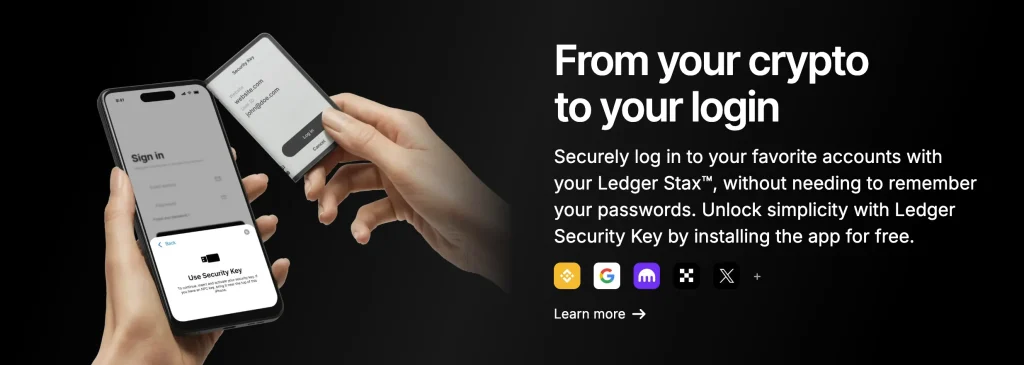
The Stax also works as a FIDO2 security key. You can use it as hardware two-factor for Google, GitHub or exchange logins, which puts more of your security on one device you already look after.
7. Stopping tampering before it reaches you
Each time it starts, the Stax checks itself against Ledger’s attestation to prove it’s genuine. The packaging has no seals on purpose, because a cryptographic check proves authenticity better than a sticker. Buy it from an official source anyway, since it’s better to never need that check.
8. Keeping the recovery phrase safe
You see the seed once, on the device itself, during setup. Steel is the right place for it, stored offline, and any prompt to type it into a phone or website is an attack. Take a photo of it and even the best wallet can no longer keep it safe.
Design and everyday use
Using it every day is how the Stax justifies $399. It wakes up quickly and reads like paper, so you actually check each transaction instead of squinting at it. It slips into a shirt pocket and feels like a piece of consumer tech rather than a security dongle.
The lock screen you can customize is a small pleasure. The slow E-Ink refresh and the price are the only complaints that keep coming up, and the Ledger Flex at $249 is there for people who want 80% of this for 60% of the price.
Ledger Stax: benefits and drawbacks
Here’s the balance at a glance. Every drawback is about money or speed, and none is about security:
Using the Stax to buy, sell and track your coins
Ledger Live lets you buy, sell and swap through partner services with the Stax. It’s handy, but those partners charge more than a regular exchange would. For big trades, sending funds to your own exchange and back is still cheaper.
The app itself is covered in the Ledger Live review.
How do you connect it to Ledger Live?
It takes a few minutes. Install Ledger Live, connect over USB-C or Bluetooth, match the code on screen, and the device guides you through the rest. The Bluetooth link is encrypted and never carries your keys, and you can switch it off completely if you’d rather use a cable.
Supported coins and NFTs
It supports the same coins as the rest of the Ledger range: 5,500+ assets on 70+ chains. NFTs on Ethereum and Polygon show up natively, and third-party wallets cover the rarer coins. Anything Ledger Live can handle, this device can sign.
DeFi and staking
You can stake on the major networks right inside Ledger Live. DeFi works through WalletConnect or wallets you pair, such as MetaMask. The clear-signing screen proves its worth every time you approve a contract.
So Ethereum, Tezos, Polkadot and similar coins can be staked from the app with your private keys kept offline the whole time. Ledger Live handles the talking to decentralized apps (dApps), and the Stax does the signing.
Fees and confirmations
The device itself charges you nothing. Each blockchain sets its own network fee, and the swap and buy partners in Ledger Live add their own margin. You see both before you confirm, so nothing comes as a surprise.
What do users say about the Ledger Stax?

Opinions are mixed but lean positive. People who own one like using it every day, while reviews of the Ledger brand as a whole raise price, support and trust concerns.
Reviews from retail buyers
On Best Buy, the Stax scores 4.8/5 from 49 reviews. Owners point to the easy setup, the solid feel, Bluetooth and a standby time of several weeks.
Reviews of the Ledger brand
Across 2,217 reviews, Ledger the company scores 3.0/5 on TrustScore. Happy customers mention reliability. Unhappy ones bring up support, prices and the closed code.
A security warning
Watch out for fake “Ledger Live” apps built to steal seed phrases, which security researchers have warned about. The rule is simple. Only download Ledger Live from ledger.com, and never type your 24-word phrase into any app or website, because once a phrase leaves the device you’ve lost control of it.
If you care about a readable screen, comfort and convenience, owners are very positive. On the other side of the scale sit the price, some effort to learn the advanced features and the discipline good Bluetooth and security habits need.
Owners like living with it. The doubts center on the price and on how much you trust Ledger as a company, not on how the Stax performs.
How the Stax compares with other hardware wallets
Three rivals usually come up when people shop for a Stax: the Ledger Flex, the Trezor Model T and Keystone’s air-gapped wallets.
The Stax or the cheaper Ledger Flex?
Ledger built the Flex for everyday investors who want the same protection and can live without the luxury extras. It keeps an E Ink touchscreen, only smaller and flat. It also gives up the curved display, wireless charging and magnetic stacking.
The Stax is the pick when you want Ledger’s most polished and capable device. On a tighter budget, the Flex saves you money and still protects your keys with the same Secure Element.
The Stax or the Trezor Model T?
The Trezor Model T is one of Ledger’s main competitors. Trezor’s firmware is open source, which appeals to people who want transparency. It has a color touchscreen as well, yet next to the Stax’s clean, Apple-like design it looks chunky and plain.
For security, Trezor leans on software and a secure microcontroller. The Stax uses a dedicated Secure Element chip, which is widely seen as harder to break into physically.
Go with Trezor if open code and transparency come first for you. For a Secure Element plus a premium feel in the same box, the Stax has the edge.
Ledger Stax vs Keystone
Keystone wallets are fully air-gapped. They never connect by USB or Bluetooth, and you sign every transaction with QR codes.
That cuts them off from online threats as far as possible, but it can feel slow and fiddly. The Stax aims for a middle ground with Bluetooth, USB-C and wireless charging.
An advanced user who wants total isolation may prefer Keystone. For everyday investors who want strong security that’s still easy to live with, the Stax is the more practical pick.
Want a closer look at one of the best QR-code hardware wallets on sale now? Read our in-depth Keystone 3 Pro review.
FAQ
How long does the Ledger Stax battery last?
Because of the E Ink screen, it lasts for weeks on standby between charges. How long it really runs depends on how often you sign and whether Bluetooth is switched on. Topping up is quick with Qi or USB-C. If you only use it now and then, you’ll charge it far less often than a device with an OLED screen.
Is it safe to pay with the Stax?
Yes. Signing takes place inside the CC EAL5+ Secure Element, and your private keys stay on the device. The Stax screen shows the details for you to check before you approve, and that alone defeats most phishing tricks. A hacked computer or phone doesn’t change this, because the wallet signs offline.
What if I lose my Ledger Stax?
As long as nobody has your 24-word recovery phrase, your coins are fine. Any compatible hardware wallet, whether a Ledger or another brand, can rebuild your wallet from that phrase. Whoever finds the lost device still can’t use it without your PIN and passphrase.
How long does a Ledger last?
With normal use and sensible storage, a hardware wallet can keep going for many years. The battery wears out over time, but you can still run the device over USB-C as it fades. Software support matters more than the battery, so update the firmware through Ledger Live whenever a security fix comes out.
Final verdict: should you buy the Ledger Stax in 2026?
In 2026, the Ledger Stax is still one of the best choices if you want security, ease of use and good design in one device and don’t mind paying extra for it.
If you want top security and a smooth experience in one slim device, the Stax delivers. You get a CC EAL5+ Secure Element, clear signing and offline keys, wrapped in a curved E Ink touchscreen with Bluetooth and Qi wireless charging.
It suits people with serious crypto or NFT holdings who refuse to trade convenience for protection. Buying, swapping, staking and managing your assets all happen in one place, thanks to the touchscreen, wireless charging and Ledger Live.
How I review: Reviewed by Andrei B. I buy the hardware wallets I review, test every product myself and score it on security, UI/UX, ease of use, price and supported coins. Before I publish, I also check recent user reviews and any hack reports.
The whole process is explained on the How We Review page. You can read more about me, or contact me with corrections, from the links at the bottom of this page. For general safety advice, see the FTC guide to cryptocurrency scams.