Trust Wallet’s pitch is scale. It’s a free self-custody wallet for phones and desktop browsers, and the company says it went past 220 million users during 2025. You pay nothing, you open no account, and you get what it calls coverage of more than 100 blockchains.
Who’s it for? Anyone whose crypto lives mainly on a phone and who’d rather not run four apps to reach four chains. We’d point you somewhere else if you insist on software you can read line by line, or if the plan is leaving savings untouched for years.
What follows is the 2026 version of this wallet: how it handles day to day, what its security history really says, which coins it carries, the bill at the end, and how to get set up without losing anything on the way.
Trust Wallet is a self-custody wallet app, which means your keys stay on your own device rather than with the company.
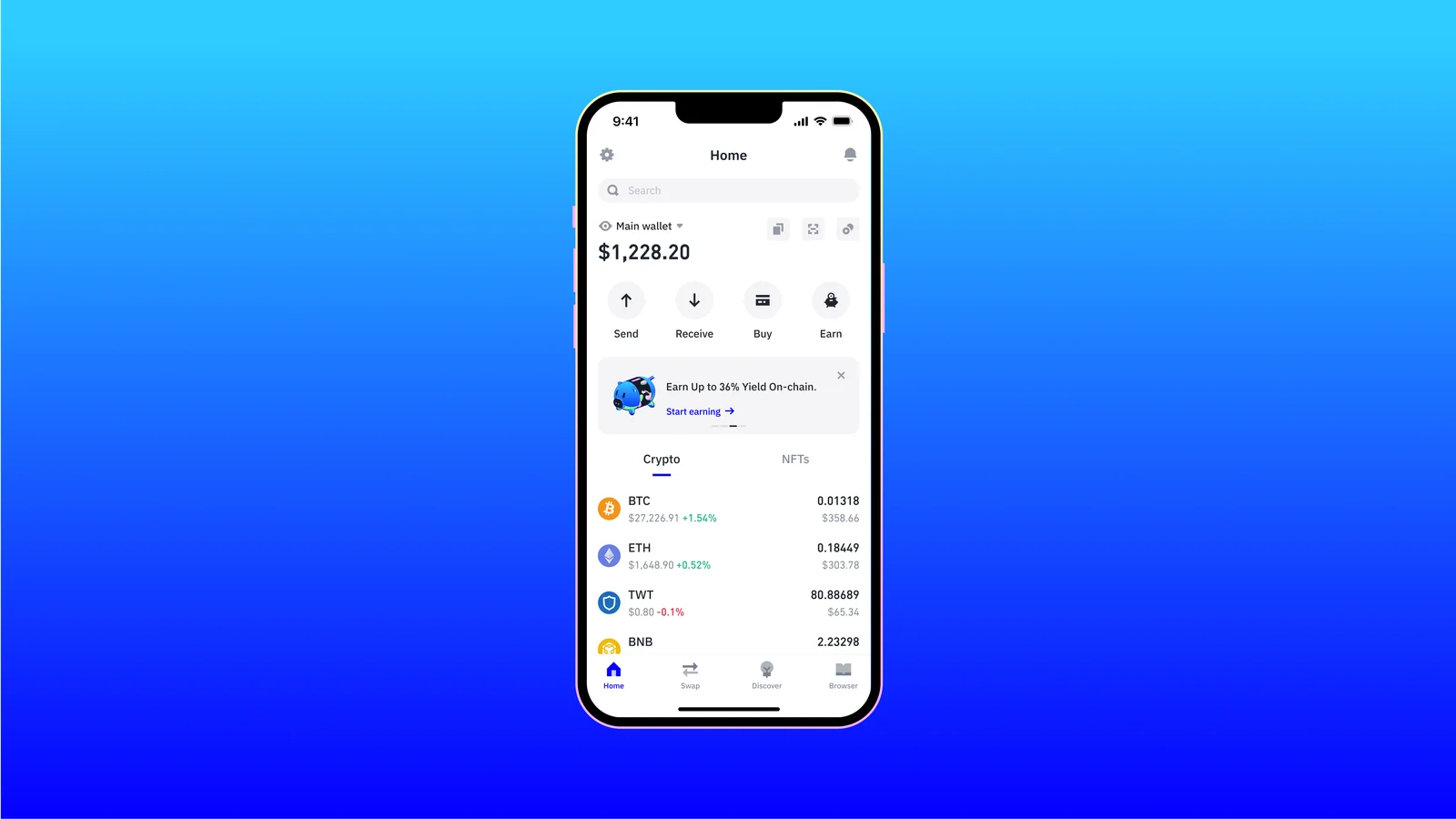
Table of contents
So What Exactly Is Trust Wallet?
Trust Wallet at a Glance | |
|---|---|
| <strong>What it costs</strong> | Nothing. The listed upfront cost is $0, and Trust Wallet says no subscription or account charge exists, all at the time of writing (September 2026). |
| <strong>What it is</strong> | Software, nothing more. You get a phone app and a desktop browser extension, with no device to buy. |
| <strong>Where it runs</strong> | iOS and Android, plus a Chrome Web Store extension that also works in Brave, Opera and Edge. |
| <strong>Who holds the keys</strong> | You do. They stay encrypted on your device behind biometrics and a PIN, and the company says its servers can’t reach them. |
| <strong>Is the code open</strong> | Only in part. Wallet Core, the cryptographic library, carries an Apache 2.0 licence on GitHub, while the current apps and extension aren’t published. |
| <strong>What it holds</strong> | The advertised figures are 100+ blockchains, 10M+ assets and 600M+ NFTs. |
| <strong>How you back it up</strong> | Either you write out a 12-word recovery phrase by hand, or you take an encrypted cloud backup to Google Drive or iCloud. |
| <strong>Second device</strong> | One recovery phrase runs both the phone app and the browser extension, and QR sync moves you between them. |
| <strong>Who it suits</strong> | Phone-first holders who want a single wallet spanning many chains and don’t fancy paying for hardware. |
The wallet started life in 2017, and Binance bought it in July 2018. It’s been part of the Binance group ever since, and Trust Wallet’s own roadmap post calls it a launchpad into that ecosystem. Eowyn Chen is the chief executive.
If Exodus is the other app on your list, Exodus vs Trust Wallet compares the two.
Everything rests on self-custody. Keys sit on your hardware rather than a company’s, which cuts both ways: nobody can freeze what you hold, and nobody can hand it back either.
Now the numbers, which don’t line up. About Us says 200 million people, the security page says over 200 million users, and the comparison page says 220 million downloads. That year-end post puts it at 220 million users passed during 2025.
Nobody audits any of it, so take it as a vendor talking about itself. Up to 35% market share among self-custody wallets is another of the claims, alongside more than $30 billion in user balances. Ratings quoted on the site run to 4.7 on the App Store and 4.6 on Google Play, dated 15 May 2026.
The Trust Wallet Features That Matter
- A single 12-word recovery phrase reaches every chain in the wallet, Bitcoin, Ethereum, Solana, BNB Smart Chain, Tron, XRP, Cardano and TON among them. There’s no juggling a second wallet to get at a different network.
- Swaps run inside the app through outside providers, ThorChain, 1inch, Mimic and Axelar included. Since Trust Wallet takes no cut, your cost is gas plus whatever the provider wants.
- Before you sign, the Security Scanner simulates the transaction and checks the destination against known scam contracts, so a bad address gets flagged while backing out is still possible. Over $191M never reached scam addresses across 2025, by the company’s count.
- Staking sits in the app for more than 25 assets, which spares you handing coins to an exchange to earn on them. On the staking page in September 2026 that meant 2.57% for Ethereum, 5.42% for Solana and 6.09% for BNB Smart Chain.
- Cards and bank transfers work through MoonPay, Simplex, Banxa, Mercuryo, Ramp Network and Transak, covering more than 300 coins. Quotes differ between providers, and you see each one before committing.
- Decentralized apps are reachable from the phone through a built-in dApp browser and WalletConnect. Pair the browser extension with a Ledger device and your keys stay offline while you carry on using the wallet.
Is Trust Wallet Easy Enough for a Beginner?
Six screens, maybe three minutes. Tap "Get Started", choose "Create a new wallet", copy out a 12-word secret phrase and you’re in. Nobody asks for an email, an account or a passport.
By crypto standards the home screen is restrained. Balance up top, Send, Receive, Buy and Earn sitting beneath it, a Crypto tab next to an NFTs tab, then Home, Swap, Discover and Browser along the bottom.
Trouble starts once you wander off that screen. Perpetual futures at up to 200x leverage, prediction markets and tokenized stocks all live in the same app now, and whoever opens a first wallet walks straight past the lot.
Wanted somewhere to park a bit of BNB? That’s a bigger app than you asked for.
Desktop gets the thinner deal. Distribution runs through the Chrome Web Store, which puts you on a Chromium browser, and the company states that its Ledger support won’t run in Firefox at all.
So a Firefox user who wants hardware has to change browser. Unfamiliar with any of this? Our explainer on what a wallet address is makes a better starting point.
Trust Wallet Security: What the Record Shows
Nothing here is custodial. Your private keys live encrypted on the device, behind biometrics and a PIN, and Trust Wallet states plainly that its servers can’t recover, freeze or move a thing you hold. We unpack what you’re signing up for in custodial vs non-custodial wallets.
On paperwork it does well. A-LIGN verified its ISO/IEC 27001 and ISO/IEC 27701 certifications, and the company names CertiK, Cure53, Halborn, Kudelski Security and Quantstamp among its auditors. Badges like those describe how a firm runs security and privacy rather than whether one line of code is safe, and a public bug bounty sits alongside them.
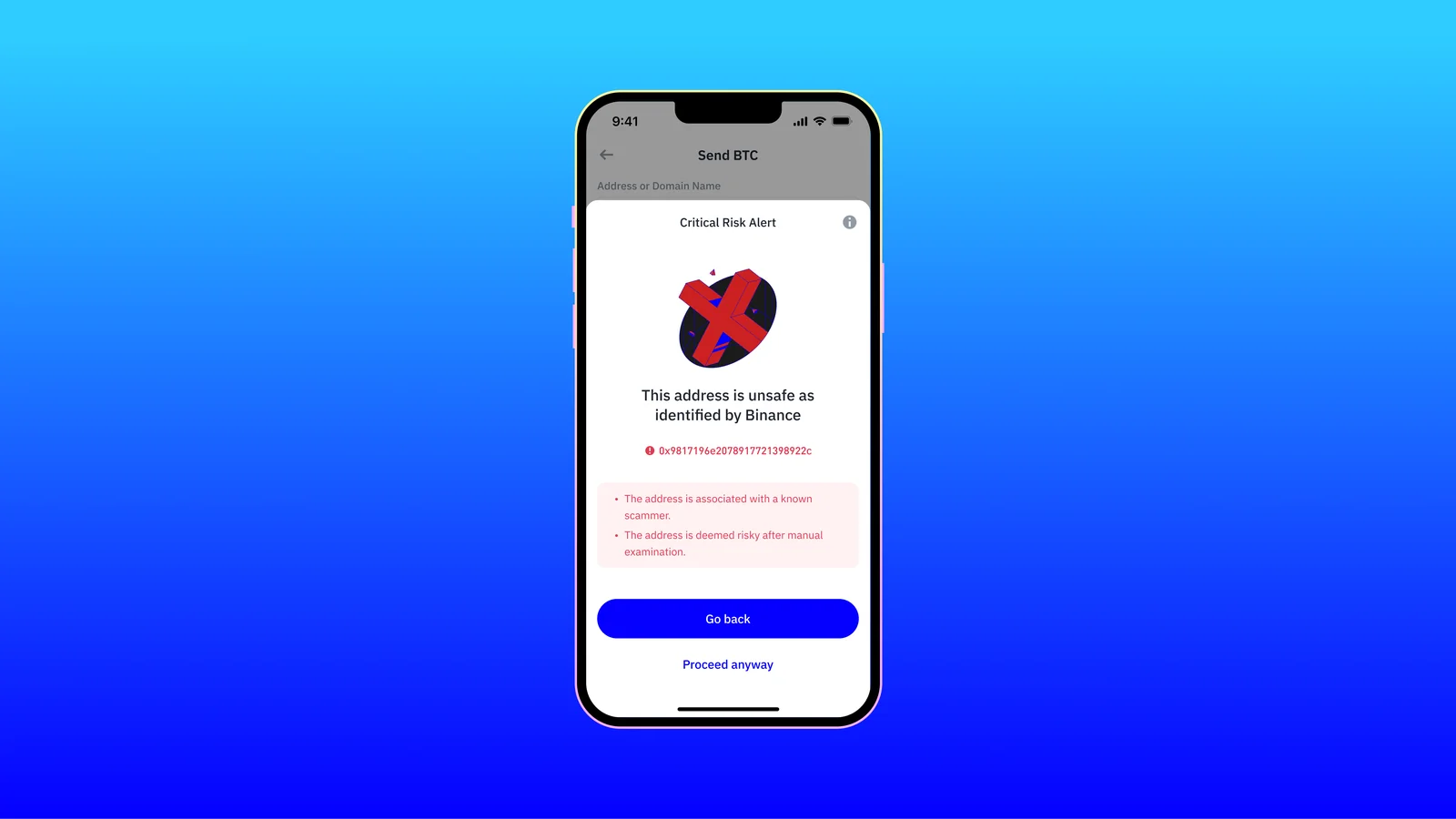
You’ll meet the Security Scanner soon enough. A flagged address throws up a "Critical Risk Alert" panel spelling out why, then hands you "Go back" or "Proceed anyway". Trust Wallet frames it as a nudge to look harder instead of a promise, and we’d call that honest.
Open source is where the story gets slippery. Wallet Core, the crypto library sitting under the wallet, carries an Apache 2.0 licence and had a commit the day we looked. Archived since 2019, the old app repositories are dead, and neither the current apps nor the extension are published anywhere.
That comparison page still drops a tick in an "Open Source" row beside the wallet’s name, no asterisk attached. Generous, we’d say.
Three incidents belong in any honest Trust Wallet review. Start with the worst and the most recent: December 24, 2025, when a malicious build of the browser extension, version 2.68, landed on the Chrome Web Store without passing through the company’s release process. Log into it between December 24 and December 26 and you were exposed.
By Trust Wallet’s count, 2,520 wallet addresses were drained of roughly $8.5 million in assets, which moved to 17 addresses the attacker controlled. Phone users escaped, and so did anyone on a different extension version. Blame lands on Sha1-Hulud, November 2025’s industry-wide supply-chain attack, which leaked developer GitHub secrets along with a Chrome Web Store API key.
Go over that sequence once more, because it’s the part that stings. Victims did everything right: official store, prompt update, a wallet they had every reason to trust.
Credit where it’s earned. Rolling back to the clean 2.67 build and shipping it as 2.69 happened quickly, and the company decided on its own to repay the people who lost money. Its update names the attacker’s domain, the leaked key, the timeline, even the researchers who spotted it, which is more detail than most firms volunteer.
Paying people back has gone slower than patching. Over 5,000 claims have arrived against 2,520 verified addresses, and the July 17, 2026 update says the team is still working through them case by case.
Two older bruises complete the picture. CVE-2023-31290 left Wallet Core builds before 3.1.1 with 32 bits of entropy, which made extension wallets from 0.0.172 to 0.0.182 guessable, and attackers cashed in during December 2022 and March 2023. A separate Trezor library flaw hit iOS wallets created between March and July 2018, patched that same July.
Notice what these have in common. No server got broken into, for the simple reason that there’s no key server to break into. Each one came down the software supply chain, and that’s the bargain you strike when your keys sit on a connected device.
Holding money you’d hate to lose? Get a hardware wallet behind it. Trust Wallet’s own security FAQ says the same and sends you to its Ledger integration.
Which Coins and Chains Can Trust Wallet Hold?
Marketing leads with 100+ blockchains, 10M+ assets and 600M+ NFTs. Different numbers turn up in the year-end post covering the same stretch: 110+ chains, over 1,000 custom EVM chains, 32M+ assets. Since an asset means whatever the counter wants it to mean, read these as a sense of size and not a specification.
Names beat numbers here. Listed on the browser extension page you’ll find Bitcoin, Ethereum, Solana, BNB Smart Chain, Cardano, Cosmos, TON, Tron, XRP, Polkadot, Litecoin, Dogecoin, Base, Arbitrum, Optimism, Polygon, Sui, Aptos, Stellar and Zcash, plus plenty more.
If you’re choosing between some of those chains, Solana vs Cardano vs Polkadot vs Avalanche compares them.
If you’re deciding between those two newer chains, Sui vs Aptos compares them.
Anything living outside the EVM world is where that breadth pays. Your Bitcoin, Solana, Cardano and Tron share a wallet with your Ethereum tokens, so there’s no second app and no second phrase to look after. That’s a large part of why the wallet keeps appearing on lists of the best decentralized crypto wallets.
For USDT on Tron specifically, our best TRC20 wallets guide looks at that network on its own.
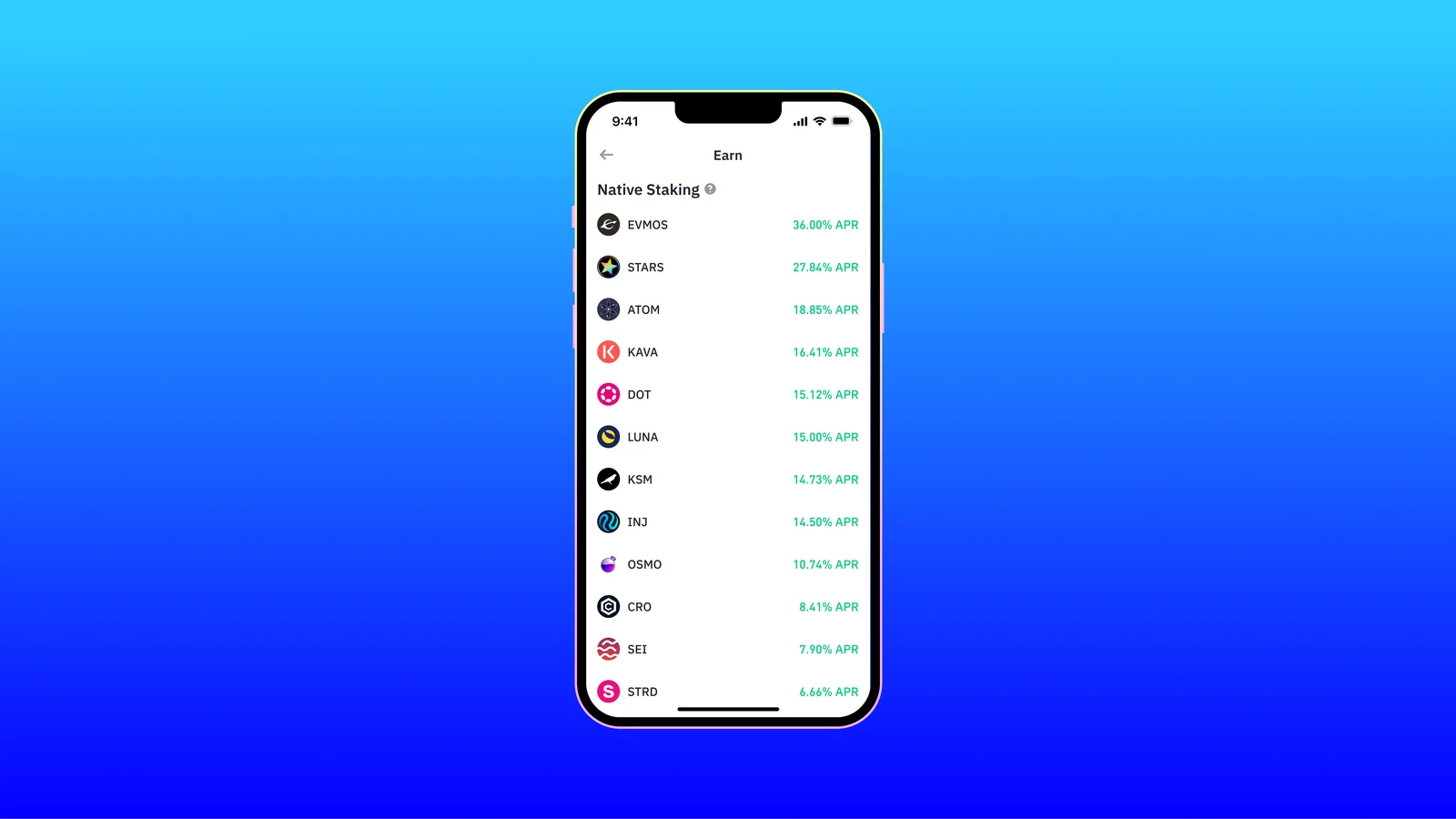
More than 25 assets can be staked without leaving the app. September 2026’s staking page listed 14.65% for Polkadot, 14.64% for Cosmos, 6.09% for BNB Smart Chain, 5.42% for Solana, 4.69% for Cardano and 2.57% for Ethereum. Networks shift those figures constantly, so look them up on the day instead of trusting ours.
Swapping reaches 10,000+ assets on the extension, across what the swap page bills as 1M+ pairs. NFTs sit in a tab of their own, where the dodgy ones can be hidden and reported. Fiat purchases cover more than 300 coins.
One figure needs unpacking. Wallet Core’s public registry names 167 coins, and that’s the list with native cryptographic support, its own address format and its own signing method. Everything past it is a token riding one of those chains, which is how you get from 167 to 10M+.
What Will Trust Wallet Cost You?
It’s free. At the time of writing (September 2026) Trust Wallet quotes an upfront cost of $0 next to $79 to $399 for a Ledger, and says staking, buying, sending and receiving carry no charge from its side.
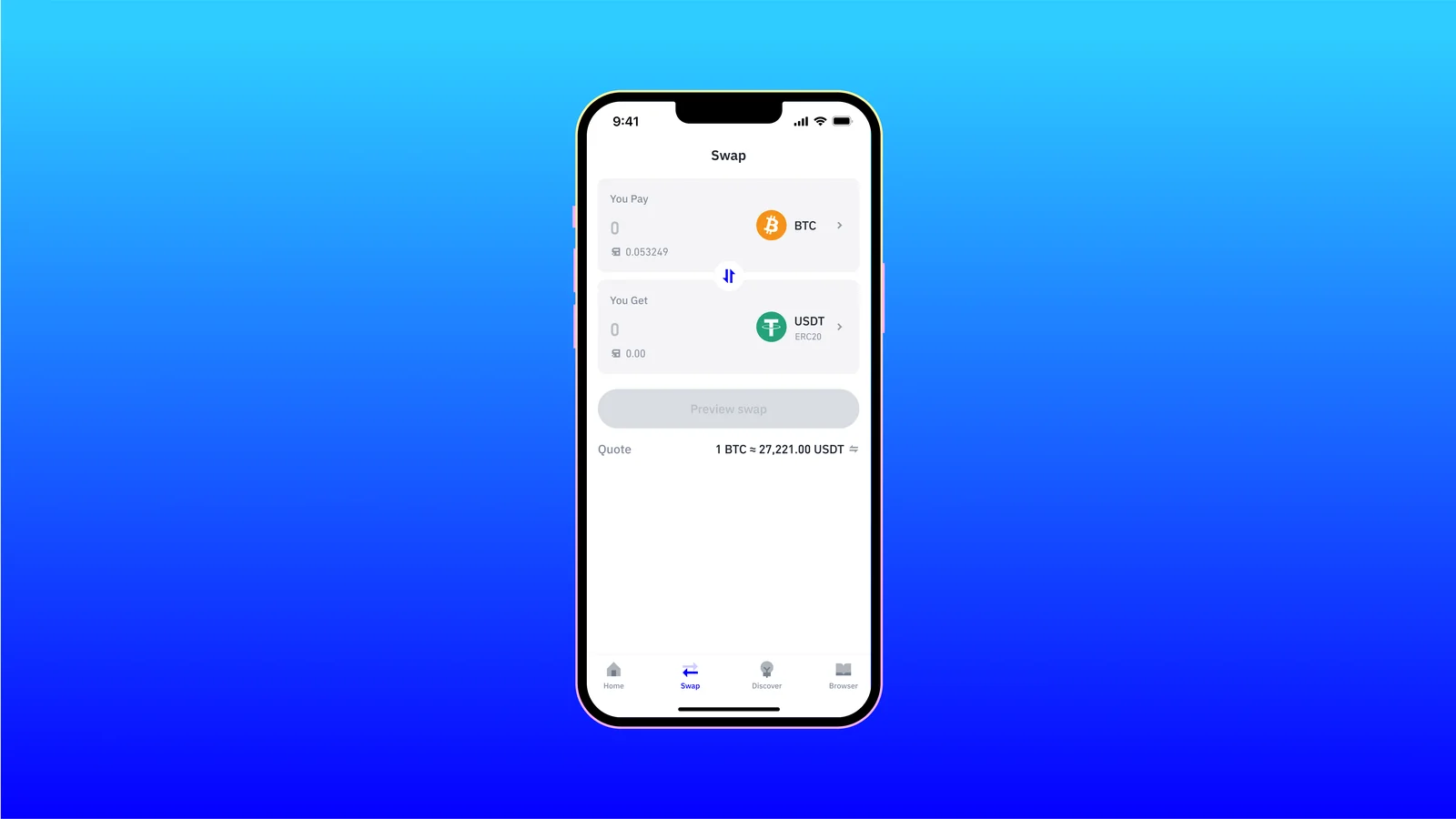
Swaps trip people up. No service fee goes to Trust Wallet, true enough, but gas is yours to pay and the third-party provider’s cut is already folded into the quote on screen. Compare what actually lands in your wallet, never the headline rate.
Fiat is the expensive door. Bank transfers through MoonPay and Ramp often land at 0.5-1.5%, the company says, while cards and Apple Pay run 2.5-4%. Around $10 or less gets you started, and every provider’s fee appears before you confirm.
Where you download it beats what it costs for importance. Stick to the App Store, Google Play, or trustwallet.com/download, and nowhere else. December 2025 makes the strongest case for staying current, since that time the poisoned build sat in the official Chrome Web Store listing itself.
Trust Wallet Strong Points and Sore Points
Breadth and price are why the user count looks like that. Few free wallets put Bitcoin, Solana, Cardano and the EVM chains behind one phrase, and a swap with no house cut saves real money if you trade often. Certifications are documented, and December’s disclosure named specifics plenty of companies would have buried.
Against that sits every hot wallet’s weakness, plus a closed codebase. When the supply chain broke in December 2025 the bill arrived fast, and a closed extension leaves you nothing to check for yourself. Fine for daily use, wrong for a vault.
Setting Up Trust Wallet Without Losing Anything
- Type trustwallet.com/download yourself, or head straight for the App Store or Google Play. The company’s rule is never to install from a link arriving by chat, email or social media, and fake wallet apps exist for exactly one purpose, which is lifting your phrase.
- Fire it up and tap "Get Started". On desktop you pick "Download for Chrome" from the download page, then hit "Add to Chrome" in the store listing.
- Select "Create a new wallet". You’ll then be asked how to back it up, with an encrypted cloud backup to Google Drive or iCloud on one side and a manual backup on the other.
- Take "Back up manually" and copy the 12-word secret phrase onto paper or steel, in order, offline. Whoever reads it owns the wallet, and if you lose it, it’s gone, with Trust Wallet powerless to help. Tick the guideline boxes, then tap "Continue".
- Prove you wrote it down by picking the four words the app names, in the slots it shows, then tapping "Confirm". Screenshots are blocked on that screen, a small detail they got right.
- Choose a six-digit passcode and switch on fingerprint or FaceID. It guards the app on this handset and nothing beyond it, so don’t mistake that layer for a backup.
- Move a token amount first, and check the network as carefully as the address. Send to the wrong network or the wrong address and the money is gone, with nobody able to claw it back. Anything substantial deserves a hardware wallet on the extension before it arrives, and our Ledger Nano X review handles the device end.
Used the extension over Christmas 2025? Anyone who logged into version 2.68 in that window is told to shift funds into a freshly created wallet and file a claim on the official support form. A banner inside the extension marks the accounts believed to be at risk.
Wallets Worth Weighing Against Trust Wallet
MetaMask
Across most of the decentralized web, MetaMask is the button you’re expected to click, and its extension beats this one. Where Trust Wallet wins is native coverage of the non-EVM chains and the feel of the phone app. The head-to-head lives in MetaMask vs Trust Wallet.
Exodus
Quieter, prettier, and built around a real desktop app with a portfolio view Trust Wallet can’t match. The catch is fewer chains and code that stays partly closed. Both halves get covered in our Exodus wallet review.
Ledger Nano X
Bothered by December 2025? Hardware, not another app, is the fix. Keys never leave the device and every transaction gets confirmed on its own little screen, at $79 to $399 depending on model, and it’s slower to live with.
FAQ
Can you trust Trust Wallet with your crypto?
Mostly. It’s non-custodial, carries ISO/IEC 27001 and 27701 certifications that A-LIGN verified, and names CertiK, Cure53, Halborn, Kudelski Security and Quantstamp among its auditors. The caveat is December 2025, when a malicious extension build emptied 2,520 wallets, so update promptly and put hardware behind anything large.
What will Trust Wallet cost you?
Nothing up front. Staking, buying, sending and receiving carry no charge from Trust Wallet, and the listed upfront cost is $0. Gas is still yours, and swaps and fiat purchases carry third-party provider fees.
How many coins can Trust Wallet hold?
Depends who’s counting. Marketing says 100+ blockchains and 10M+ assets, while the year-end post says 110+ chains and 32M+ assets. Wallet Core’s public registry names 167 coins with native support, and the rest are tokens riding those chains.
Does Trust Wallet pair with a hardware wallet?
Yes, with Ledger, over the browser extension. Firefox is the exception, because Trust Wallet says Ledger support doesn’t work there. The company itself suggests the pairing once your balance gets serious.
What if you lose your phone?
Your 12-word recovery phrase brings the wallet back on any device. Lose the phrase and nothing recovers it, not even Trust Wallet, which is exactly why it belongs offline on paper or steel rather than in a photo roll or a cloud note.
Is the Trust Wallet code open source?
Partly. GitHub carries Wallet Core, the cryptographic library, under Apache 2.0, and work on it continues. Neither the current apps nor the browser extension are published, and the old app repositories were archived back in 2019.
Who owns Trust Wallet?
Binance does, having bought it in July 2018. Keys stay yours because the wallet is non-custodial, but the company sits inside the Binance group, and its own roadmap describes the wallet as a launchpad into that ecosystem.
Our Verdict on Trust Wallet
Get it if your crypto lives on a phone, spreads across several chains, and you’d rather not pay for the privilege of holding it. Fees are hard to argue with, the Security Scanner justifies itself, and the certifications are on paper. Where it sits against everything else is laid out in our guide to the best non-custodial wallet.
Go elsewhere if reading the source yourself matters, or if this is money you intend to leave alone for years. Our call: about as capable as free mobile wallets get, and still a wallet rather than a vault.
Everything above is general information, not financial, legal, or investment advice. Features and prices move, so check the vendor’s own page before you spend.
How I review: Reviewed by Andrei B. I buy the hardware wallets I review, test every product myself and score it on security, UI/UX, ease of use, price and supported coins. Before I publish, I also check recent user reviews and any hack reports.
The whole process is explained on the How We Review page. You can read more about me, or contact me with corrections, from the links at the bottom of this page. For general safety advice, see the FTC guide to cryptocurrency scams.