Your Trust Wallet address is easy to find once you know it lives behind the “Receive” button. This guide gets you from opening the app to handing the sender the correct address for the coin you’re expecting, and that normally takes about a minute. All you need is Trust Wallet on iOS or Android (or the browser extension) and a wallet you’ve already set up and backed up.
Think of a wallet address as the public string people paste in when they want to pay you in crypto. The catch with Trust Wallet is that every type of coin gets its own one, so choosing correctly is where you’ll spend your attention. If you haven’t settled on the app yet, my Trust Wallet review is a better place to begin.
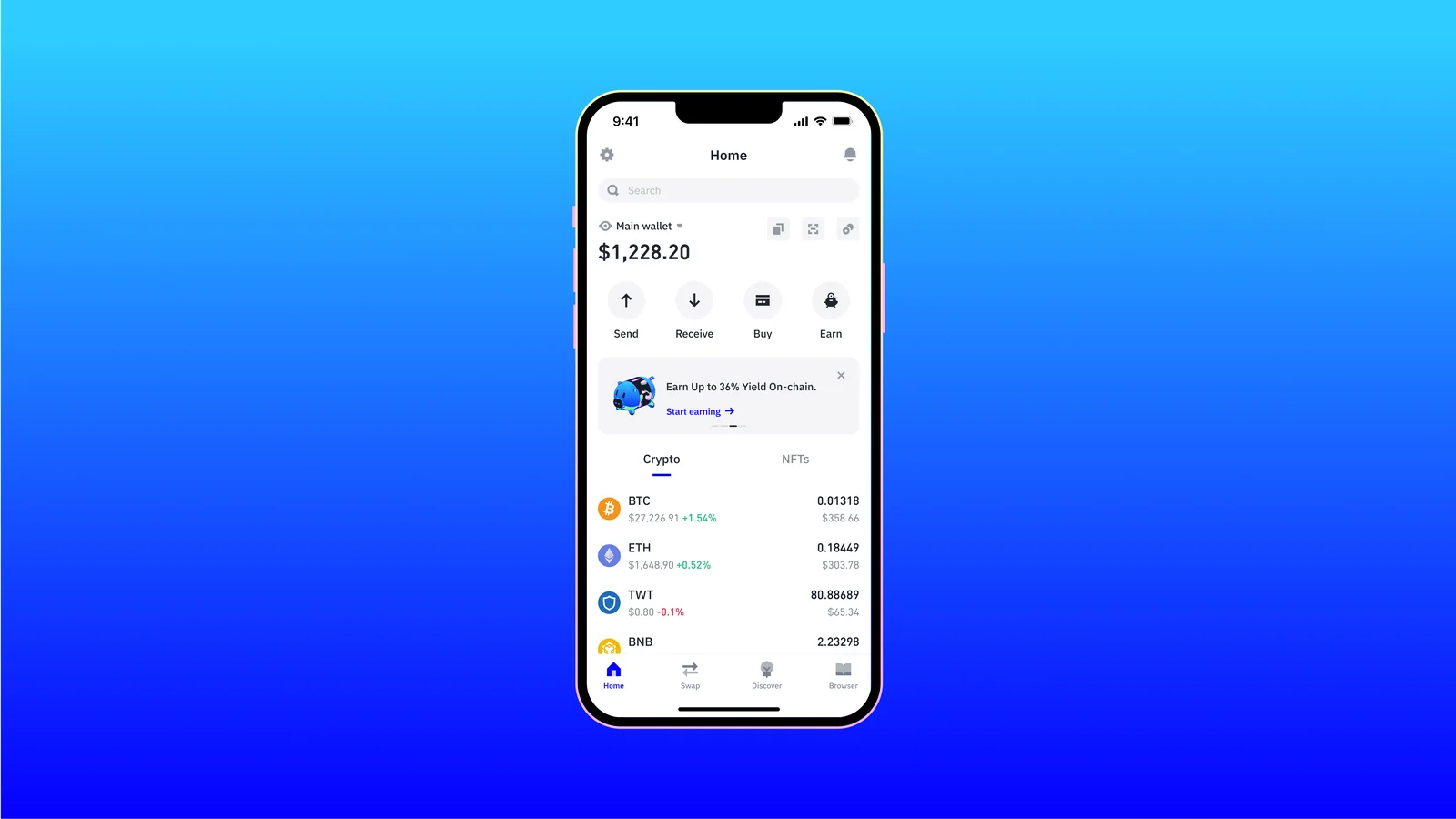
Table of contents
What you’ll need before looking for your Trust Wallet address
- Get the app from Google Play, the Apple App Store or trustwallet.com/download. Trust Wallet itself warns against installing from links that turn up in chats, emails or social media posts.
- You’ll want a wallet that already exists and a written copy of its recovery phrase (also called a seed phrase). Those words can rebuild the whole wallet, which is exactly why they should never be seen by anyone but you.
- Find out which coin and which network the sender is using, say USDT on Tron versus USDT on Ethereum. Don’t guess.
- It helps to know if the money’s coming from an exchange or from someone’s own wallet, because a few chains rely on a memo or destination tag.
- There’s nothing to sign up for. Trust Wallet is self-custody, meaning your private keys are kept on your own device, and no login stands between you and your address.
Please read this bit twice. Crypto sent to the wrong address, or over the wrong network, can be lost permanently, and there’s no one who can pull it back.
Trust Wallet’s support team describes crypto transactions as irreversible. It also has no power to freeze or move your funds on your behalf.
How to find your Trust Wallet address, step by step
I’ve based the steps on Trust Wallet’s official guides, which were refreshed in July 2026. According to those guides the browser extension follows the same receive flow, although no extension-specific walkthrough has been published.
Step 1. Open Trust Wallet and make sure you’re in the right wallet
Unlock the app. Your wallet’s name, “Main wallet” for instance, appears at the top of the home screen next to a little drop-down arrow, and below that you’ll see the balance with four buttons in a row: “Send”, “Receive”, “Buy” and “Earn”.
Got several wallets? Check that name before anything else.
Every wallet carries its own set of addresses, so copying from the wrong one means the coins land in that other wallet. Switching happens under the settings icon, in “Wallets”.
Step 2. Hit “Receive” on the home screen
Tap “Receive” from that row of four. A search bar comes up so you can choose which crypto you’re about to receive.
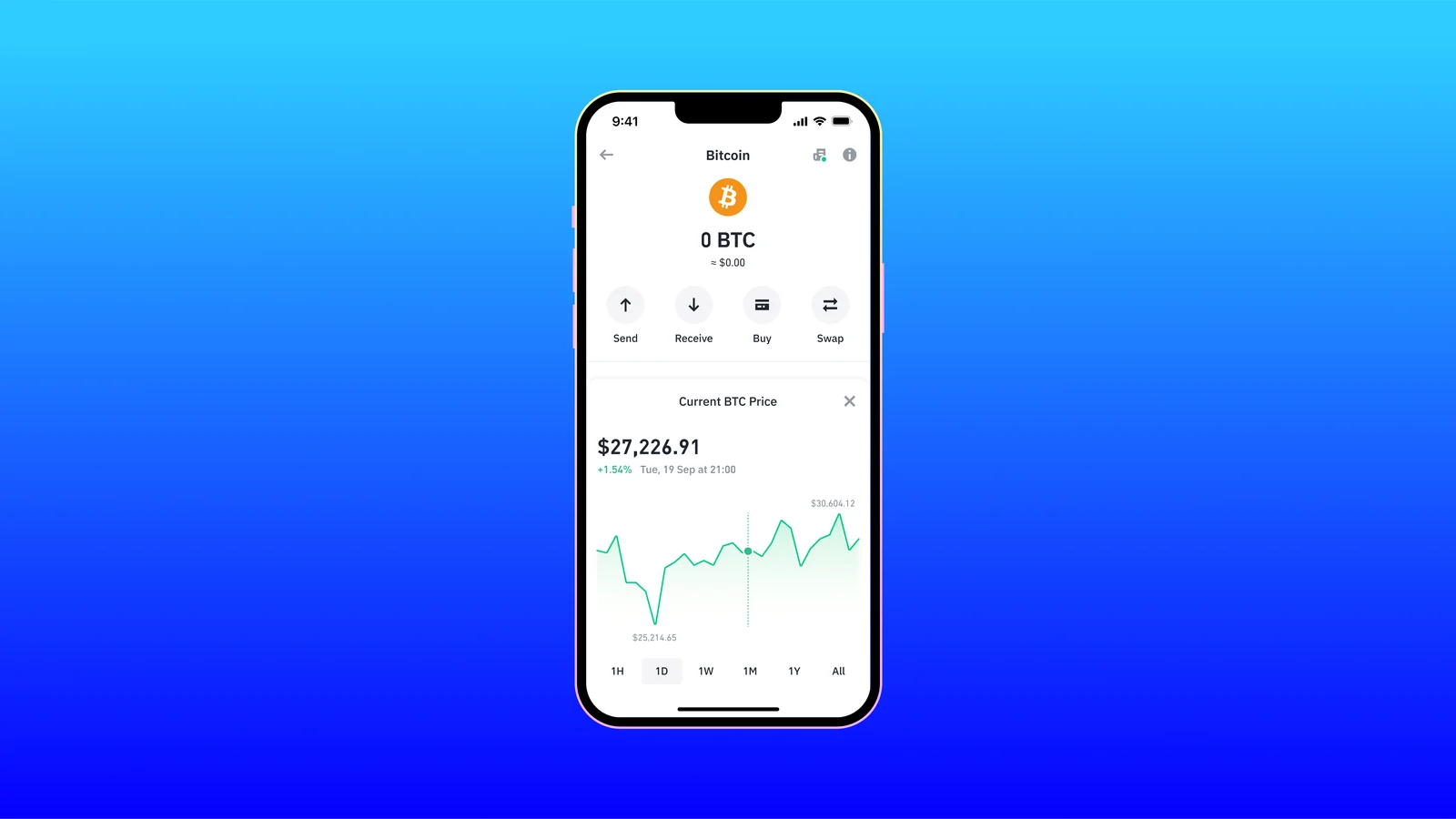
There’s a second way in, and I often find it quicker. Open a coin from your “Crypto” list (BTC, for example) and its own screen offers “Send”, “Receive”, “Buy” and “Swap”, where “Receive” jumps directly to the address for that coin.
Step 3. Search for the coin you’re expecting
Enter the ticker or the coin’s name, then tap the result that matches. Because Trust Wallet makes a separate address for each kind of cryptocurrency, your Solana address won’t match your Bitcoin one, and neither will match your Ethereum address.
Here’s where people trip up: a token chosen on the wrong network. USDT, like plenty of tokens, exists on more than one chain, so line the network label up with whatever the sender is going to use.
Step 4. Find the address sitting under the QR code
You’ll now see a QR code, and beneath it a long run of letters and numbers. That’s your Trust Wallet address for the coin you picked.
Nothing is hidden in the QR code, by the way. It just encodes that same public address.
Glance at the coin name on the screen before you go further. Seeing Ethereum when you meant Bitcoin? Back out and search again.
Step 5. Copy it, or let the sender scan the QR code
Tapping “Copy” saves the address to your clipboard, ready to drop into an exchange’s withdrawal form or a message to whoever’s paying you. When the sender is in the same room, it’s simpler for them to point their wallet’s scanner at your QR code, which Trust Wallet rates as the most secure way to pass an address along.
Whatever you do, don’t retype it. Trust Wallet’s support staff push copy and paste for a reason: get a single character wrong and the funds go to some other address.
Once it’s pasted, hold it up against the address on your screen and go through it character by character. Tedious, I know, but worth it.
Step 6. Work out whether a memo or tag is needed
On certain blockchains, XRP and Binance Chain (BNB) among them, transfers can carry an extra identifier known as a Memo or Destination Tag. Trust Wallet’s support article cautions that leaving out a required Memo or Destination Tag can stop the funds from reaching the recipient.
Receiving XRP or an XRPL token works the same way as any other coin. You tap “Receive”, look up the asset and copy the deposit address.
Sending the other direction later, from Trust Wallet to an exchange? Look for a tag on that exchange’s deposit page first.
Step 7. Ask for a small test and wait for it to land
If it’s a big sum, get the sender to push through a tiny amount before the rest. When that shows up in Trust Wallet you’ve confirmed the address and network are right, and the main transfer can go ahead. I’d do this every time with real money on the line.
Are you the one moving Bitcoin? I cover that half in how to send Bitcoin to another wallet.
Fees and limits when you receive to Trust Wallet
Looking up and sharing an address won’t cost you anything. You only pay when coins actually move, and that money goes to the network, not Trust Wallet.
| What you might pay for | How it works (as of September 2026) |
|---|---|
| Receiving into Trust Wallet | Trust Wallet puts its own charge at $0. |
| The network fee | The sender covers it, and miners or validators collect it. Trust Wallet doesn’t. |
| Tokens on the XRPL | Turning a token on costs Network and Reserve Fees, which the blockchain sets. |
| USDT held on Tron | Moving it onward later means keeping some TRX for the fee. |
| Memos and Destination Tags | A few chains need one, XRP and Binance Chain (BNB) for example. |
How long until the crypto shows up?
Getting the address is the fast part, well under a minute. How soon the coins turn up is down to the chain, plus the exchange’s own withdrawal processing if that’s where they’re coming from.
On Bitcoin, blocks arrive roughly every 10 minutes on average. Bitcoin.org is careful to add that any single confirmation might show up far sooner or far later than that.
Ethereum is quicker. It moves in 12-second slots, so once the sender submits a transfer it tends to be picked up into a block shortly afterwards.
Trust Wallet address problems and how to fix them
- If the sender swears the coins went out and your app shows nothing, drop your address into a block explorer like BscScan or Etherscan to check whether the transfer confirmed.
- When the explorer lists the tokens but Trust Wallet doesn’t, the token is probably just hidden. Go to “Add Token” or “Manage Tokens”, look it up by contract address or name, and flip the toggle on.
- A token that never appears in search needs adding by hand. Tap “manage crypto”, then the “+” button, pick the network, paste in the contract address and finish with “Import”.
- Sender chose the wrong network? Trust Wallet’s advice is to look the transfer up on an explorer, bridge the tokens over to the right network, or get in touch with support at the platform that sent them.
- Forgot a required Memo or Destination Tag? Reach out to support at whichever platform took the deposit, with the transaction details to hand.
- Maybe you handed over an address from a different wallet. Swap to it via the settings icon and “Wallets”, because the coins will be sitting in the wallet that owns that address.
Safety habits I’d stick to every time
- Do a small test before moving anything large.
- Don’t ever grab an address out of your transaction history. Scammers running address poisoning drop tiny amounts in from addresses that look almost like yours, betting you’ll paste the fake.
- Keep addresses you’ve verified in Trust Wallet’s address book, and read every character of any new one.
- Your public address is the only thing you should hand out. Trust Wallet’s support team won’t ask for your recovery phrase, ever.
- Only install from trustwallet.com/download or the official app stores.
- Since March 2026, Trust Wallet’s Address Poisoning Protection has flagged suspicious destination addresses on 32 EVM chains before you send. I’d see it as a safety net that sits behind your own checking, not in place of it.
The numbers Trust Wallet quotes are grim: more than 225 million poisoning attacks detected, and roughly $500 million confirmed stolen. Its address poisoning explainer shows how the trick plays out.
Trust Wallet address FAQ
Can I safely give out my Trust Wallet address?
Yes. Anyone holding it can only send crypto to you, since the address is public, and the QR code carries nothing beyond that address, so it can’t open your wallet. Your recovery phrase is the thing to guard.
How come each coin in Trust Wallet has its own address?
That’s by design. Trust Wallet makes one address per type of cryptocurrency, which is why Bitcoin, Ethereum and Solana each show something different. Pick the coin first, then copy.
Does my Ethereum address also work on Polygon and BNB Smart Chain?
Usually. Both are EVM networks, and Trust Wallet points out that a single address often works across dozens of those. Even so, the sender has to pick the network you’re expecting.
Will Trust Wallet charge me for receiving crypto?
No. Its stated fee for receiving is $0, and the network fee is the sender’s to pay, going to the blockchain.
Where’s my address in the Trust Wallet browser extension?
Same place. Trust Wallet says the extension shares the receive flow: choose the crypto, hit Receive, then copy the address shown under the QR code.
If I share the wrong address, can Trust Wallet undo the transfer?
No. It’s a non-custodial wallet, so Trust Wallet has no way to recover, freeze or move anyone’s funds, and crypto transactions can’t be reversed. Check the network and address before a single coin is sent.
The short version: finding your Trust Wallet address
Open Trust Wallet, check you’re in the right wallet, tap “Receive”, search for the coin and copy the address below the QR code. Make sure the network matches the sender’s, include a memo or tag on chains that call for one, and start with a small test.
If you use Coinbase Wallet too, I’ve written up how to find your Coinbase Wallet address separately. And for a head-to-head with the rival most people weigh it against, see MetaMask vs Trust Wallet.
This article is for general information only and is not financial, legal, or investment advice. Prices and features change; check the vendor’s official page before buying.