Moving DOGE is cheap and it clears fast. Dogecoin Core’s own recommended fee is 0.01 DOGE per kilobyte, and the chain targets a fresh block once a minute. That speed is a big part of why so many people leave their coins parked on an exchange instead of taking them out.
That parked balance isn’t really yours, though. It’s a promise from whoever runs the exchange.
So here are six Dogecoin wallets I’d actually use in 2026. Not one of them holds your keys for you, and each one turns up on the wallet page the Dogecoin project publishes at dogecoin.com, which is where I began the shortlist. Every price, fee and feature below came off a vendor page or official documentation I read in September 2026.
My default suggestion is MyDoge. Costs nothing, does Dogecoin and little else, and it’s on iOS, Android and Chrome.
Holding more than you’d shrug off losing? Get a Trezor Safe 3, which is $59 at the time of writing (September 2026) for a certified chip guarding the keys.

Table of contents
The six Dogecoin wallets side by side
Two picks are hardware wallets, meaning little gadgets that hold the keys offline and won’t send anything until you press a button on the gadget itself. The rest are software, and they don’t do the same job at all.
One is a full node. Another sticks to Dogecoin on purpose. The last two park DOGE beside hundreds of other assets.
Dogecoin Wallets Compared | |
|---|---|
| Dogecoin Core | Pick it if you’d rather check the chain yourself than ask a server. Costs nothing on Windows, macOS or Linux, and it runs a full node. MIT licensed, so all of the code is out in the open. |
| MyDoge | Pick it if your DOGE lives on a phone and gets spent. Free on iOS, Android and Chrome, and Twitter tipping is baked in. Closed source, and dogecoin.com gives it no open-source tag. |
| Exodus | Pick it if you’d like DOGE in the same app as the rest of your coins. Free on desktop, phone and browser, and it’ll pair with a Trezor or a Ledger. Some of the code is open, some isn’t. |
| Trust Wallet | Pick it if you end up holding things on chains you’d never heard of. Free on iOS, Android and as an extension, spanning 100+ blockchains. The Wallet Core library is open source; the apps aren’t. |
| Trezor Safe 3 | The least you can spend to get Dogecoin keys behind a certified chip. It’s $59 at the time of writing (September 2026), with an EAL6+ secure element. Firmware and design are both published. |
| Ledger Nano S Plus | Pick it if DOGE is one line in a long portfolio. Also $59 at the time of writing (September 2026), and Ledger builds the Dogecoin app in house. Ledger calls its software 95% open source or open for review. |
1. Dogecoin Core: for people who trust nobody’s server
Dogecoin Core is Dogecoin’s reference implementation, and the wallet isn’t a separate product: it sits inside the software that keeps the network running. In the project’s own words it’s a community-driven cryptocurrency inspired by a Shiba Inu meme, adapted out of Bitcoin Core, with Scrypt doing the proof of work.
Why it’s on the list: no other wallet here can match it for certainty. Every block gets pulled down and checked by your machine, so nobody else’s server gets to tell you what you own. Version 1.14.9 is the current release, out in December 2024, and the licence is MIT.
What Dogecoin Core does well
- You get three binaries: dogecoin-qt with a window and buttons, dogecoind for a headless box, and dogecoin-cli to drive whichever one you’re running.
- An address appears the first time you launch it, with the private key tucked into the wallet file, so nothing extra has to be set up.
- Fees default to a recommended 0.01 DOGE per kilobyte, and from version 1.14.5 onward the charge follows the exact byte count of what you’re sending.
- Blocks are aimed at one a minute, which keeps confirmations down to minutes rather than an afternoon of refreshing.
- Nothing gets paid to node operators, though the project argues that nodes shield the network from censorship and from denial of service attacks.
Grab a tagged release, not master, which the project has marked unstable since August 2024. Fuzzy on why your own keys beat an exchange balance? Our guide to custodial versus non-custodial wallets lays out the difference.
2. MyDoge: the Dogecoin wallet I’d hand a beginner
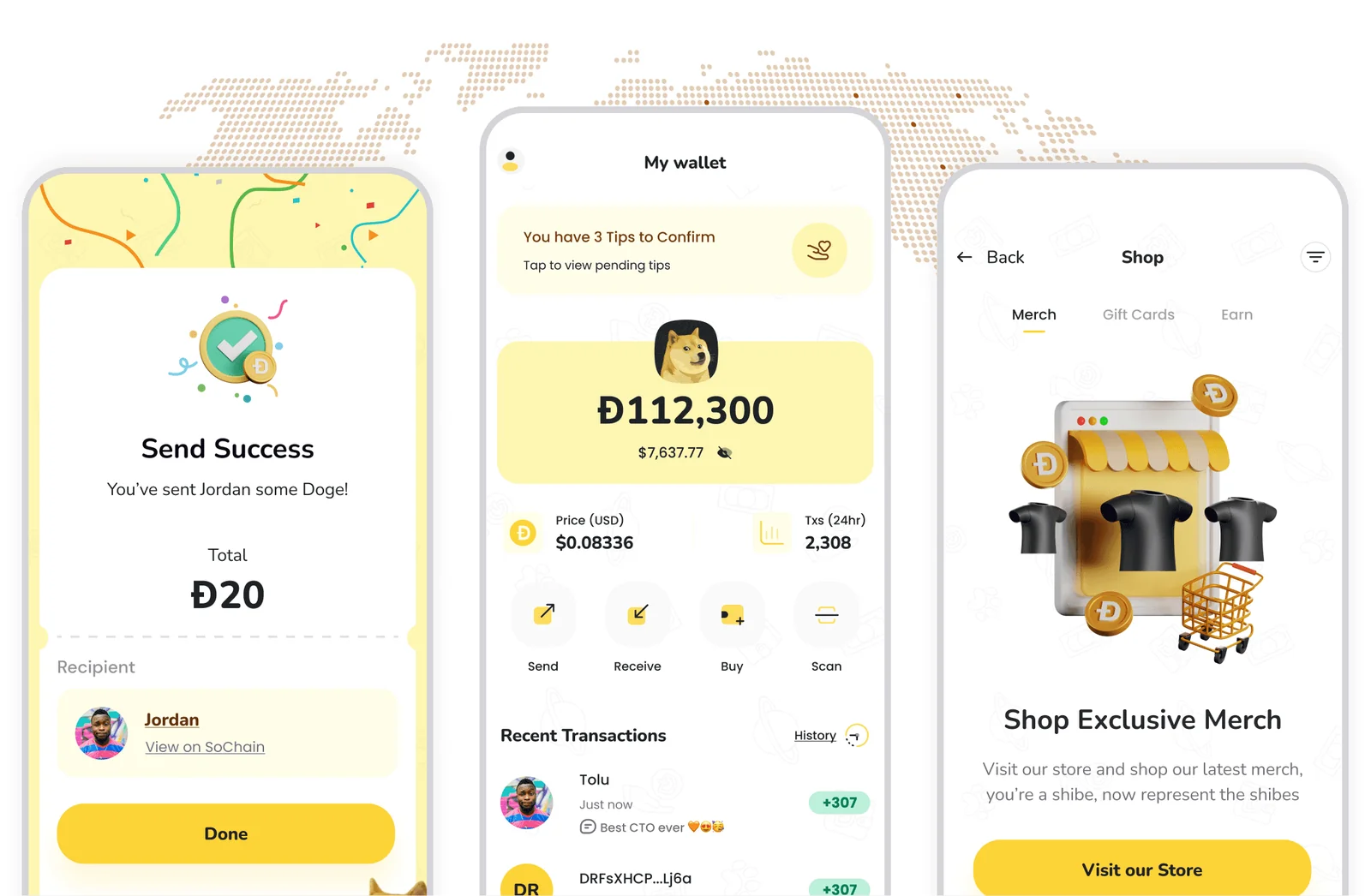
MyDoge bills itself as a free and secure self-custodial Dogecoin wallet, plus the tagline about being the social wallet for the people’s currency. There’s an iOS app, an Android app and a Chrome extension, and dogecoin.com files it under self-custodial.
What won me over is that DOGE isn’t buried in here as coin number 47 on a dropdown. The app will buy, send, receive and hold Dogecoin, fire off tips on Twitter, and pick up discounted gift cards for shops and restaurants. MyDoge puts it bluntly: self-custody means nobody, itself included, can touch your funds.
What MyDoge gets right
- Nothing is skimmed by MyDoge itself, and the terms of use say the only fees you’ll pay are Dogecoin network fees.
- Tips move over Twitter in both directions, and your own posts can collect them.
- Funding happens by moving Dogecoin in from a wallet you already have, which means no exchange account is required to start.
- Recent versions of the site describe the wallet as multichain and hang a directory of Doge apps, games and quests off it.
- Your social profile is a separate thing from the wallet, and shutting it down means emailing MyDoge support.
Those missing docs are the bit that’d stop me putting serious money in here. I hunted for a MyDoge help centre and came up with nothing, so I can’t tell you what the app does with a recovery phrase, and that annoys me more than any feature gap would.
Got DOGE sitting alongside four other coins on the same handset? Then hold it up against our roundup of the best mobile crypto wallets first.
3. Exodus: my pick when DOGE shares a wallet
Exodus keeps your keys on your own hardware and runs on Windows, macOS, Linux, iOS and Android, with a browser extension on top. Dogecoin’s wallet list names it for every one of those platforms.
I’d reach for it when Dogecoin is one of several things you hold and you’re tired of juggling apps. The company dates back to 2015, reckons it supports over a million assets, and trades on the NYSE under EXOD. Sending costs you nothing beyond the network fee, because Exodus takes no cut, and the keys stay encrypted where they are.
What Exodus does well
- Sends and receives are free of any Exodus charge, so the network fee is the entire bill.
- Coverage runs to 50+ crypto networks according to the knowledge base. Token support is uncapped on the busier web3 chains.
- Your backup is a 12-word secret key, and if it’s gone Exodus has no way to bring it back.
- Hook a Trezor up to Exodus Desktop, or a Ledger Nano X or Ledger Flex to Exodus Mobile.
- Trezor’s Dogecoin page backs this up from the other side, confirming its platform syncs with Exodus.
Read up on that April 2025 mess before you install anything. ReversingLabs traced a malicious npm package that rewrote Exodus desktop builds sitting on people’s machines, so the address a payment landed on quietly changed, while downloads from the vendor itself were clean.
Which is a long way of saying: take Exodus from exodus.com, full stop. Our Exodus wallet review digs through the app properly.
4. Trust Wallet: a Dogecoin wallet that reaches everywhere
Trust Wallet pitches itself as a self-custody Dogecoin wallet trusted by over 220M users, free on iOS, on Android and as a browser extension. The project goes back to 2017, and there’s no sign-up to get through.
Sheer coverage is what earned it a slot. With 100+ blockchains behind it, a token that shows up on some chain you’ve never touched is still yours to hold and move.
On custody, the company says it neither controls nor can access your private keys or secret phrase. Its own pages quote ratings of 4.7 on the App Store and 4.6 on Google Play, drawn from 2.7M reviews.
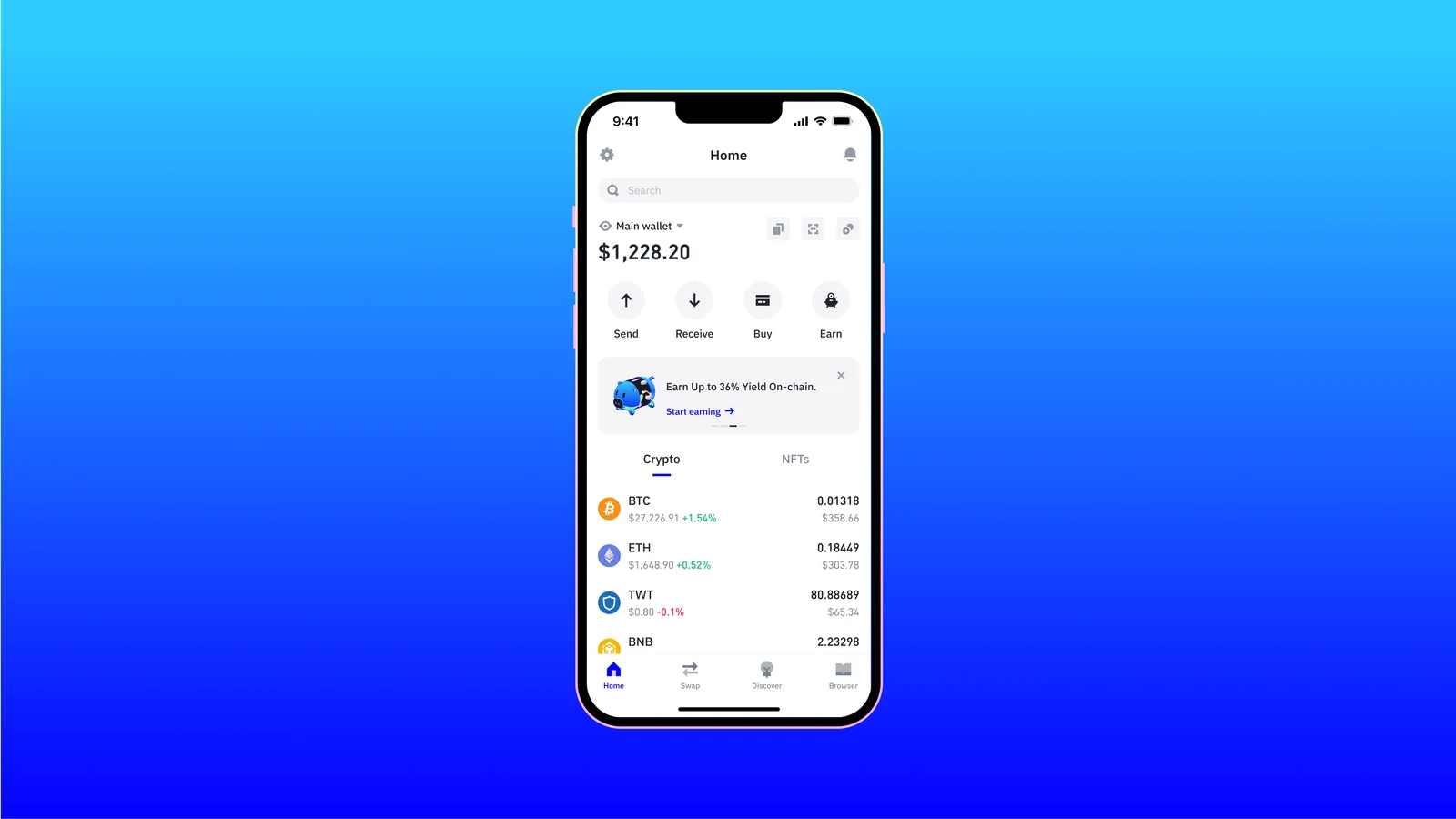
What Trust Wallet brings
- USD, EUR, GBP and 100+ other fiat currencies convert into DOGE, and DOGE goes back out to fiat the same way.
- Before you sign, the Security Scanner plays out what a transaction would actually do and checks the contract against known scams.
- Lose the handset and Encrypted Cloud Backup is what gets you back in.
- Five firms have reviewed the code, namely CertiK, Cure53, Halborn, Kudelski Security and Quantstamp, and A-LIGN signed off its ISO/IEC 27001 and ISO/IEC 27701 certifications.
- Any device can rebuild the wallet from a 12-word recovery phrase, and lacking that phrase, nobody gets your funds back.
Planning to run this on a desktop? Then the extension story is one you should know.
A tampered version 2.68 landed in the Chrome Web Store on December 24, 2025, hitting 2,520 wallet addresses and roughly $8.5 million in assets. Trust Wallet shipped the clean code again as version 2.69, opted to pay affected users back, and reported that the phone apps came through untouched. Our MetaMask vs Trust Wallet comparison puts it next to the other heavyweight mobile option.
5. Trezor Safe 3: cheap hardware, open code
Priced at $59 at the time of writing (September 2026), the Trezor Safe 3 takes care of Dogecoin through the Trezor Suite app. DOGE shows up on Trezor’s coin page as supported across every model it sells.
Nothing cheaper will get your Dogecoin keys behind a certified secure element. You’re getting an EAL6+ chip, a device that refuses to sign until you approve it there on the hardware, and firmware and design that Trezor publishes. Invity.io is the plumbing behind buying and selling DOGE inside Trezor Suite.
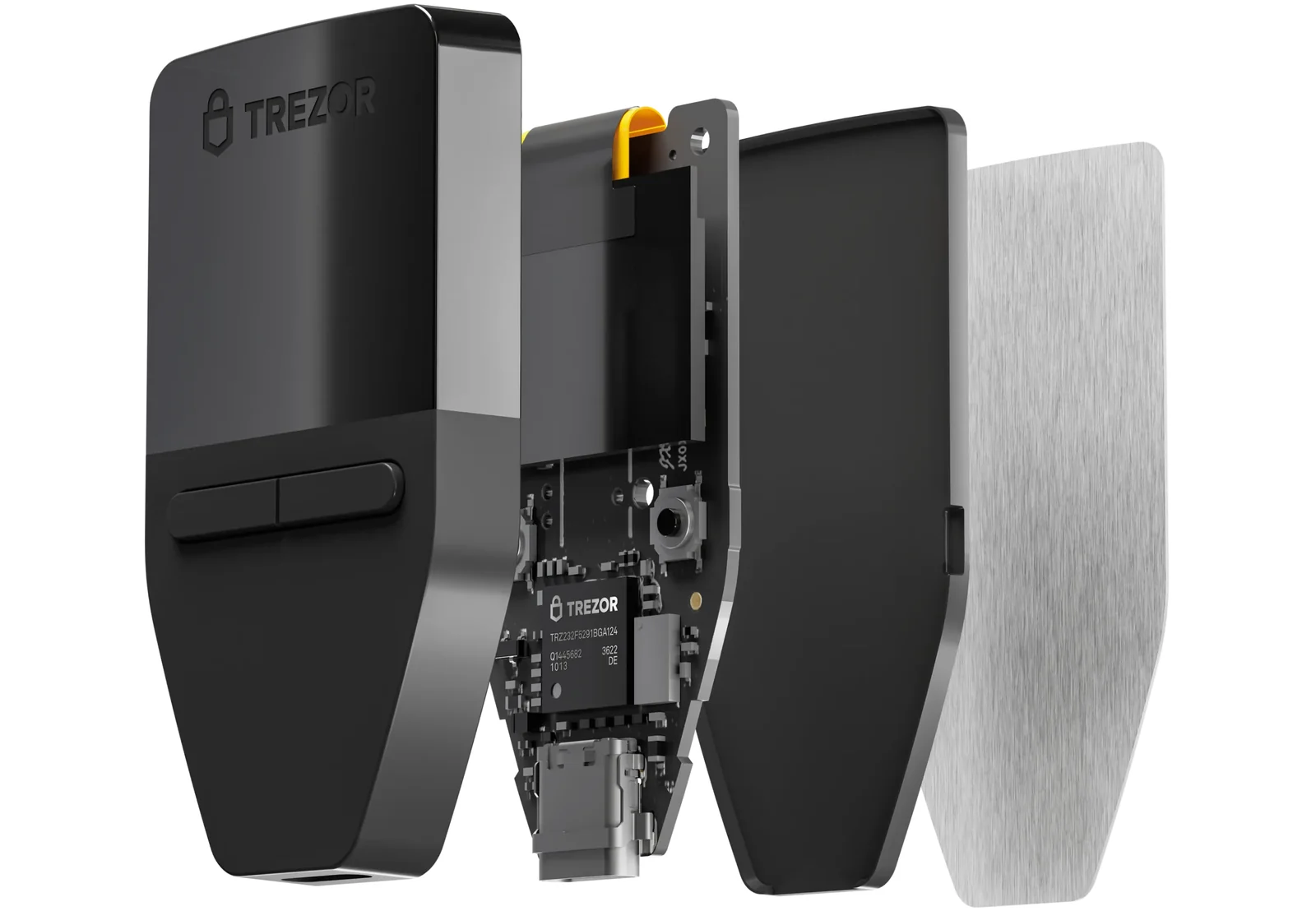
What the Safe 3 gives you
- Confirmations happen on a 0.96 inch monochrome OLED with two buttons underneath. A USB-C cable carries the connection.
- Pick a 12, 20 or 24 word backup, or use Multi-share Backup, which breaks the secret into pieces you can keep in different places.
- Desktop, web and mobile all run Trezor Suite, and it covers thousands of coins and tokens.
- Open the box and you’ll find a USB-C cable with two 20-word backup cards, ready for the phrase there and then.
- It’s 14 g and 59x32x7.4 mm, so it’ll live on a keyring without you noticing.
Two caveats deserve your attention here. On November 12, 2024 Ledger’s Donjon lab published a finding that certain Safe 3 defences against supply chain attacks could be worked around, and my takeaway is simple: order from Trezor directly and nowhere else.
Then on August 13, 2026 Trezor said its logistics partner ShipMonk had spilled order records for 80,689 customers, and 11,742 of those included full names, phone numbers, email addresses and shipping addresses. No devices, keys or backups were involved, which is the reassuring half. The unpleasant half is that whoever holds that list can write you a very convincing phishing email, so treat unexpected Trezor messages as hostile.
Fancy a colour touchscreen instead? The Trezor Safe 5 runs $129.
6. Ledger Nano S Plus: Dogecoin plus a very long coin list
You’ll pay the same $59 at the time of writing (September 2026) for the Ledger Nano S Plus, and the Dogecoin app on it is built and looked after by Ledger. May 2026 is when Ledger last revised its Dogecoin support article.
Reach for this one when DOGE is a single row in a portfolio that runs down the page. Ledger’s store page advertises 15,000+ coins and tokens, the secure element carries a CC EAL6+ rating, and up to 100 apps can sit on the device at the same time. Starting with Dogecoin means pulling the Dogecoin app out of My Ledger, then creating a Dogecoin account over in Ledger Wallet.
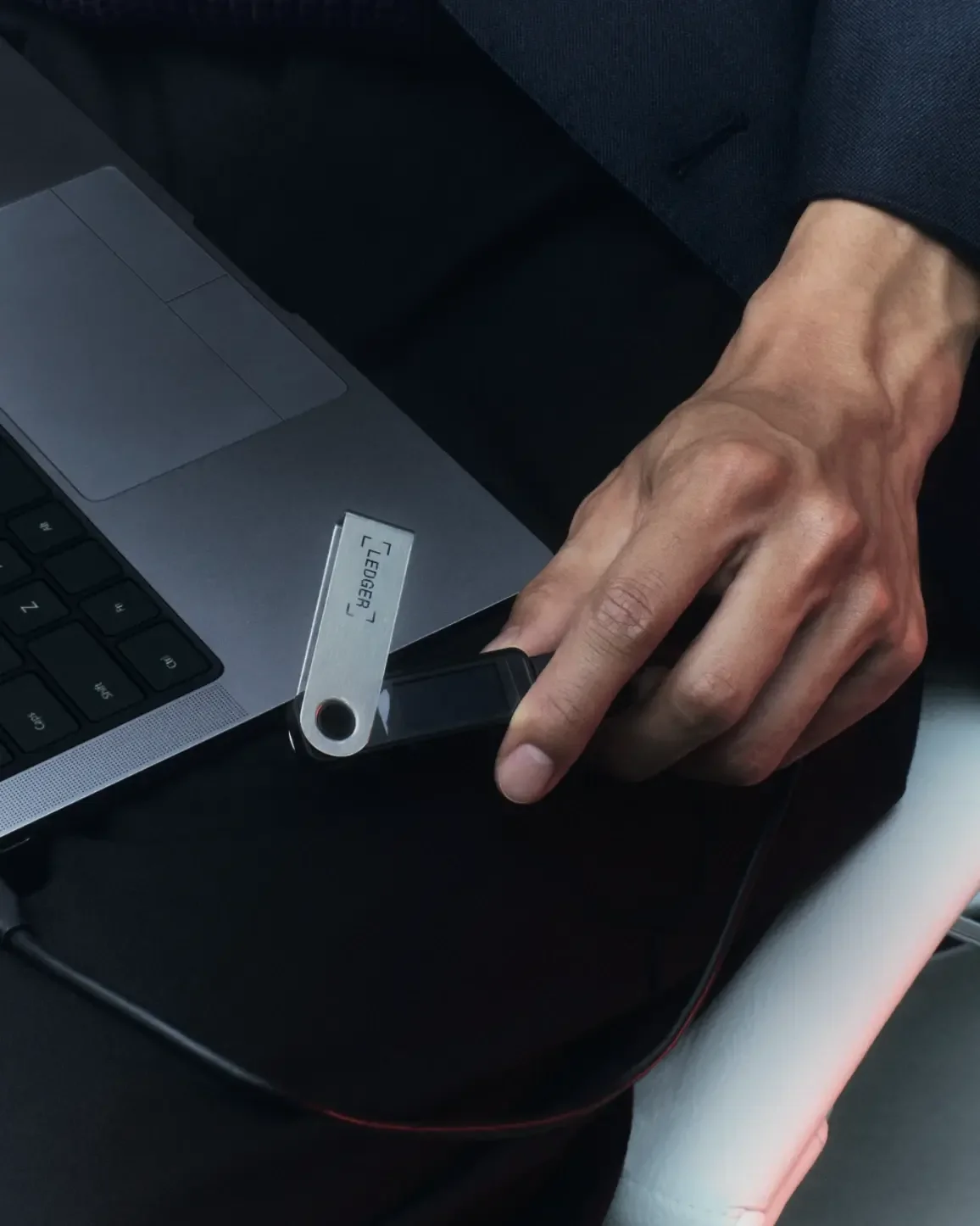
What the Nano S Plus gives you
- A PIN and a 24-word recovery phrase control access. The keys themselves never leave the secure element.
- Check any Dogecoin receiving address on the little screen before you pass it to anyone.
- Dogecoin’s ledger is public. Ledger Wallet therefore hands you a brand new address for each payment.
- DOGE can be bought directly into the account using MoonPay, Coinbase or Revolut.
- A USB-C to USB-A cable comes in the box along with three recovery sheets for writing the phrase down.
iPhone user? Then it’s the Ledger Nano X for you, at $99, with Bluetooth on board.
Those leaks belong in the picture as well. Roughly 1 million email addresses walked out of Ledger’s systems in July 2020, and order data held by Global-e was exposed in January 2026. Ledger’s position on both is that devices, keys and funds were never in play, and it keeps repeating that it will never ask you for your 24 words.
Curious how the rest of the Nano range stacks up? Our Ledger Nano S vs Nano X comparison untangles it.
How I picked these Dogecoin wallets
Keeping the keys yours
Not one of these six is custodial, which rules out any company freezing or shifting your DOGE. I also went through what each vendor has written about its own incidents, and how frankly it wrote it.
What else they hold
DOGE support came first, and the wallet list on dogecoin.com is where each name came from. Beyond that I weighed how much else fits, since hardly anybody’s portfolio stops at a single coin.
Living with them day to day
Wallets that guide you through a backup, and that print the fee on screen before you commit, scored better with me. Platform holes mattered too, and that’s the reason the Nano S Plus drops a point: no iPhone support whatsoever.
What they cost
Installing four of them costs you nothing. Both hardware picks sit at $59 at the time of writing (September 2026), which is roughly the cheapest a certified secure element gets.
Backups, and getting back in
Every other mistake can be walked back. Losing a backup cannot.
So plain documentation about backups counted for something, and that’s precisely MyDoge’s soft spot. Multi-share Backup from Trezor is the most adaptable answer here, because the secret splits up and the parts can live in different rooms, or different buildings.
How much code is public
When the source is readable, researchers outside the company can see what a wallet is really doing with your keys. Dogecoin Core is wide open under MIT, and Trezor puts out both firmware and design, whereas Exodus, Trust Wallet and Ledger each publish a portion and keep the rest in house.
Which Dogecoin wallet fits you?
Here for the tipping, the memes and small sums? Put MyDoge on your phone and don’t let the balance creep up. Among these six, it’s the only one designed for Dogecoin and nothing else.
Keeping DOGE beside other coins? Exodus, if a laptop and a phone should show the same wallet. Trust Wallet, if the phone is the computer and you wander across a lot of chains.
Sitting on a pile that would genuinely hurt to lose? Then buy hardware, and order it from the manufacturer rather than a marketplace. Trezor Safe 3 if published code is what reassures you, Ledger Nano S Plus if you want the longest coin list and you’re not on an iPhone.
Rather verify the lot yourself? Dogecoin Core is waiting, assuming you’ve got the disk space and can live through that opening sync. Bigger budgets should look at our roundup of the best crypto hardware wallets.
One rule to absorb before your first transfer, whichever wallet you went with. A wrong address, or the wrong network, and those DOGE are gone permanently, with no one anywhere able to undo it.
Reading our explainer on what a wallet address is will help. Sending a tiny test amount first helps even more.
Questions people ask about Dogecoin wallets
Which Dogecoin wallet should I get?
MyDoge, for most people. Nothing to pay, it’s on iOS, Android and Chrome, and Dogecoin is the only thing it’s built for. Sitting on a bigger balance? A Trezor Safe 3, $59 at the time of writing (September 2026), parks the keys offline instead.
Will a hardware wallet hold my Dogecoin?
Yes. Every Trezor model handles DOGE through Trezor Suite, and on the Ledger side the Dogecoin app is written and maintained by Ledger itself.
What does it cost to send DOGE?
Dogecoin Core recommends 0.01 DOGE per kilobyte as its default, and from version 1.14.5 that charge tracks the exact size of your transaction. Individual wallets choose their own defaults, so glance at the number on screen before you hit send.
Is Dogecoin Core the official wallet?
It’s the reference implementation, released by the Dogecoin project under the MIT licence, with the wallet built into the node software rather than sold separately. Current release: 1.14.9, from December 2024.
Must I run a full node to hold Dogecoin?
No. Dogecoin Core is the only pick here that runs one, and it asks for 60GB of disk minimum, 2GB of RAM and a first sync beyond 24 hours. None of that applies to the other five.
Can anyone see my Dogecoin transactions?
Yes, they can. Ledger’s own documentation calls Dogecoin transactions public information and tells you not to reuse an address, which is why Ledger Wallet hands out a new one every time.
My recovery phrase is gone. What now?
If the phone or device went with it, the Dogecoin went too. Trust Wallet doesn’t soften this: without that phrase, your funds are beyond recovery by anyone, the company included.
Where I’d land
Begin on MyDoge while your Dogecoin is spending money, and graduate to a Trezor Safe 3 or a Ledger Nano S Plus once the number gets uncomfortable. Both Exodus and Trust Wallet earn their place when DOGE is one holding among plenty. As for Dogecoin Core, it’s there for the people who’d rather audit the chain than take somebody’s word for it.
None of this beats what you do with the phrase, though. Keep it on paper, refuse to type it into any website, and always shove a small test payment through ahead of anything that matters.
This article is for general information only and is not financial, legal, or investment advice. Prices and features change; check the vendor’s official page before buying.